


Dynamics GP
Public Group
Active a week ago
Dynamics GP
Organizer:
- JOSE Organized by
-
-

GP 2018 Web Client – Intermittent error on Company Switch
-
GP 2018 Web Client – Intermittent error on Company Switch
Posted by David Morinello on September 20, 2019 at 4:13 pm-
While testing the GP 2018 Web Client in our DEV environment, we are able to occasionally duplicate the a freeze/hang issue by switching companies in the Web Client and doing work in the new company. Other times we are able to switch companies at will without error.
***************************************************************************
The session would freeze and the icon in the main bar would simply spin and spin.
The user cannot exit GP or perform any function in GP while it is in this state. If the user closes the browser or refreshes the browser, they are taken back to the session screen where they can either create a new session or resume a previous session. The user will see the session that was stuck in that list. If the user selects this session it throws an error and never loads.
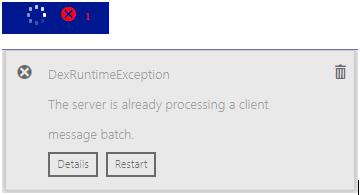
Details: DexRuntimeException The server is already processing a client message batch. at Microsoft.Dynamics.GP.Web.Services.Runtime.Dexterity.DexClientMessageCoordinator.BeginProcessing(ICollection`1 newMessages) at Microsoft.Dynamics.GP.Web.Services.Runtime.Dexterity.DexRuntimeStateManager.DeliverClientMessages(ICollection`1 messages) at Microsoft.Dynamics.GP.Web.Services.Runtime.Dexterity.DexRuntimeService.ProcessClientMessages(Byte[] data) at Microsoft.Dynamics.GP.Web.Services.Runtime.Dexterity.DexRuntimeService.ProcessDexClientMessages(Byte[] data)
If the user selects restart in the error window, It gives this message:
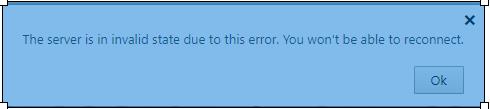
This behavior is primarily observed when a user switches companies and attempts to do something in the new company. ***************************************************************************
• Windows 2016
• SQL Server 2014 • GP 2018 R2
• Web Client (Single Server & Wildcard Cert)
• Microsoft Edge or IE11——————————
David Morinello
Senior Dynamics GP Systems Architect
Ascend Learning, LLC
Leawood KS
—————————— -
Hi David,
This sounds like an old issue we had many moons ago.I am not sure if it applies to the web client but at least its something to try:
- Certain SmartList reminders may cause logon issues, depending on the homepage role for that user. To verify the reminders for a user, use the following:
- In Microsoft Dynamics GP, click Microsoft Dynamics GP, and then click Reminders. Click Change Reminder Preferences, and then remove the reminders in the Custom Reminder section at the bottom of the window.
- You may have shortcuts to network locations that are no longer mapped or available. Microsoft Dynamics GP will try to validate those locations. However, if they are not reachable, the process will time-out after several seconds.
- In Microsoft Dynamics GP expand the Shortcuts folder in the Navigation pane on the left side of the Home Page. If you notice any unnecessary or invalid shortcuts, remove them.
- You can also validate the links that are stored in the Shortcut Bar Master (SY01990) table. Run the following script in Query Analyzer or in SQL Server Management Studio:
SELECT * FROM DYNAMICS..SY01990
If you see any network paths in the ScbTargetStringOne column that are no longer valid, delete the associated shortcut. You can delete the shortcut in Microsoft Dynamics GP or from the table.
Good luck!
Sue——————————
Susan Gamache
GraVoc
Peabody MA
——————————
——————————————- - Certain SmartList reminders may cause logon issues, depending on the homepage role for that user. To verify the reminders for a user, use the following:
-
Thanks for the suggestion ! I was a good thought.
Unfortunately ??this didn’t resolve the issue. Since this is my DEV box (I can’t promote to QA or Production until I fix this) I wiped all the ScbTargetStringOne fields. Restarted the two Services and IIS. Someone on my team was still able to duplicate the issue. I cannot duplicate the issue and switching companies works for me.I did see an error in the Dynamics Event log that seems to match up with the latest test though. Keep in mind that the Web Client (mostly) works fine unless we do the Company switch.
(0x80004005): Server cannot set status after HTTP headers have been sent.——————————
David Morinello
Senior Dynamics GP Systems Architect
Ascend Learning, LLC
Leawood KS
——————————
——————————————-
David Morinello replied 7 years ago 1 Member · 0 Replies -
-
0 Replies

Sorry, there were no replies found.
The discussion ‘GP 2018 Web Client – Intermittent error on Company Switch’ is closed to new replies.
