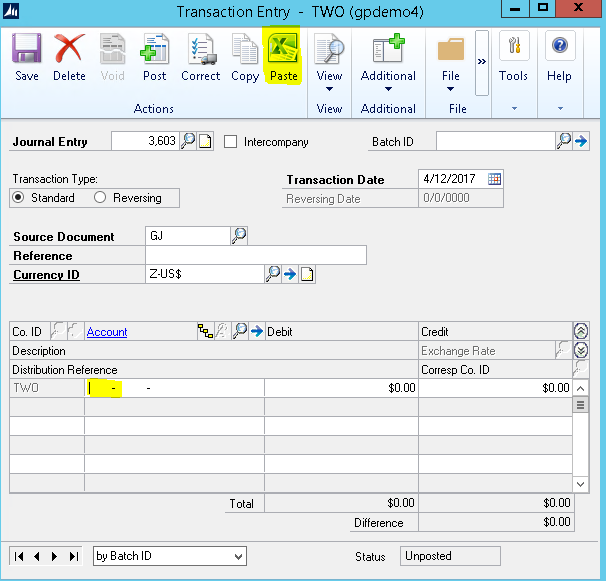
We just upgraded to GP 2016 and I am trying to copy and paste an excel spreadsheet into GP as a journal. I used to be able to use CTRL D, that does not work. Is there a new way to paste into the JE screen?
Thanks
Jennifer Satterfield
—————————— Jennifer Satterfield Accounting Manager Dynamic Communities Riverview FL ——————————
Stuart Gallion
Member
January 4, 2017 at 5:54 PM
Ctrl-V is the from the dawn of computers way to paste. This is from a geezer who has the combination deeply imbedded. š
—————————— Stuart Gallion Project Accountant/GP System Administrator GP2010SP1/FRx6.7 Stanford Hotels Corporation San Francisco CA ————————————————————————-
Sally Diehl
Member
January 5, 2017 at 9:36 AM
Jennifer ~
Ctl – C will copy – the “Paste” button on the General Ledger Transaction Entry window will allow you to Paste.
Good Luck!
—————————— Sally Diehl Director Technology and Management Consulting RSM US LLP Minneapolis MN ————————————————————————-
Jim Golding
Member
January 5, 2017 at 10:50 AM
Control-V hasn’t worked for me either. I use the Paste button in the JE screen.
—————————— Jim Golding Landmark ————————————————————————-
Bill Schulz
Member
January 5, 2017 at 3:31 PM
Just make sure your cursor is positioned in the first account number field before you hit PASTE as highlighted below.
—————————— Bill Schulz Turnkey Technologies, Inc. St. Louis MO ————————————————————————-
Bill Marshall
Member
January 6, 2017 at 9:34 AM
As far as I can tell, there is no hotkey for Paste from Excel. This is likely because the Ctrl-C/Ctrl-V hotkeys are dedicated to field copy/paste, copying the value of one field into another. Programmatic hotkeys can be added in Dexterity if you put a “&” in the button prompt, which is diplayed as a letter with an underscore, but then that’s Alt+letter hotkey. Ctrl-Letter hotkeys can be added only by using a menu item. With the new Action Pane/Ribbon interface, unfortunately all hotkey combinations are hidden, but if you revert to the old style menus, you’ll see them.
As for the GL Transaction Entry window, the only way to have a hotkey is to do the “&” in the button prompt. If you revert to the menu interface, you’ll see that the paste button is “Paste”, so Alt-P might normally work, but unfortunately, there’s also a “Post” button prompt, so Alt-P wants to Post the transaction.
—————————— Bill Marshall President mc² ————————————————————————-
Please note:
This action will also remove this member from your connections and send a report to the site admin.
Please allow a few minutes for this process to complete.

Report
You have already reported this .
Welcome to our new site!
Here you will find a wealth of information created for peopleĀ that are on a mission to redefine business models with cloud techinologies, AI, automation, low code / no code applications, data, security & more to compete in the Acceleration Economy!