


Dynamics GP
Public Group
Active 5 weeks ago
Dynamics GP
Organizer:
- JOSE Organized by
-
-

Edit 1099 Transactions Security
-
Edit 1099 Transactions Security
Posted by DSC Communities on January 12, 2017 at 5:48 pm-

Tiffany Ziegler
MemberJanuary 12, 2017 at 5:48 PM
Anyone know which security task will grant access to the Purchasing/Transactions/Edit 1099 Transactions window?——————————
Tiffany Ziegler
Vice President & Controller
Velcor Leasing Corporation
Madison WI
—————————— -
Hi Tiffany
I am on leave right now so I don’t have my PC to look this up.
If you have GP Power Tools you can look this up on the Security Information window in seconds.
Hopefully a GPPT user can confirm this for you. Looking at you Beat. ??
GP Power Tools portal http://WinthropDC.com/GPPT
David
——————————
David Musgrave MVP, GPUG All-StarManaging Director
Winthrop Development ConsultantsPerth, Western Australia
http://www.winthropdc.com
——————————
——————————————- -
Bob McAdam
MemberJanuary 13, 2017 at 6:07 AM
TRX_PURCH_020——————————
Bob McAdam
General Manager, GPUG
Dynamic Communities
Tampa, FL
bob.mcadam@dynamiccommunities.com
——————————
——————————————- -
Beat Bucher
MemberJanuary 13, 2017 at 8:54 AM
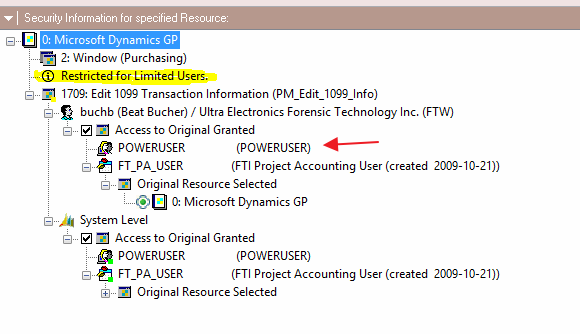
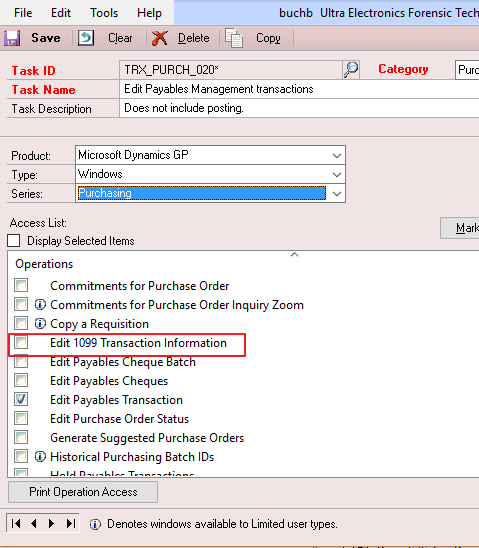
YES Sir !!!Sorry Mr McAdam to tell you’re wrong.. TRX_PURCH_020 only covers by default the window form ‘Edit Payable Transaction’… this doesn’t cover the “Edit 1099 Transaction Information” window/form.. I checked in both GP2013R2 and 2016R2 versions, and they are missing in both.
Somehow Microsoft forgot to put that into the security and by default (out-of-the-box) only POWERUSER role has access to this window..
Tiffany,
You’ll have to modify the security role you use by default for your purchasing users (either BOOKKEEPER or else) to change the included forms in the Task ID TRX_PURCH_020 and check the box accordingly.
Hope this helps..PS: this form seems only accessible to user-type ‘Full’ .. Limited & Self-Service users don’t have access to it.
——————————
Beat Bucher
Business Analyst, Dynamics GP MVP
Ultra-Electronics Forensic Technology Inc.
Montreal QC/Canada
+1-514-489-4267
@GP_Beat http://dyngpbeat.wordpress.com/
Montreal QC GPUG Chapter Leader
GP2013R2 / MR2012 CU14
——————————
——————————————- -
I have a pretty vanilla copy of the TWO sample company running on GP 2016 RTM and the Edit 1099 Transaction Information window IS CHECKED in task TRX_PURCH_020*. I would check your copy of this task. If it’s there you are good to go, if not, you can add it.
Mark
——————————
Mark Polino
Director of Client Services
Fastpath
Altamonte Springs FL
——————————
——————————————- -
Beat Bucher
MemberJanuary 13, 2017 at 10:17 AM
Tiffany,
Mark mentioned that he was able to find the resource under the TRX_PURCH_020* security Task ID, confirming the intial reply of Bob McAdam.. So it looks like we have potentially here an issue when it comes to GP setups.. I for sure have never removed this resource from a default security Task in GP, as I always use a copy of the original task or role when I do want to apply some kind of customization to GP’s security.
However, one explanation I have for this is possibly a bug in the security scripts from past GP upgrade processes..
We’ve see this a few times were the transitions from the GP 2010 up to 2013 or 2015 was not creating a whole series of security objects in GP.. However, when you would do a ‘maiden’ installatin with no upgrade from past versions, the mentioned missing security objects would be created..
Conclusion: if your GP has been upgraded in the past, some of the security settings may not cover the current status it is supposed to be out-of-the-box in the latest GP releases. My appologize to Mr. McAdam for the initial reply. You’re not fired (:-) )——————————
Beat Bucher
Business Analyst, Dynamics GP MVP
Ultra-Electronics Forensic Technology Inc.
Montreal QC/Canada
+1-514-489-4267
@GP_Beat http://dyngpbeat.wordpress.com/
Montreal QC GPUG Chapter Leader
GP2013R2 / MR2012 CU14
——————————
——————————————- -
Tiffany Ziegler
MemberJanuary 13, 2017 at 4:15 PM
Thanks all – Beat’s tip helped – I had to add the window to the task. Must be an upgrade issue.Happy Friday to everyone 🙂
——————————
Tiffany Ziegler
Vice President & Controller
Velcor Leasing Corporation
Madison WI
——————————
——————————————- -
Beat Bucher
MemberJanuary 14, 2017 at 11:12 PM
Hi Tiffany,
I’m glad you solved it..
I did some research and my suspicion was confirmed as I found the blog post here from Microsoft providing a link to an updated script about missing security objects missing in GP after you upgrade to GP2016RTM (!!)..
However, this script mentions that it includes all cumulative updates from the past corrections to 2013R2 & 2015.. but the 1099 Transaction Information window was only fixed in that latest version.The line of code is the following :
Insert into SY10700 values (‘TRX_PURCH_020*’,0,1709,2)So Bob & Mark were right, but only if were running GP 2016 as a maiden setup or as an upgrade with the above script applied.
Have a great time.——————————
Beat Bucher
Business Analyst, Dynamics GP MVP
Ultra-Electronics Forensic Technology Inc.
Montreal QC/Canada
+1-514-489-4267
@GP_Beat http://dyngpbeat.wordpress.com/
Montreal QC GPUG Chapter Leader
GP2013R2 / MR2012 CU14
——————————
——————————————-
DSC Communities replied 9 years, 10 months ago 1 Member · 0 Replies -
-
0 Replies
Sorry, there were no replies found.
The discussion ‘Edit 1099 Transactions Security’ is closed to new replies.
