


Dynamics GP
Public Group
Active 3 days ago
Dynamics GP
Organizer:
- JOSE Organized by
-
-

eConnect GetPMNextPaymentNumber
-
eConnect GetPMNextPaymentNumber
Posted by Vicki Hillary on March 9, 2021 at 11:03 am-
Help! We have a new 3rd party product and the vendor built us an integration to GP. Unfortunately, the integration is failing. After doing some research with my partner, we determined that the GetPMNextPaymentNumber is needed in order to resolve the issue. They are currently passing a Voucher Number instead of a Payment Number which is causing duplicates and failed integrations. The 3rd party vendor said that they can not use this stored procedure GetPMNextPaymentNumber because they show that it was removed with GP 2013. I can’t find any documentation to indicate that this is true. Does anyone know if this stored procedure was removed with GP 2013? If so, how are you passing a payment number to GP if this is no longer an option?
——————————
Vicki Hillary
RDV Corporation
Grand Rapids MI
—————————— -

Thaddeus Suter
MemberMarch 10, 2021 at 9:01 AM
Those ta stored procedures still exist thru GP18.3.1200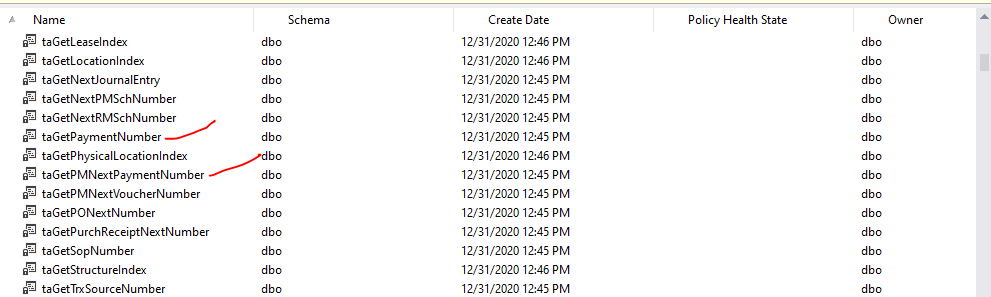
——————————
Thaddeus Suter
Retus, Inc
HELOTES TX
——————————
——————————————- -
Thaddeus,
Thank you for your response. Where did you get that information? I would like to share it with my 3rd party vendor.
——————————
Vicki Hillary
RDV Corporation
Grand Rapids MI
——————————
——————————————- -
Thaddeus Suter
MemberMarch 11, 2021 at 10:55 AM
First you look in SQL and see if the taGetPMNextPaymentNumber exists and it does. That is the screenshot I attached above.
Then you execute the procedure to see if it works or is buggy. See that it returns the next payment value of PMT00675
Next screenshot: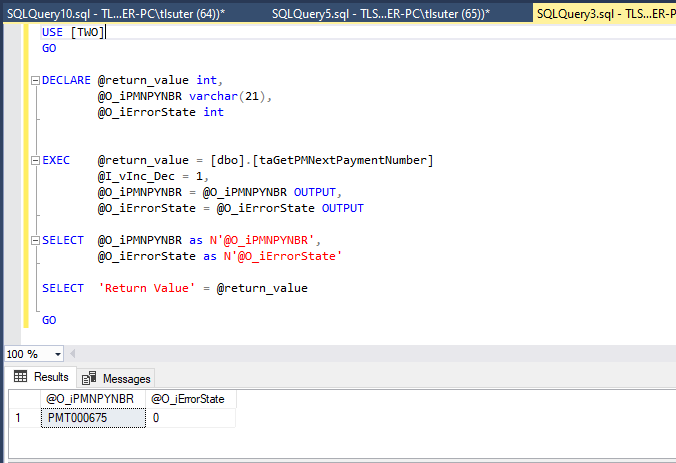
Lastly compare that value to the value in your Payables Setup Options for next Payment Number and verify that the value increments by the input value of vInc_Dec such as 1 that you provided.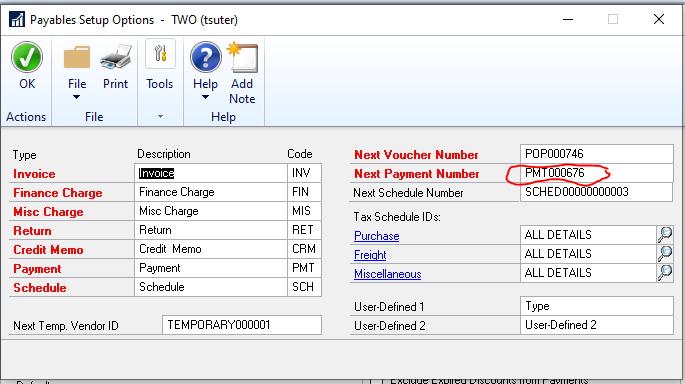
Maybe time for a new VAR? 🙂——————————
Thaddeus Suter
Retus, Inc
HELOTES TX
——————————
——————————————- -
Thaddeus Suter
MemberMarch 11, 2021 at 1:36 PM
To complete the thought process here, what may be confusing for some developers is that when using taGetPMNextPaymentNumber, you must provide the value to increment the counter else the stored procedure will error and return error code 3393.To get around this modify the taGetPMNextPaymentNumber as follows by setting the value of vInc_Dec = 1 instead of NULL.
Now you do not need to provide the input for vInc_Dec as I did above.
Here is the modified ta stored procedure see BOLD.USE [TWO]
GO
/****** Object: StoredProcedure [dbo].[taGetPMNextPaymentNumber] Script Date: 3/11/2021 12:20:54 PM ******/
SET ANSI_NULLS ON
GO
SET QUOTED_IDENTIFIER ON
GO
ALTER procedure [dbo].[taGetPMNextPaymentNumber] @I_vInc_Dec tinyint = 1, @O_iPMNPYNBR varchar(21) = NULL output, @O_iErrorState int = NULL output as set transaction isolation level read uncommitted set nocount on declare @Loop int, @iError int, @iStatus int, @PMNPYNBR varchar(21) select @O_iPMNPYNBR = ”, @O_iErrorState = 0, @iStatus = 0, @Loop = 0 if @I_vInc_Dec is NULL begin select @O_iErrorState = 3393 return (@O_iErrorState) end select @Loop = @Loop + 1 while @Loop <> 0 and @Loop < 1000 begin select @Loop = @Loop + 1 select @O_iPMNPYNBR = PMNPYNBR from PM40100 WITH (TABLOCKX HOLDLOCK) where UNIQKEY = 1 if ( @@rowcount <> 1) begin select @O_iErrorState = 3383 end if @O_iErrorState = 0 begin select @PMNPYNBR = @O_iPMNPYNBR exec @iStatus = ivNumber_Inc_Dec @I_vInc_Dec, @PMNPYNBR output, @O_iErrorState output select @iError = @@error if @iStatus = 0 and @iError <> 0 select @iStatus = @iError update PM40100 set PMNPYNBR= @PMNPYNBR where UNIQKEY = 1 if @@error = 0 select @Loop = 0 end end if @O_iErrorState <> 0 or @iStatus <> 0 or @Loop <> 0 begin select @O_iPMNPYNBR = ” select @O_iErrorState = 3384 return (@O_iErrorState) end return (@O_iErrorState)
GO
——————————
Thaddeus Suter
Retus, Inc
HELOTES TX
——————————
——————————————- -
Lutavia Clemens
MemberMarch 11, 2021 at 10:50 AM
Vicki,
This link may be helpful.
How to retrieve the next payment number for Payables Management payments when you use the Miscellaneous Routines Assembly in eConnect——————————
Lutavia Clemens
DLD Business Solutions, Inc.
Birmingham AL
——————————
——————————————-
Vicki Hillary replied 5 years, 6 months ago 1 Member · 0 Replies -
-
0 Replies
Sorry, there were no replies found.
The discussion ‘eConnect GetPMNextPaymentNumber’ is closed to new replies.
