Dynamics GP WIndow Resizing Issue

  • Dynamics GP WIndow Resizing Issue

    Posted by greg-wahl on April 30, 2021 at 11:38 am
    • Greg Wahl

      Member

      April 30, 2021 at 11:38 AM

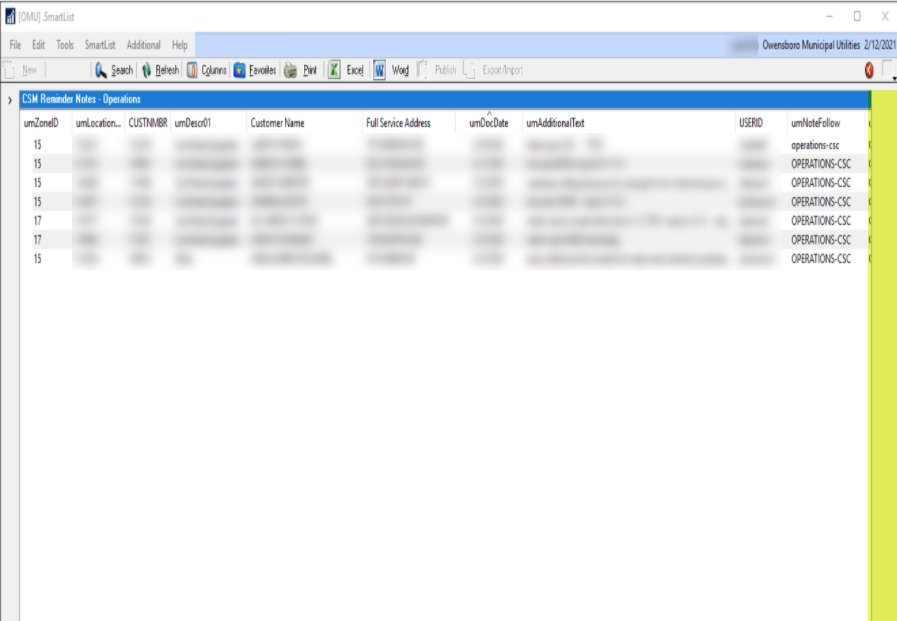
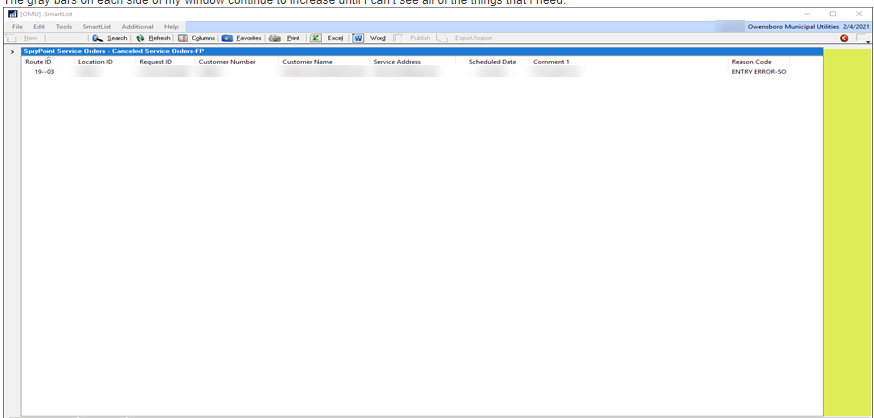
      We have an issue where a user is complaining about how her smartlist window sometimes displays a gray bar on the right hand side that reduces her full display window so it forces her to have to scroll over to see all the data.Ā  It doesn’t happen everytime and she can close the smartlist window and reopen it and the she will get the full display.Ā  I am curious if any others have experienced this.Ā  It seems to only be affecting her


      ——————————
      Greg Wahl
      IT Applications Supervisor
      Owensboro Municipal Utilities
      Owensboro KY
      ——————————

    • David Musgrave

      Member

      May 3, 2021 at 12:50 AM

      Hi

      Are you using GP Power Tools to remember the size, state and position of windows (which is the default behavior)?

      That user can reset their stored window data from the User Preferences window Additional Menu.Ā  Or you can reset the user from the Window Position Memory window.

      Don’t know if this will help, but worth a try.

      Regards

      David?

      ——————————
      David Musgrave MVP, GPUG All-Star

      Managing Director
      Winthrop Development Consultants

      Perth, Western Australia

      http://www.winthropdc.com
      ——————————
      ——————————————-

    • Greg Wahl

      Member

      May 3, 2021 at 9:27 AM

      I checked and we are still utilizing that functionality to remember size, state and position of windows but I will have her do the “Reset Window Memory Settings” to see if that clears up what she is seeing…

      Thanks for the suggestion!

      ——————————
      Greg Wahl
      IT Applications Supervisor
      Owensboro Municipal Utilities
      Owensboro KY
      ——————————
      ——————————————-

    • David Morinello

      Member

      May 4, 2021 at 8:25 AM

      A side question, are your users on local GP Client installs or Terminal Services/Citrix?

      ——————————
      David Morinello
      Senior Dynamics GP Systems Architect
      Ascend Learning, LLC
      Leawood KS
      ——————————
      ——————————————-

    • Greg Wahl

      Member

      May 4, 2021 at 8:31 AM

      We currently use Terminal servers

      ——————————
      Greg Wahl
      IT Applications Supervisor
      Owensboro Municipal Utilities
      Owensboro KY
      ——————————
      ——————————————-

    • David Morinello

      Member

      May 5, 2021 at 12:57 AM

      I believe there are some resolution settings in Terminal Services, but I am out of practice on where. In the Citrix Receiver I recently had to have a new user adjust her session for a High DPI.

      ——————————
      David Morinello
      Senior Dynamics GP Systems Architect
      Ascend Learning, LLC
      Leawood KS
      ——————————
      ——————————————-

    greg-wahl replied 4 years, 11 months ago 1 Member · 0 Replies
  • 0 Replies

Sorry, there were no replies found.

The discussion ‘Dynamics GP WIndow Resizing Issue’ is closed to new replies.

Start of Discussion
0 of 0 replies June 2018
Now

Welcome to our new site!

Here you will find a wealth of information created for peopleĀ  that are on a mission to redefine business models with cloud techinologies, AI, automation, low code / no code applications, data, security & more to compete in the Acceleration Economy!