


Dynamics GP
Dynamics GP
Organizer:
- JOSE Organized by
-
-

Dynamics GP 18.7 VBA Customizations
-
Dynamics GP 18.7 VBA Customizations
I am running into an odd issue when trying to clean up VBA customizations in GP 18.7.
The VBA customizations keep coming back when clearing and importing a package file.
***************************************************
1. I started with a test environment used to pre-test the GP 18.7, so it is configured with the same modules and 3rd party.
2. With GP shut down, I removed all .VBA files in the main GP folder C:\Program Files (x86)\Microsoft Dynamics\GP$18_7
3. I replaced the .DIC files with clean empty dictionaries from a new clean GP installation.
4. Opened GP and nothing appears in the Customization Maintenance screen. Nothing in the Visual Basic e
5. I Imported a copy of the Production package file containing all current customizations, including multiple “Form with VBA” & “Modified Form with VBA”.
6. On the test system I exported all Non-VBA customizations to a new package file.
7. Cleared dictionary & VBA files again (steps 2-4)
8. Imported the new package file from step #6 that does not show any VBA.
Interesting note: The GP Import Package File screen lists no VBA forms.
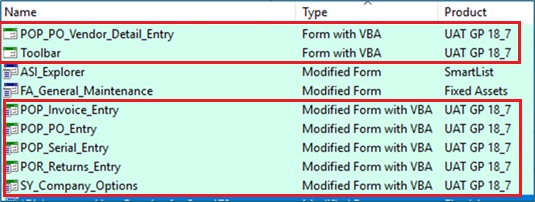
9. After the import, the Customization Maintenance screen shows VBA customizations are back. Both “Form with VBA” & “Modified Form with VBA”. VBA is back in the Visual Basic Editor.
It’s been a while since I’ve seen a new one from GP.
What step am I missing in clearing out VBA?


Log in to reply.
