


Dynamics GP
Public Group
Active 4 weeks ago
Dynamics GP
Organizer:
- JOSE Organized by
-
-

Document Attachment Issue
-
Document Attachment Issue
Posted by jim.delmonte@stahls.com on July 9, 2020 at 5:11 pm-
I was notified by one of our Accounting Staff that documents attached to Customer IA489 were showing up on another customer’s attachments. See the first attachment. Note that all of customers have the same document number 006E008C.
I have checked the contents of the SQL tables: CO00101, CO00102, CO00104, CO00105. The results are attached. All that I can identify as unique is the path in the BusObjKey field is this path:
0SystemNotes06E008C I have quite a few with this path but I cannot see where in the tables it identifies the master record associated with the attachments.
This issue does not cause any problems with posting transactions and no SQL errors are noted. It just looks strange.
I tried to delete an incorrect record off one of them and it deleted on all three customer records.Any insight or possible solution would be appreciated.
——————————
Jim DelMonte
Dynamics GP Manager
Groupe Stahl
Mentor OH
—————————— -
Hi ,
Can you confirm the following:
1.) What version of GP you’re using?
2.) That you are using OLE note attachments over document attach. OLE Notes are what I call the “post it” note button on various fields while the Document Attach button is a large paperclip icon (or a piece of paper with a paperclip attached once a document is there) in the navigation ribbon (if you use the ribbon) on newer versions of GP.??I’m thinking the answer to number #2 is the OLE Notes based on the information and screenshots you provided, but it’s always best to confirm.
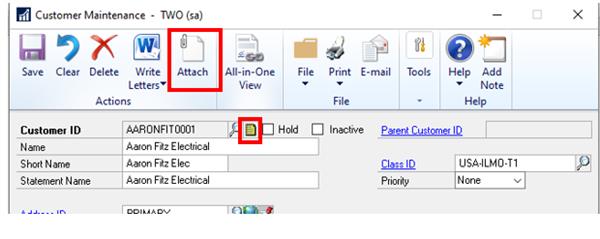
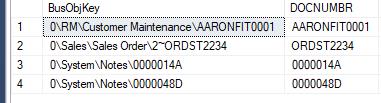
With regard to finding the master record, the answer is slightly different if you’re using OLE Notes than if you’re using document attach.Document Attach is a little more straightforward. It lists the master record in the busObjKey itself as well as in the DOCNUMBR field of the CO00105. Below is a screenshot of the CO00105 where can compare both the busobjkey and the docnumbr of 2 records attached using Document Attach to 2 record attached using the OLE Notes – notice the OLE Notes have similar sequences to what you’re seeing.
Both sets of documents were attached to the same master records – 2 to customer card and 2 to a sales order.
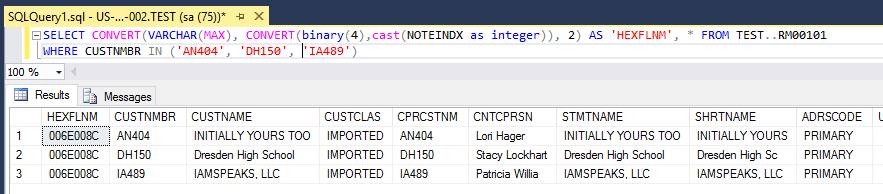
For the OLE Notes you have to convert the note index master of your master record table to it’s HEX file name in order to make sense of it. The script would look something like below for the Customer Master table. You’d need to sub in your company database for TWO and your master record table (i.e. sales transactions, vendors, etc.) for RM00101.SELECT CONVERT(VARCHAR(MAX), CONVERT(binary(4),cast(NOTEINDX as integer)), 2) AS ‘HEXFLNM’, * FROM TWO..RM00101
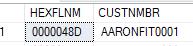
Once you have that, you can use that hex file name in CO00102, CO00103, CO00104, and CO00105 to identify which records are associated with it. In my case, it happened to match my record 4 from the CO00105 screenshot I showed you.

With regards to how the issue occurred, this most commonly occurs when somehow the next Note Index in the company master (SY01500) has been set to low and documents start getting indexes that already exist elsewhere – though it’s odd you have three different customers with the same index.
Microsoft provides a script in the KB article below on how to correct the note index (if that’s the issue) to prevent it from happening again. It doesn’t correct what’s already gone sideways though. Since you mentioned you already deleted the documents, you could try the fix, reattach the documents in their proper location and see if they work properly. I’d recommend backing up the databases and running when no one is in the system so GP isn’t trying to find the max note index while users are actively adding to the index.
Does that make sense? If you have any questions, just let me know.
Thanks,
Samantha
?——————————
Samantha Higdon ,CPA,CGMA
Consultant
Lagom, LLC
Carmel IN
——————————
——————————————- -
Samantha,
In response to your questions:
1. GP2018 R2 (18.00.0704)
2. I think they are using a mixture of the two. The ones I trained directly use the doc attach while some of the others use the OLE Container. It is the same two users that experience this which makes me believe they are using the OLE container.
3. Thank you for the script. That will help me identify the master record and see if the duplication occurs elsewhere.
4. Appreciate the KB Article. It will be helpful.Thank you
——————————
James Delmonte
Dynamics GP Manager
Groupe Stahl
Mentor MI
——————————
——————————————- -
Samantha,
I ran the script you sent (thank you) and it shows the three customers having the same HEXFLNM (see below). You said in your notes below that it is odd to have three records with the same note index. Looks like I am one of the odd ones.
So, I would guess my next step is to run the fix from the KB article after deleting the attachments and then see what happens after re-attaching them.
I will let you know the results after the testing
Thanks.
Jim DelMonte | Dynamics GP Manager | Groupe Stahl | 7650 Tyler Blvd., Mentor, OH 44060
| Mobile: 216.941.2650 | Fax: 440.497.5331 | e-mail: Jim.DelMonte@Stahls.com | http://www.groupestahl.com
——————————————-
-
If the fix in the KB article is the automated fix for notes, be very careful and make SURE you have a good backup!?
——————————

——————————
——————————————- -
Jo,
Most definitely. I have a separate test server that I can work on.
In addition, I have a SQL job that restores PROD to the TEST server in case it blows up on me.
Thanks.
Jim DelMonte | Dynamics GP Manager | Groupe Stahl | 7650 Tyler Blvd., Mentor, OH 44060
| Mobile: 216.941.2650 | Fax: 440.497.5331 | e-mail: Jim.DelMonte@Stahls.com | http://www.groupestahl.com
——————————————-
-
Samantha,
The script in the KB article worked. I am going to execute it in Production this weekend. Thank you for all your help
——————————
James Delmonte
Dynamics GP Manager
Groupe Stahl
Mentor MI
——————————
——————————————- -
Hi ,
Glad to hear the script helped!
I saw your other messages to Jo as well. It does seem odd that you have so many customers ?with the same HEXFLNM, but there’s a lot of unknowns about how/why things happen. *shrug* .
Since it wasn’t isolated to the couple of customers you identified, I’d recommend digging deeper into the customer side of the house to figure out how/why the note index are duplicating so often. The script will right the ship so to speak ,but it could happen again if the cause isn’t determined/resolved.
Are customers created manually or are they imported from an external system as well?
Thanks,
Samantha
——————————
Samantha Higdon ,CPA,CGMA
Consultant
Lagom, LLC
Carmel IN
——————————
——————————————- -
The customers are imported from an external system. We use a 5 character (alphanumeric) code based on a home grown algorithm to calculate the ID. The algorithm checks for dupes before it creates the code and if it does find them, it grabs a character elsewhere.
I am going to do the digging for other dupes. It really helps having the separate test environment. I have an awesome DBA that is a SQL guru and helps me accomplish stuff in minutes that would normally take me hours.
I will let you know what I find. Thanks
——————————
Jim Delmonte
Dynamics GP Manager
Groupe Stahl
Mentor OH
——————————
——————————————- -
Hi
The first and foremost issue is that in the Sales Module there should be NO duplicate document numbers. In the Sales Module, unlike Purchasing, the document numbers must ALL be unique even if it is a different customer.
Are you guys integrating Sales Docs into GP from another system? If so, and if the integration is written correctly, you should be getting errors saying it can’t be done. This definitely should not be happening if users are hand-keying the transactions inside of GP.
The rest of the coding for the Doc Attachments relies on this business logic so, other than manually changing the doc numbers in SQL to be unique you may not have much luck fixing this one.
I would highly recommend that you guys find out ‘how’ the document numbers were allowed to repeat between customers. It’s surprising you have not had more issues than this. ?
——————————
——————————
——————————————- -
Jo,
We are importing invoices from an external system but notes are not included in integration. We have a unapproved project to rebuild the integration this year.
I am not yet sure if I have more duplicates. I am going to need to investigate that further. The script that Samantha provided did the trick and allowed me to re-attach the docs to the correct customer.I think the duplication was occurring partially from using the OLE attachment rather than the doc attachment function. When I ran the first script she provided, numerous customers returned the same HEX code. Our Customer ID numbering comes from an external system and uses some unique algorithm. I still have a lot of work to do. Thank you for your help.
Jim
——————————
James Delmonte
Dynamics GP Manager
Groupe Stahl
Mentor MI
——————————
——————————————-
jim.delmonte@stahls.com replied 6 years, 3 months ago 1 Member · 0 Replies -
-
0 Replies

Sorry, there were no replies found.
The discussion ‘Document Attachment Issue’ is closed to new replies.
