


Dynamics GP
Public Group
Active 20 hours ago
Dynamics GP
Organizer:
- JOSE Organized by
-
-

Doc Date Verify – PSTL
-
Doc Date Verify – PSTL
Posted by DSC Communities on March 22, 2017 at 9:51 am-

Beth Landies
MemberMarch 22, 2017 at 9:51 AM
 Hi,
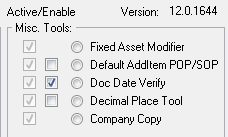
Hi,We are trying to enable Doc Date Verify within PSTL. I have checked the second check box on the PSTL window. Is that the only step needed? Does PSTL need to be installed on all PCs?
I ask because PSTL was installed on my computer and Doc Date Verify seems to be working fine. I tried to test Doc Date Verify on A/Ps computer to which it did not work. When I log in as SA on the A/P computer, I do not see the PSTL window.
Thanks!
Beth
——————————
Beth Landies
MasterCorp, Inc
Crossville TN
—————————— -
Windi Epperson
MemberMarch 22, 2017 at 1:39 PM
Hey Beth,
Yes, PSTL does need to be on any machine that you want that option to work for.
Thanks
Windi——————————
Windi Epperson
President/GP Senior Consultant
Advanced Integrators, Inc.
Norman OK
405-946-1774 Ext 102
——————————
——————————————- -
Steve Erbach
MemberMarch 22, 2017 at 1:43 PM
Beth,The great Amber Bell posted a video about Doc Date Verify a couple years ago. We tried implementing it recently but decided that it added too many extra clicks.
That is, we wanted to prevent the situation that is described by Amber in the video: entering a year far in the future. It happened to us one time and a bunch of Receivables invoices were paid with payment dates in 2106 instead of 2016. I had to repair those dates in the back end database.
But when we turned it on, if we received, say, a Payables invoice with a document date in the prior month after we’d already closed that month, GP now warns the user about the date being in a closed period. We determined that it was far less likely that we would enter a date far in the future than entering a proper invoice date in a closed period… so we turned Doc Date Verify right back off.
Regards,
——————————
“Sparkly” Steve Erbach – Business Analyst & MS Dynamics Platform Administrator
WOW Logistics Company – Appleton, WI
VP for Communication, GPUG WI (Milwaukee) Chapter
Co-Chair, GPUG WI (Green Bay) Chapter
GP 2016 (16.00.0439) / MR 2012 CU15
Blog: https://www.gpug.com/blogs/steve-erbach
Twitter: @serbach
Welcome to Dynamics!
You do not have permission.
Call Steve. (hat tip: Lou Spevack)
——————————
——————————————- -
Beat Bucher
MemberMarch 27, 2017 at 9:54 AM
Hi Beth,
There has been a lenghty thread about the PSTL doc date verify feature.
https://www.gpug.com/communities/community-home/digestviewer/viewthread?MessageKey=848167b7-3aaa-40ae-9284-c10dce840343&CommunityKey=4754a624-39c5-4458-8105-02b65a7e929e&tab=digestviewer#bm848167b7-3aaa-40ae-9284-c10dce840343
The PSTL doesn’t need to be installed on every workstation.. it only needs one setup on a ‘master’ GP client (usually the server or your GP reference workstation).. Once the feature is enabled, it works with all the users on all workstation, but it is a per company setting, not system wide, which means you have to apply it to every company where you want this to work.——————————
Beat Bucher
Business Analyst, Dynamics GP MVP
Ultra-Electronics Forensic Technology Inc.
Montreal QC/Canada
+1-514-489-4267
@GP_Beat http://dyngpbeat.wordpress.com/
Montreal QC GPUG Chapter Leader
GP2013R2 / MR2012 CU14
——————————
——————————————- -
Beth Landies
MemberMarch 28, 2017 at 9:17 AM
Thanks Brad! Our IT will be so happy about not having to install on this on all workstations!——————————
Beth Landies
MasterCorp, Inc
Crossville TN
——————————
——————————————- -
Hi Beat
Are you sure about PSTL not needing to be installed?
While it only needs to be enabled on one workstation, I think the PSTL code does need to be on all workstations for the triggers to be enabled.
The only way it would work without needing the PSTL dictionary installed is if the code is in core Dynamics. And if it is in core Dynamics, then why would you even need PSTL to turn it on.
David
——————————
David Musgrave MVP, GPUG All-StarManaging Director
Winthrop Development ConsultantsPerth, Western Australia
http://www.winthropdc.com
——————————
——————————————- -
Beat Bucher
MemberMarch 30, 2017 at 8:51 AM
Hi David,
I’m positively sure about that.. I’ve tested it personnaly.. I’ve the PSTL only setup on my Server side client and was able to use the Doc Date verify on my workstation (local client) without having the PSTL dictionnary installed.
it was also confirmed by checking in Richard Whaley’s excellent book about PSTL..However, some of the tools of PSTL will not work if you haven’t installed it on the workstation, like the Modifier / Changer / Combiner tools.. In this case we’re only talking about flags to be enable at the system level of GP.. and it is company specific.
EDIT: it looks like that I should have turned my tongue 7 times in my mouth before writing the above statement.. I validated this a while ago in my GP 2016R2, and I thought I had used the local client without the PSTL, but on my GP 2013 it was not installed and sure it wasn’t giving out the warning about the closed period.. whereas it does on the server side..
So the PSTL tools will need an installation on every workstation where the function needs to be enforced.. This is very unfortunate, as Microsoft could have added this a ‘flag’ in the system, or make it DEX.ini entry..
PS: I also checked Richard’s book about the setup of PSTL, and though he mentions that some of the functions requires the installation of the tool on the local workstation, he doesn’t go into details..
——————————
Beat Bucher
Business Analyst, Dynamics GP MVP
Ultra-Electronics Forensic Technology Inc.
Montreal QC/Canada
+1-514-489-4267
@GP_Beat http://dyngpbeat.wordpress.com/
Montreal QC GPUG Chapter Leader
GP2013R2 / MR2012 CU14
——————————
——————————————- -
Rob Klaproth
MemberMarch 30, 2017 at 12:22 PM
I second what David says. In my testing it had to be installed on all workstations who wanted the doc date verify. It only needs to be enabled once but every workstation needs PSTL installed.Sent from my iPhone
——Original Message——
Hi David,
I’m positively sure about that.. I’ve tested it personnaly.. I’ve the PSTL only setup on my Server side client and was able to use the Doc Date verify on my workstation (local client) without having the PSTL dictionnary installed.
it was also confirmed by checking in Richard Whaley’s excellent book about PSTL..However, some of the tools of PSTL will not work if you haven’t installed it on the workstation, like the Modifier / Changer / Combiner tools.. In this case we’re only talking about flags to be enable at the system level of GP.. and it is company specific.
EDIT: it looks like that I should have turned my tongue 7 times in my mouth before writing the above statement.. I validated this a while ago in my GP 2016R2, and I thought I had used the local client without the PSTL, but on my GP 2013 it was not installed and sure it wasn’t giving out the warning about the closed period.. whereas it does on the server side..
So the PSTL tools will need an installation on every workstation where the function needs to be enforced.. This is very unfortunate, as Microsoft could have added this a ‘flag’ in the system, or make it DEX.ini entry..
PS: I also checked Richard’s book about the setup of PSTL, and though he mentions that some of the functions requires the installation of the tool on the local workstation, he doesn’t go into details..
——————————
Beat Bucher
Business Analyst, Dynamics GP MVP
Ultra-Electronics Forensic Technology Inc.
Montreal QC/Canada
+1-514-489-4267
@GP_Beat http://dyngpbeat.wordpress.com/
Montreal QC GPUG Chapter Leader
GP2013R2 / MR2012 CU14
——————————
——————————————- -
Beat Bucher
MemberMarch 30, 2017 at 10:18 AM
Beth,
Against my initial statement, it looks like you will have to deploy the PSTL chunk file to all the Workstation where you require the function.. If you have a lot of clients to deploy the package to, you should be able to use GP’s client update function :Administration >> Setup >> System >> Client Updates
place the tautil.cnk file in a shared folder on the network and point a new update entry towards the file. Check the box “Update client at next use” and it should automatically install the PSTL to the workstation.
——————————
Beat Bucher
Business Analyst, Dynamics GP MVP
Ultra-Electronics Forensic Technology Inc.
Montreal QC/Canada
+1-514-489-4267
@GP_Beat http://dyngpbeat.wordpress.com/
Montreal QC GPUG Chapter Leader
GP2013R2 / MR2012 CU14
——————————
——————————————-
DSC Communities replied 9 years ago 1 Member · 0 Replies -
-
0 Replies
Sorry, there were no replies found.
The discussion ‘Doc Date Verify – PSTL’ is closed to new replies.
