


Dynamics GP
Public Group
Active 3 hours ago
Dynamics GP
Organizer:
- JOSE Organized by
-
-

Check Batch stuck in Recovery
-
Check Batch stuck in Recovery
Posted by DSC Communities on June 13, 2017 at 11:58 am-

Carolus Daniel
MemberJune 13, 2017 at 11:58 AM
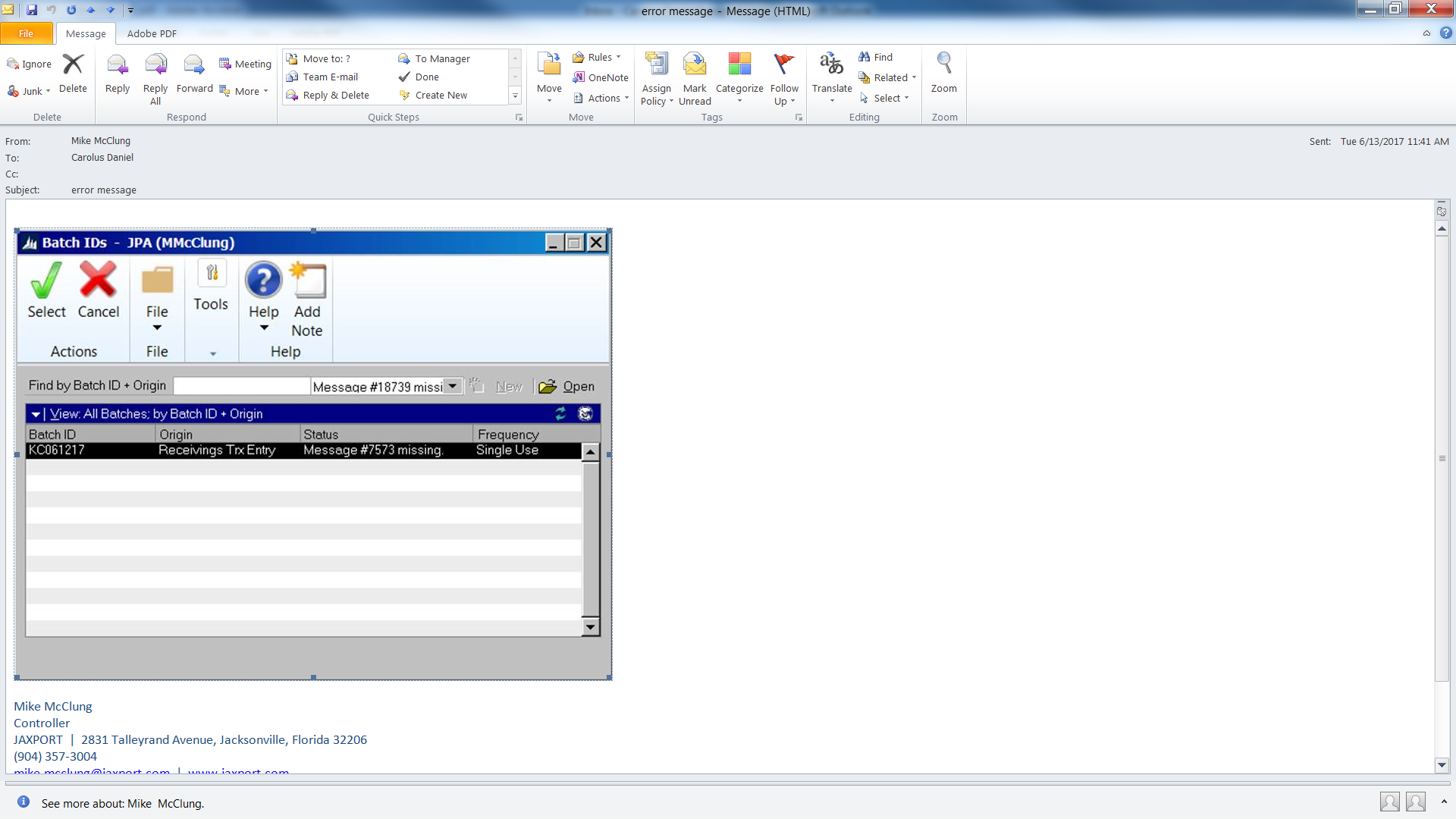
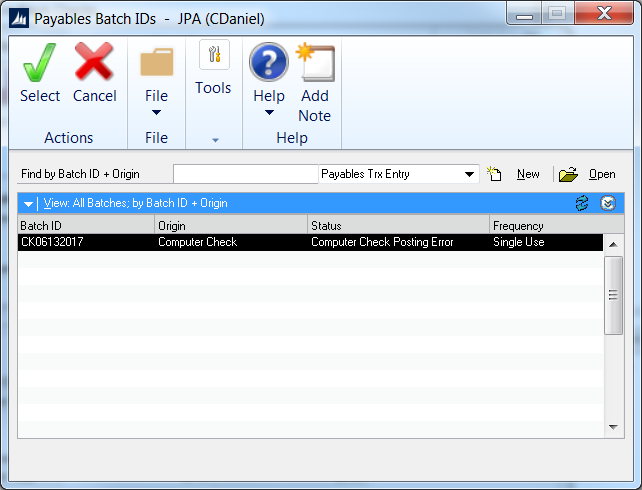
We ran a normal weekly check batch, all checks printed no problems. When the batch was sent to Controller to post it was sent to recovery.It is saying Error #7573 Missing
Any help would be appreciated.
——————————
Carolus Daniel
Senior Finance Administrator
Jacksonville Port Authority
Jacksonville FL
—————————— -
Steve Erbach
MemberJune 13, 2017 at 1:17 PM
Carolus,Can you determine if the check amounts did, indeed, post properly to G/L? Very possibly they did. If there’s a hiccup in the connection to your SQL Server, it’s very possible that GP didn’t fully update your transaction tables.
Here is one of many articles on the topic of freeing up stuck batches. You will need the assistance of your database administrator since removing or updating records in the System tables cannot be done through the GP user interface.
Sincerely,
——————————
“Sparkly” Steve Erbach – Business Analyst & MS Dynamics Platform Administrator
WOW Logistics Company – Appleton, WI
VP for Communication, GPUG WI (Milwaukee) Chapter
Co-Chair, GPUG WI (Green Bay) Chapter
GP 2016 (16.00.0439) / MR 2012 CU15
Blog: https://www.gpug.com/blogs/steve-erbach
Twitter: @serbach
——————————
Welcome to Dynamics!
You do not have permission.
Call Steve.
(hat tip: Lou Spevack)
——————————
——————————————- -
Carolus Daniel
MemberJune 14, 2017 at 10:29 AM
Thanks for the feedback and the information, we rebooted GP and the batch posted correctly. Not sure why it was getting stuck but the problem seems to have worked itself out.We are using 3rd party programs to integrate our purchasing application and travel, so it could be an issue outside of GP.
——————————
Carolus Daniel
Senior Finance Administrator
Jacksonville Port Authority
Jacksonville FL
——————————
——————————————- -
Hi Carolus,
Three things:
1) The Batch ID’s in the two screen shots are not the same.
- The one with the status MESSAGE #7573 missing is: KC061217 (a Receivings batch)
- The second one is: CK06132017
2) The other thing I have a question about is in the 1st screen shot; what is the ORIGIN type of:
Message#18739 missing
Do you have a third-party product that this is coming from? It’s not native GP.The error message that you see in the first screen does not have anything to do with the second batch.
3) Have you tried Batch Recovery?
Microsoft Dynamics > Tools > Routines > Batch Recovery——————————
Frank Heslin
Financial Systems Administrator
ExamWorks, Inc.
Atlanta GAMember, GPUG Advisory Committee
Chairman, Georgia Regional GPUG Chapter
Summit Track Leader
GPUG All Star 2016GP2015 R2
MR CU14Follow me on Twitter: @Automate_It
GPUGGA – http://www.gpug.com/Atlanta
*** Help Us, Help You…provide enough info so that we don’t have to ask for more:) ***
*** If you solve your issue please share the solution to assist others! ***
——————————
——————————————- -
Steve Erbach
MemberJune 13, 2017 at 3:19 PM
Hi, Frank!I didn’t notice the different batch numbers until you mentioned it; but I see that all the time in our simple setup here. That is, the G/L batch number for, say, a batch of Sales invoices from one of our external systems will be different from the batch number for the sales invoices themselves.
As far as “Have you tried Batch Recovery”, it looked to me like that’s what he’d already tried, but it was still stuck. So now it’s a job for the GP database admin to reset batch statuses and such, right?
Regards,
——————————
“Sparkly” Steve Erbach – Business Analyst & MS Dynamics Platform Administrator
WOW Logistics Company – Appleton, WI
VP for Communication, GPUG WI (Milwaukee) Chapter
Co-Chair, GPUG WI (Green Bay) Chapter
GP 2016 (16.00.0439) / MR 2012 CU15
Blog: https://www.gpug.com/blogs/steve-erbach
Twitter: @serbach ——————————
Welcome to Dynamics!
You do not have permission.
Call Steve.
(hat tip: Lou Spevack)
————————————————————————-
-
Steve,I didn’t notice the different batch numbers until you mentioned it; but I see that all the time in our simple setup here. That is, the G/L batch number for, say, a batch of Sales invoices from one of our external systems will be different from the batch number for the sales invoices themselves.Steve Erbach, 06-13-2017 03:18 PM
Yes, the Batch ID’s will be different because GP assigns a Batch ID for the GL batch from the subledgers.
The point I was making was that the error message from the first screen shot doesn’t appear to be related to the batch in the second screen shot.
As far as “Have you tried Batch Recovery”, it looked to me like that’s what he’d already tried, but it was still stuck. So now it’s a job for the GP database admin to reset batch statuses and such, right?Steve Erbach, 06-13-2017 03:18 PMI agree that the indication is that they tried Batch Recovery but I wanted to verify that.
Yes, in general, if a batch gets stuck in the Batch Recovery loop, then the next step is in SY00500.
I’m staying tuned!
——————————
Frank Heslin
Financial Systems Administrator
ExamWorks, Inc.
Atlanta GAMember, GPUG Advisory Committee
Chairman, Georgia Regional GPUG Chapter
Summit Track Leader
GPUG All Star 2016GP2015 R2
MR CU14Follow me on Twitter: @Automate_It
GPUGGA – http://www.gpug.com/Atlanta
*** Help Us, Help You…provide enough info so that we don’t have to ask for more:) ***
*** If you solve your issue please share the solution to assist others! ***
——————————
——————————————- -
One more item I would check before going the SY00500 route would be to ask was a vendor placed on hold before posting the check batch. That will cause the batch posting to fail if there is a payment for the vendor put on hold.
Happened to us and once we took the vendor off of hold were able to recover the batch and finish the posting process and then put the vendor back on hold.
——————————
Bert Green
GP Developer/GP Administrator
Berger Transfer & Storage, Inc.
Saint Paul MN
GP2015/MR CU11
——————————
——————————————- -
Windi Epperson
MemberJune 14, 2017 at 9:48 AM
Hi Carolus,
My questions would be, did it get stuck when posting from the AP side – or had AP finished and it got stuck when posting from the GL side. Looks like AP, but just wanted to check. Second question, when you run the recovery process, what happens? Does it just circle back into the Recovery window, or does it put the batch back into AP (or GL) batches? If the batch does go back to the original module, then pull the batch up in the applicable batch window and see if you can run an edit list. If you can, it should tell you what’s wrong with the batch. From a check batch standpoint, it may be hard to fix. But maybe it will just be that you’re posting to a closed period or something easy.
Thanks
Windi——————————
Windi Epperson
President/GP Senior Consultant
Advanced Integrators, Inc.
Norman OK
405-946-1774 Ext 102
——————————
——————————————- -
Carolus Daniel
MemberJune 15, 2017 at 8:33 AM
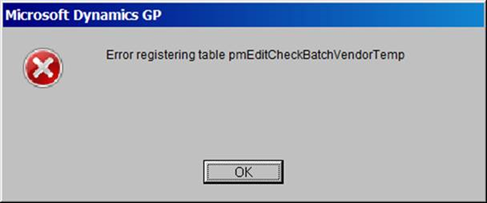
Hi Wendy,It posted fine on the AP side, it was when we had already printed checks and tried to post to the GL.
This was the message we were getting in batch recovery
Thanks for the help
——————————
Carolus Daniel
Senior Finance Administrator
Jacksonville Port Authority
Jacksonville FL
——————————
——————————————- -
Carolus Daniel
MemberJune 14, 2017 at 10:30 AM
Thanks for the feedback and the information, we rebooted GP and the batch posted correctly. Not sure why it was getting stuck but the problem seems to have worked itself out.——————————
Carolus Daniel
Senior Finance Administrator
Jacksonville Port Authority
Jacksonville FL
——————————
——————————————-
DSC Communities replied 8 years, 7 months ago 1 Member · 0 Replies -
-
0 Replies
Sorry, there were no replies found.
The discussion ‘Check Batch stuck in Recovery’ is closed to new replies.
