

Changing Line Item Inventory Account for PO’s

  • Changing Line Item Inventory Account for PO’s
    Posted by DSC Communities on January 5, 2017 at 12:00 pm
    • Sonja Taylor

      Member

      January 5, 2017 at 12:00 PM

      We set up Purchase Orders for suppliers that provide a service, but that service can be coded to different products that we produce. The product that they are working on defines which GL code the service is coded to. Currently, at the beginning of the year I am setting up PO’s with multiple line items, each with their own GL code, and predicting what the amount for the year will be per item. By September, I am reallocating funds from one line item to another in order to receive invoices against the PO’s. I would like to be able to set up a PO for a supplier for a particular service, and assign the GL code as I am receiving the invoice against the PO. Currently, if I try to change the distribution, I get a message saying that I cannot change the PURCH account at the summary level, and I must change the inventory account for the line item instead. This typically means I have to delete an entry that I have started and go in and change the PO before I can then process the invoice. Is there a setting that we can change to allow distributions to be modified as required when receiving invoices against PO’s? I am hoping this is just a set up issue and 2017 is the year that I can look forward to receiving invoices against PO’s with distributions as needed. Thanks all, and Happy New Year!

      ——————————
      Sonja Taylor
      Payroll and Finance Clerk
      Canadian Science Publishing
      Ottawa ON
      ——————————

    • Michael Taranto, CPA

      Member

      January 5, 2017 at 12:39 PM

      Hi Sonja!

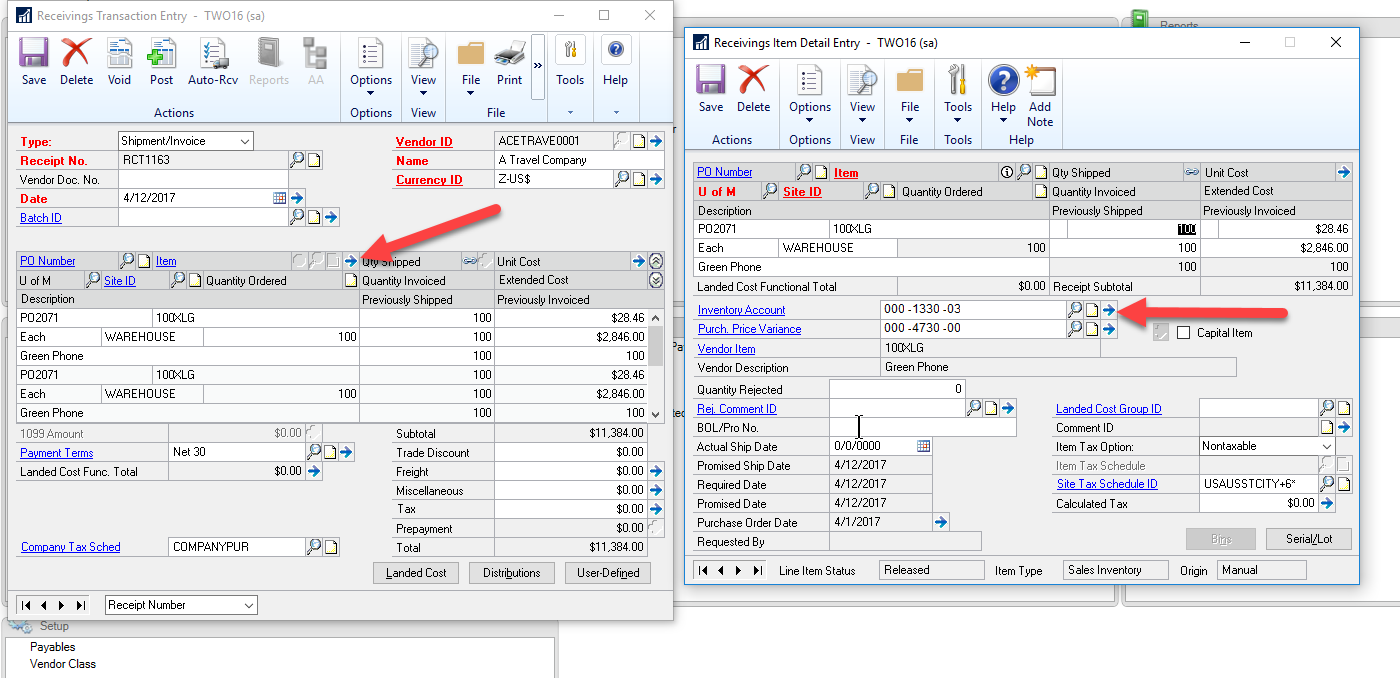
      To change the GL account on a receiving document you need to edit the line item and not the distribution on the main window.  To do that highlight the line you are receiving and click on the blue expansion button next to the label “Item”.  That will take you to the receiving’s item detail Entry.  Change the distribution. You will get a message “The document distributions don’t match the line item distributions for the PURCH distribution type.  Do you want to update distributions for this line item”.  Click Yes and your total distributions will be updated.

      Hope this helps!

      Mike

      ——————————
      Michael Taranto
      ERP Consulting LLC
      Pataskala OH
      ————————————————————————-

    • Sonja Taylor

      Member

      January 5, 2017 at 12:49 PM

      Thank you Michael! I will give that a try. I had been going back to the PO to change the number, but this looks like a shortcut from the invoice receiving window!! Much appreciated!!

      ——————————
      Sonja Taylor
      Payroll and Finance Clerk
      Canadian Science Publishing
      Ottawa ON
      ————————————————————————-

    DSC Communities replied 9 years, 10 months ago 1 Member · 0 Replies
  • 0 Replies

Sorry, there were no replies found.

The discussion ‘Changing Line Item Inventory Account for PO’s’ is closed to new replies.

Start of Discussion
0 of 0 replies June 2018
Now

Welcome to our new site!

Here you will find a wealth of information created for peopleĀ  that are on a mission to redefine business models with cloud techinologies, AI, automation, low code / no code applications, data, security & more to compete in the Acceleration Economy!
