


Dynamics GP
Public Group
Active a day ago
Dynamics GP
Organizer:
- JOSE Organized by
-
-

Capturing SQL Temp table using VS Tools
-
Capturing SQL Temp table using VS Tools
Posted by greg-wahl on August 30, 2018 at 10:40 am-
?Is there a way to capture what SQL temp table is being used on a particular Dynamics GP window through the use of VS tools? I found some examples of capturing table buffers but I can’t figure out how to capture the actual name of the temp table in SQL so that I may be able to query the data.
Update:
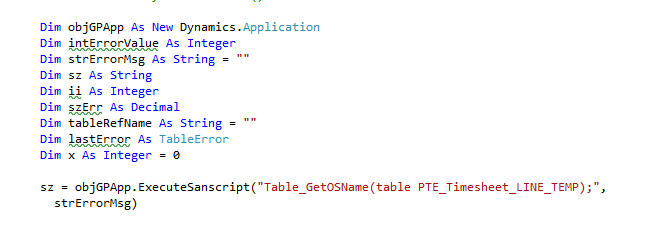
Is there a way to capture the string when you execute the Table_GetOSName function? The ExecuteSanScript function only returns an integer indicating if the script ran successfully. I was trying to run the Table_GetOSName function to return the SQL temp table name it using. For example… ##213578
——————————
Greg Wahl
Senior Database Administrator
Owensboro Municipal Utilities
Owensboro KY
——————————
?? -
Hi Greg
That will not work. When you execute() code it runs as a global procedure in the target dictionary.
As a global procedure it will create a new instance of the temp table which will be empty.
You might be able to get it to work using the default form to {form name}; command as the first executable line in the script to change context. This sometimes works to get the form’s instance of the table buffer.
Also to use parameters you will need to mark the add-in as COM visible on the assembly version property window.
Does that help?
——————————
David Musgrave MVP, GPUG All-StarManaging Director
Winthrop Development ConsultantsPerth, Western Australia
http://www.winthropdc.com
——————————
——————————————- -

Bruce Strom
MemberSeptember 4, 2018 at 2:14 PM
You can do this in Dexterity,
copy the temp table structrure for the form to a regular table,
and with a dex database trigger, do a
copy from table TEMP to table NEWname
Then you can examine the data.——————————
Bruce Strom
Programmer Analyst
Associated Grocers of Florida / Supervalu
Sunrise FL
——————————
——————————————- -
?Could you provide some sample code to illustrate what you are recommending? My DEX programming is not the strongest…
Thanks!
——————————
Greg Wahl
Senior Database Administrator
Owensboro Municipal Utilities
Owensboro KY
——————————
——————————————- -
This is one thing I tried but it still returns an empty string?
Dim myParamHandler As ParamHandlerClass = New ParamHandlerClassDim objGPApp As New Dynamics.Application
Dim passthrough_code As String = “”
Dim compile_err As String = “”
Dim result As Integer
Dim error_code As Integer
result = objGPApp.SetParamHandler(myParamHandler)
passthrough_code = (passthrough_code + “default form to PTE_Timesheet_Entry;”)
passthrough_code = (passthrough_code + “local boolean err_val;”)
passthrough_code = (passthrough_code + “local string table_name;”)
passthrough_code = (passthrough_code + “table_name = Table_GetOSName(table PTE_Timesheet_LINE_TEMP);”)
passthrough_code = (passthrough_code + “err_val = OLE_SetProperty(“”TableName””,table_name);”)
Try
error_code = objGPApp.ExecuteSanscript(passthrough_code, compile_err)
MsgBox(“Table name is “ & myParamHandler.TableName)
Catch ex As Exception
MsgBox(ex.Message)
End Try
——————————
Greg Wahl
Senior Database Administrator
Owensboro Municipal Utilities
Owensboro KY
——————————
——————————————-
greg-wahl replied 7 years, 7 months ago 1 Member · 0 Replies -
-
0 Replies
Sorry, there were no replies found.
The discussion ‘Capturing SQL Temp table using VS Tools’ is closed to new replies.
