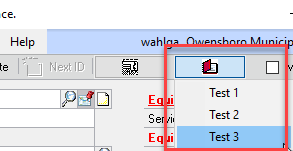
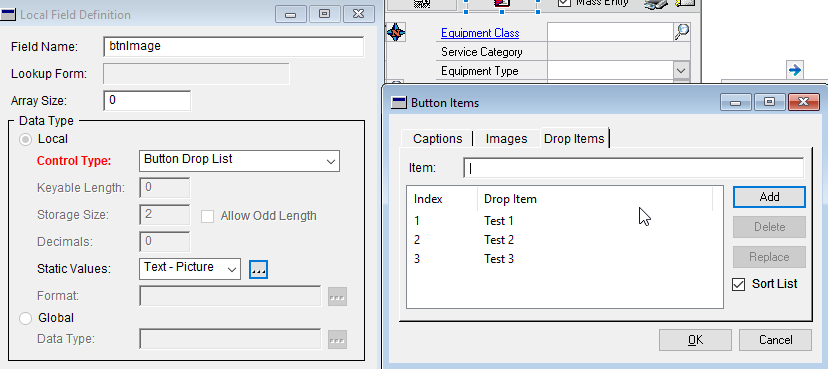
I added a button dropdown list to a window in modifier and I added 3 items to it so when you click on the button, you get 3 choices underneath it.Ā
Now, in Visual Studio Tools, I can add an eventhandler to the button but I want to add an eventhandler to the 3 individual items under that button so that I can do different things depending upon the selected menu item.Ā What is the proper VB command to do that?
The command to add an eventhandler to the actual button is as follows…
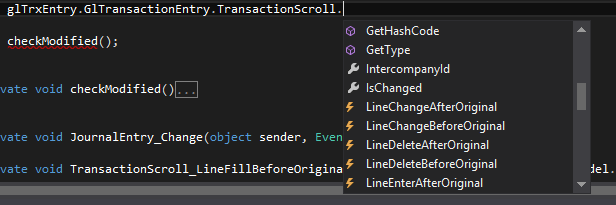
If you’re using Visual Studio, then just type out the object you want the event on, hit period, and scroll through the list of available events. The little lightning bolt means it’s an event. I’m using C#, but it’s close enough to VB to show what to do. The point is, Visual Studio can write the code for you, so long as you know the object.
Once you have the event, type space += and then you’ll get a popup asking if you want to create the handler.
Hit tab, and you have a stub handler to put your code.
If you’re not sure which Event to use, put a MessageBox popup in events until you find the one you want.
—————————— Dan Peltier Sr. Support Engineer Microsoft Fargo ND —————————— ——————————————-
Please note:
This action will also remove this member from your connections and send a report to the site admin.
Please allow a few minutes for this process to complete.

Report
You have already reported this .
Welcome to our new site!
Here you will find a wealth of information created for peopleĀ that are on a mission to redefine business models with cloud techinologies, AI, automation, low code / no code applications, data, security & more to compete in the Acceleration Economy!