


Dynamics GP
Public Group
Active 4 weeks ago
Dynamics GP
Organizer:
- JOSE Organized by
-
-

Budget Upload
-
Budget Upload
Posted by Tracy Yaklyvich on May 24, 2019 at 7:57 am-
??Good morning. I am attempting to upload data from Excel into a GP budget using the budget wizard for Excel. The first error I receive states that the number of budget periods does not equal the number of Excel columns. Has the template for upload changed? We have Account, Description, Beginning Balance, a column for each month and a Total column.
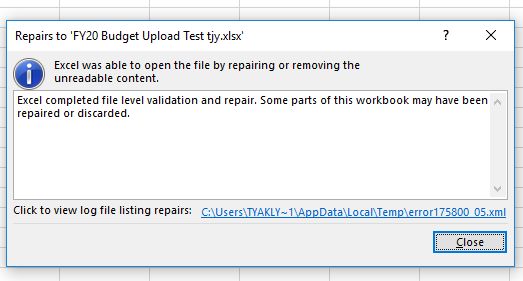
When I attempt to then access the Excel worksheet, I receive the message below regarding the worksheet.
Any ideas on what is going on? Thanks, Tracy
——————————
Tracy Yaklyvich, MBA
Controller
American Society of Health-System Pharmacists
Bethesda MD
tyaklyvich@ashp.org
—————————— -

Ryan Galang
MemberMay 24, 2019 at 9:20 AM
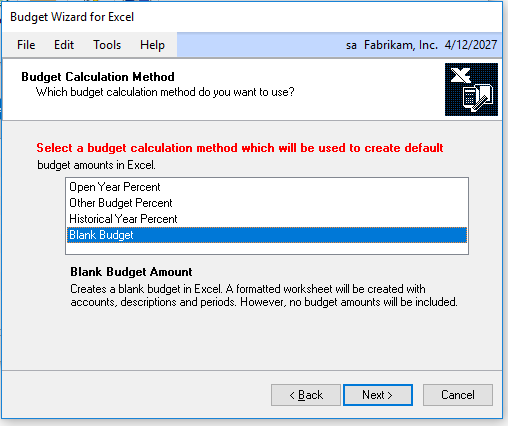
Hi Tracy,Using the Budget Wizard for Excel, can you create a Blank Budget and use that as your ‘template’ instead?
——————————
Ryan Galang
BTP Technologies LLC
Chantilly VA
——————————
——————————————- -
Michael Taranto, CPA
MemberMay 24, 2019 at 1:05 PM
I had the same issue. After looking at the columns the creator had added a small column or two for readability. I agree that you may want to export out a blank budget to assure you have the exact number of columns.——————————
Michael Taranto, CPA
President
ERP Consulting, LLC
Pataskala, OH 43062
614-342-0098 mtaranto@erpconsultingLLC.com
erpconsultingllc.com
——————————
——————————————- -
Tracy
Check the column headers in your excel import file.
Sometimes GP experts out dates as your headers. There import routine can not process dates as labels.
Change the headers to just month names or periods 1 -period 12
And then try re-importing.Zubin
——————————
Zubin Gidwani
Founder
Dynamic Budgets
San Francisco-Bay Area CA
——————————
——————————————- -
Tracy,
I ran into the same thing today. Make sure:
1) Your headers are the same as the budget template
2) Your headers are in “General” format (used to be it had to be in text)——————————
Kim Chambers
TROSA
Durham NC
——————————
——————————————- -
Windi Epperson
MemberJune 12, 2019 at 10:56 PM
Hey
What we will do if our customers have issues with the operations people changing the template format is to put the template on Sheet2 of a spreadsheet, copy it to Sheet1, use basic formulas to link the two sheets then hide Sheet2.That way if they change something they shouldn’t on Sheet1 they don’t mess up the template. When you unhide Sheet2 and look it over, any major changes they make will throw out issues with your calculation so they should show up fairly easily.
Thanks
Windi?——————————
Windi Epperson
President/GP Senior Consultant
Advanced Integrators, Inc.
norman OK
405-946-1774 ext. 102
——————————
——————————————-
Tracy Yaklyvich replied 7 years, 5 months ago 1 Member · 0 Replies -
-
0 Replies
Sorry, there were no replies found.
The discussion ‘Budget Upload’ is closed to new replies.
