


Dynamics GP
Public Group
Active 16 minutes ago
Dynamics GP
Organizer:
- JOSE Organized by
-
-

AP Check in G/L but not PM
-
AP Check in G/L but not PM
Posted by Jim Lines on February 8, 2018 at 7:14 pm-
Greetings,
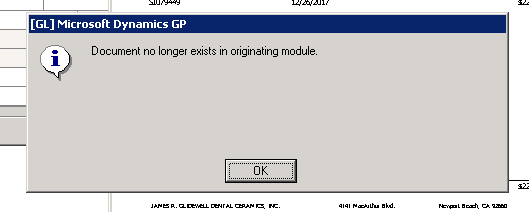
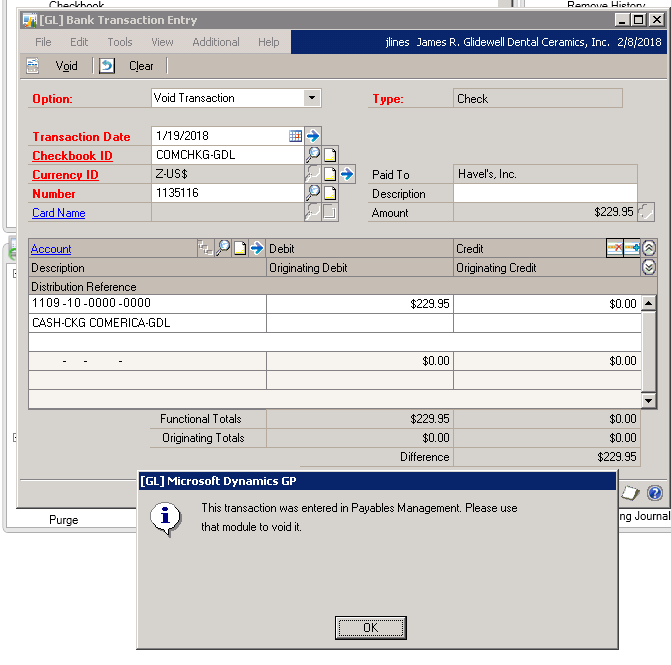
I’ve got a situation where an AP check was cut to a vendor and applied to a single invoice. Something got corrupted during check posting (not the typical check batch interruption). Batch recovery did not resolve the problem. Printing the edit list gave an error of “The total applied amount is incorrect. This transaction contains error. It won’t be posted”, which I was unable to fix. I ran checklinks which emoved the AP check (?). I can find the check in the Checkbook Register, but I can’t drill back as I get the message “Document no longer exists in originating module.” I also cannot void using bank transactions as I get the message “This transaction was entered in Payables Management. Please use that module to void it.” Now I am stuck.
Anyone have any idea of how I can void or remove the AP invoice? Thanks in advance.
Jim
——————————
Jim Lines
Sr. IT Analyst
Glidewell Laboratories
Newport Beach CA
—————————— -

Tanya Henderson
MemberFebruary 8, 2018 at 7:55 PM
?Have you tried the Utilities areas of Purchasing and Financial that will allow you to remove transaction and distribution history? Make sure if you use these features to only choose that transaction and not all. It is also a good idea to have a backup.
Hope this helps,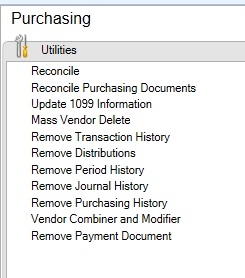
——————————
Tanya Henderson
Senior Consultant
S2 Technology
Park City UT
——————————
——————————————- -
Thanks Tanya. I think I’m going to have to do some removal at some point to get both the the check and the invoice out of GP completely. I know there is likely corrupt data in the PM tables and want to investigate that first.
Jim——————————
Jim Lines
Sr. IT Analyst
Glidewell Laboratories
Newport Beach CA
——————————
——————————————- -
Tanya Henderson
MemberFebruary 9, 2018 at 1:08 AM
Jim,
If you are comfortable in SQL I would definitely look through the PM Open, History and Key tables. Then in the Open GL tables. If you need any help I would be happy to start you in the correct direction.
Tanya——————————
Tanya Henderson
Senior Consultant
S2 Technology
Park City UT
——————————
——————————————- -
HI Tanya,
I’ve checked both open and history. I need to check the PM keys. It’s been a while, but I’m pretty sure I had to work on the key table. Thanks again!
Jim——————————
Jim Lines
Sr. IT Analyst
Glidewell Laboratories
Newport Beach CA
——————————
——————————————- -
Leslie Vail
MemberFebruary 10, 2018 at 4:05 AM
Jim,
If I were in your situation, I would use the ApexSQL Search tool and look for any occurrences of the document number, voucher number, check number, etc. to make sure that I find the complete trail of the problem transaction. Sometimes remnants of transactions hide in unlikely places. I’ve attached Apex search, but you can download it from their website. https://www.apexsql.com/sql_tools_search.aspx
Kind regards,
Leslie——————————
Leslie Vail
Accounting Systems Consulting, Inc.
Dallas TX
leslievail@earthlink.net 972-814-8550
——————————
——————————————- -
Bruce Strom
MemberFebruary 12, 2018 at 2:32 PM
Your orphan is probably in the applied to file.——————————
Bruce Strom
Programmer Analyst
Associated Grocers of Florida
sunrise FL
——————————
——————————————- -
Thanks Leslie! That’s a pretty awesome tool. It’s searching right now and has already found my invoice in a handful of tables. Thanks for pointing me in the right direction. I’ll post my results.
——————————
Jim Lines
Sr. IT Analyst
Glidewell Laboratories
Newport Beach CA
Celebrating 20 of GP Fun!
——————————
——————————————-
Jim Lines replied 8 years, 2 months ago 1 Member · 0 Replies -
-
0 Replies
Sorry, there were no replies found.
The discussion ‘AP Check in G/L but not PM’ is closed to new replies.
