


Dynamics GP
Public Group
Active 4 weeks ago
Dynamics GP
Organizer:
- JOSE Organized by
-
-

Active Vendor Smartlist
-
Active Vendor Smartlist
Posted by Tracy Yaklyvich on February 23, 2021 at 5:34 pm-
Hi. How can I run a smartlist of active vendors? The instructions I see say to go to Purchasing – Vendors but we don’t have that option. All of the vendor folders we do have do not give accurate listings. TIA!
——————————
Tracy Yaklyvich, MBA
Controller
American Society of Health-System Pharmacists
Bethesda MD
tyaklyvich@ashp.org
—————————— -
Purchasing > Report List > Vendors
When the list populates, click on the Columns icon.
Add Vendor Status.
Click on the Search icon.
Now you can use the Search Definition feature to sort the the Vendor List by Vendor Status (Active, Inactive, Temporary).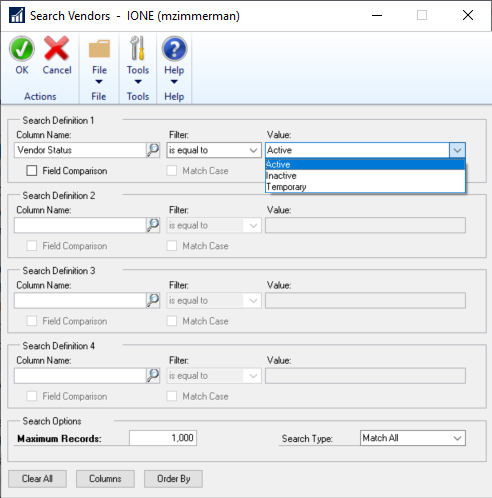
——————————
Madeline Zimmerman
Joint Municipal Water and Sewer Commission
Lexington
——————————
——————————————- -
Hi ,
How are you defining “active”?? Vendors who don’t have a status of inactive? Vendors who you’ve paid in the last X number of months?
Without knowing the answers to the question posed above, my general recommendation would be to go to SmartList>>Purchasing>>Vendors>>*. From there you can add columns for vendor status (active vs. inactive vs. temporary), last check date, last purchase date, etc.
Once you have the columns added, you can filter to only show active or only show those people paid in the last X number of months, etc. Then when you have it how you like it, you could create a favorite of that SmartList for regular use.

Does that make sense? Let me know if you have any questions or there is anything else I can do to help based on your answer to my question regarding how you define “active”.Thanks,
Samantha
——————————
Samantha Higdon ,CPA,CGMA
Consultant
Lagom, LLC
Carmel IN
——————————
——————————————- -
Hi Samantha & Madeline, Thanks for your quick responses. I am defining active vendors as those where Status = Active. ?My issue is that I do not have a folder labeled Vendors under Smartlist>>Purchasing nor do I have the Report List option. How can I get these options?
Thanks, Tracy
——————————
Tracy Yaklyvich, MBA
Controller
American Society of Health-System Pharmacists
Bethesda MD
tyaklyvich@ashp.org
——————————
——————————————- -
Hi ,
Apologies on the delay. It sounds like you don’t have security access to those SmartLists?. You’d want to look at your security roles and tasks to see if the assignment is missing.
Administration>>Setup>>System>>Security Tasks. You’ll need to find the security task that controls your smartlists. Sometimes it’s called SmartList_Objects, but it can vary depending on how your IT or admin group names the tasks.
You’ll be looking for a checkbox that says “vendors” to be unchecked. If it’s unchecked, you don’t have access to it. You’d have to check that box to grant access. If a user was already logged in, they would have to log out and log back in for the changes to take effect.
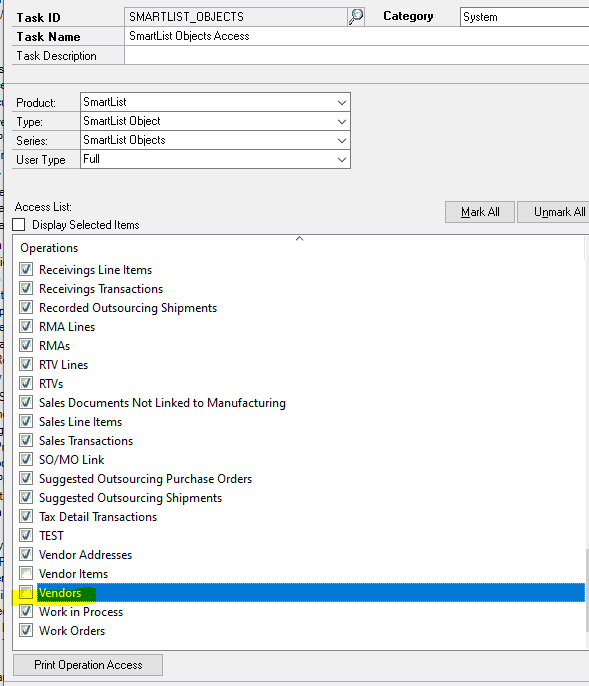
If you have any issues finding the security task or in general, just let me know.
Thanks,
Samantha
——————————
Samantha Higdon ,CPA,CGMA
Consultant
Lagom, LLC
Carmel IN
——————————
——————————————-
Tracy Yaklyvich replied 5 years, 8 months ago 1 Member · 0 Replies -
-
0 Replies

Sorry, there were no replies found.
The discussion ‘Active Vendor Smartlist’ is closed to new replies.
