Accessing BackColor Property for Added Filed on Modified Form

  • Accessing BackColor Property for Added Filed on Modified Form
    Posted by greg-wahl on September 1, 2022 at 10:36 am
    • Greg Wahl

      Member

      September 1, 2022 at 10:36 AM

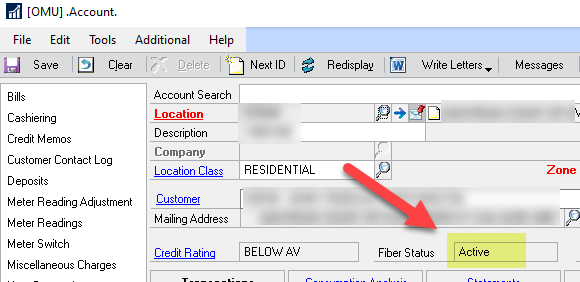
      My Customer Service department has requested that the backcolor of a field that I have added on a form change depending upon what gets populated in that field.Ā  For example, if the field displays “Active”, they would want the backcolor set to Green, etc…


      I have some experience with adding fields and populating them with data through .NET and then adding that .dll to the addin folder but I can’t figure out how to access the backcolor property on that field.

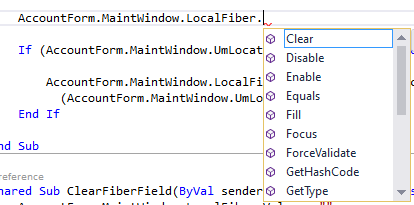
      I have imported the Microsoft.Dexterity.Bridge as well as MIcrosoft.Dexterity.Applications in my code so I am able to access some of the field properties such as Value, Focus, Clear but nothing regarding backcolor…


      Do any of you programmers have an idea as to how to access the backcolor on that field?Ā  Do I need to reference something else that has those properties included?

      ——————————
      Greg Wahl
      IT Applications Supervisor
      Owensboro Municipal Utilities
      Owensboro KY
      ——————————

    • David Musgrave

      Member

      September 2, 2022 at 12:35 AM

      Only Dexterity can do change the background Colours.

      You would need to use pass through Dexterity or Visual Studio Integration Toolkit helper functions.

      Also GP Power Tools can create the entire customisation for you without needing external development tools.

      Regards

      David

      ——————————
      David Musgrave MVP, GPUG All-Star

      Managing Director
      Winthrop Development Consultants

      Perth, Western Australia

      http://www.winthropdc.com
      ——————————
      ——————————————-

    • Greg Wahl

      Member

      September 7, 2022 at 8:27 AM

      Thanks to David’s help and GP Power Tools, we were able to accomplish the setting of the backcolor property depending upon what gets populated in that field.Ā  He was also very gracious and took the time to show me other features of GP Power Tools.

      Thanks Again David!

      ——————————
      Greg Wahl
      IT Applications Supervisor
      Owensboro Municipal Utilities
      Owensboro KY
      ——————————
      ——————————————-

    greg-wahl replied 3 years, 10 months ago 1 Member · 0 Replies
  • 0 Replies

Sorry, there were no replies found.

The discussion ‘Accessing BackColor Property for Added Filed on Modified Form’ is closed to new replies.

Start of Discussion
0 of 0 replies June 2018
Now

Welcome to our new site!

Here you will find a wealth of information created for peopleĀ  that are on a mission to redefine business models with cloud techinologies, AI, automation, low code / no code applications, data, security & more to compete in the Acceleration Economy!