


AA Budget to Account Level Setup error

  • AA Budget to Account Level Setup error

    Posted by zgidwani@dynamicbudgets.com on March 8, 2018 at 6:14 am
    • Zubin Gidwani

      Member

      March 8, 2018 at 6:14 AM


      on Fabrikam
      Getting stuckĀ in a loop
      can specify a budget to tree level and export a template, but having trouble trying to specify a budget to account level.

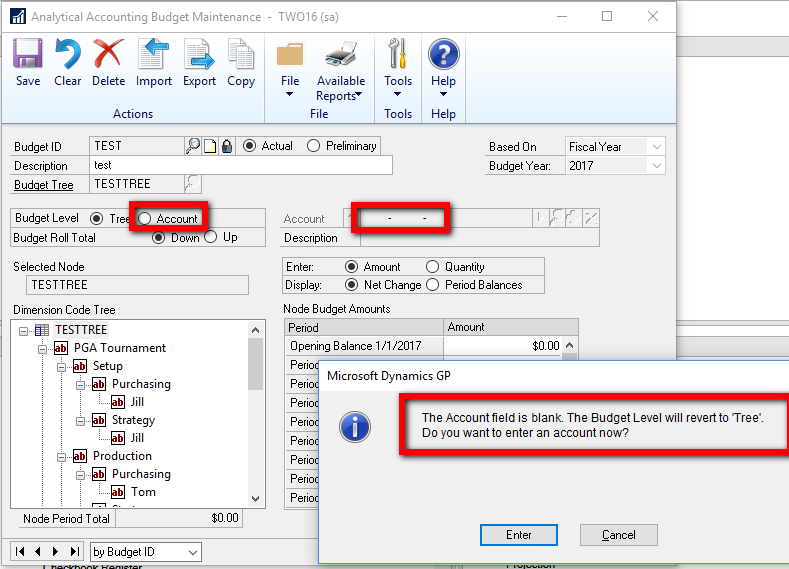
      when clicking on Account Radio button cursor advances to Account field, but the field is greyed out and won’t allow data entry, attempts to tab out of the field yield the popup error below “Account Field Is Blank” (like I didn’t already know that…)
      clicking the magifyingĀ glass shows an account selection popup which is just blank.

      We have assigned Budget Tree codes
      Have Setup User Access to the Codes
      Do we need to re-enter the Account Access to Transaction Dimension Codes, they all seem to be defaulted to All Accounts already?Ā 

      feels like I’m missing a step somewhere.


      Thanks in advance,
      Zubin

    • Windi Epperson

      Member

      March 9, 2018 at 9:27 AM

      Hey ,
      I just worked on this recently! Ā  See if this helps:

      I think the answer is that you have to go a bit deeper to get the acct level budgeting.

      • First you have to make sure there is a relationship between the 2 codes (I’m pretty sure you had it setup that way) and only accts in the based on the acct class/acct class link will be budgetable.
      • After that, you setup the budget tree and budget id like you have in the past.
      • Then you have to assign budget amounts to the nodes before you can assign it down to the class.
      • For the example I did, I streamlined this a bit by budgeting first at the budget id level and then rolling it down one level at a time.
    • Once you have money on each node, you can then push it down to accts.Ā 

Another option is to get as far as you want in the above setup, then click export and send it to Excel.Ā  You can then fill in specific amounts and click Import to bring it back in.

Thanks,
Windi

?

——————————
Windi Epperson
President/GP Senior Consultant
Advanced Integrators, Inc.
Norman OK
405-946-1774 Ext 102
——————————
——————————————-

zgidwani@dynamicbudgets.com replied 8 years ago 1 Member · 0 Replies
  • 0 Replies

    Sorry, there were no replies found.

    The discussion ‘AA Budget to Account Level Setup error’ is closed to new replies.

    Start of Discussion
    0 of 0 replies June 2018
    Now

    Welcome to our new site!

    Here you will find a wealth of information created for peopleĀ  that are on a mission to redefine business models with cloud techinologies, AI, automation, low code / no code applications, data, security & more to compete in the Acceleration Economy!
