


Dynamics F/SCM
Public Group
Active 8 hours ago
Dynamics F/SCM
Organizer:
- JOSE Organized by
-
-

UI Modifications
-
UI Modifications
Posted by DSC Communities on February 7, 2017 at 10:55 am-

Pranay M
MemberFebruary 7, 2017 at 10:55 AM
Hi Folks
We are implementing AX 2012R3. We are developing some customizations and we are interested in improving upon the standard “look and feel” for some of our customized forms.
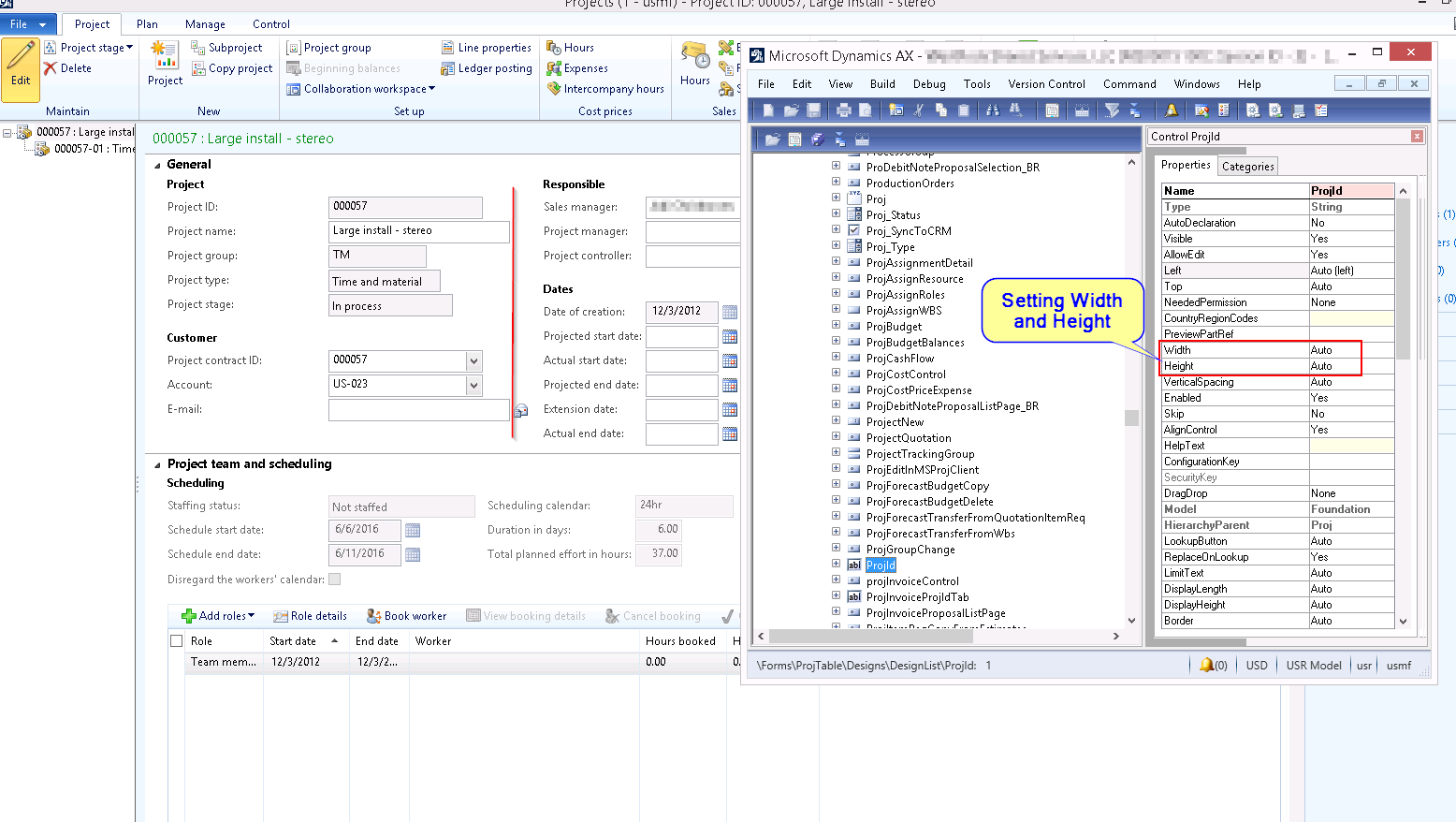
In particular, by default in AX, the textboxes, dropdowns, date controls, etc. do not have similar widths and adjust themselves based on the length of the field in the database tables.
We wish to make these all aligned so that our U/I looks more uniform. In order to do so we are considering changing the Width property of some of our fields. Also we wish to change the color and font(bold) for few fields based on certain conditions. Would making these changes noticeably impact performance?
It has been suggested to us that attempting to make such changes could negatively impact performance and could make future upgrades more difficult.
Have any of you made these type of U/I changes? Have you found that changes to Width, Height, Top, Left, color, font, properties impacted your performance and upgrades?
What are the “best practices” related to making these types of U/I adjustments.
Any suggestions or warnings from others that have attempted to improve upon the default U/I for customized forms would be greatly appreciated.
Thanks
——————————
Pranay M
Web Developer
WestRock Merchandising Displays
Winston Salem NC
—————————— -
Microsoft Dynamics 365 for Operations (D365O) provides a rich set of form patterns. These form patterns provide consistency across similar user actions, allowing the user to quickly understand the purpose or role of each form allowing them to easily complete their task. As part of the form patterns, D365O will automatically provide a display length (width) for input controls for the developer. This auto-sizing ensures consistency of similar types across multiple forms. This consistency provides familiarity and easier to use and understand data input. Of course, there are exceptions where a specific input field requires a smaller or wider display length than was determined by the D365O framework. In those cases, you can change two properties to resize your input. First, let the framework know that you’d like to size this input yourself by changing the property DisplayLengthMode from “Auto” to “Fixed.” Next, put the desired length (in characters) in the DisplayLength property.
——————————
Todd Lefor
Microsoft
——————————
——————————————- -
Corey Vantilborg
MemberFebruary 13, 2017 at 8:20 AM
I disagree with some of the others here on the scale of the impact of modifying forms specifically.Modifying forms is pretty low risk compared to modifying other AOT elements. Most changes to form elements are visual in nature and very easy to merge.
The exception to this is form data sources, as the entire datasource node is considered a single AOT element. This can make merging here a manual process.
We have 816 form elements(there may be multiple elements per form) in our CUS layer, which need to be merged during a CU or other major upgrade. Having done this several times now, it takes me no more then a couple hours to get through all of the form elements. Many of our changes are to display lengths, or control parameter manipulation. These are easy to merge.
Further we intend to modify many more forms because of the weakness of the AX personalization system.
——————————
Corey Vantilborg
ERP Analyst
Tigercat International Inc.
Brantford ON
——————————
——————————————- -
This is an interesting discussion. First of all, the specific UI improvement you’re talking about sounds like a matter of preference. I would argue that the length of the text boxes should align with the length of the underlying data field. As a user, I would find it frustrating trying to enter data in a field that looks like it should fit 20 characters if I’m only allowed to enter 10 characters because the field in the table is 10 characters. That all being said, the nice thing about AX is that it is pretty easy to customize and you can make those kind of changes if you wish. As with any customization, you should evaluate the total cost of the change which includes not only the initial development time, but also the time to maintain with each upgrade. A small change like this should have a pretty small footprint for both initial development and maintenance. That being said, there are literally thousands of forms in AX. Are you going to update all of them? How many do you use? I would have a hard time arguing for the business value of that change, but it really up to you.
——————————
Kaare Boraas
Solution Delivery Manager
PCL Constructors Inc.
Edmonton AB
——————————
——————————————- -
Pranay M
MemberFebruary 15, 2017 at 9:19 PM
Thank you everyone for your valuable suggestions and comments.
As every one of you pointed, changing width of a field will not impact performance or future upgrades.
In regards to upgrades, we are already doing heavy customizations which needs to be addressed anyway during an upgrade I think making UI changes will not be a much over-head for us.We will absolutely consider the benefits of this change against time and cost.
I think it would have been nice if AX did not decide up on the widths overall. Forms usually look scrambled all over the place and you might need to scroll horizontally to see other fields due to one textbox/dropdown has large data length
——————————
Pranay M
Web Developer
WestRock Merchandising Displays
Winston Salem NC
——————————
——————————————- -
Mike Fechter
MemberFebruary 7, 2017 at 2:52 PM
Hi Pranay,The only thing we have changed is the background color on the forms to help distinguish our different environments. This is done in one place and doesn’t seem to affect performance. I think your users will get used to the look and feel over time. You can make some adjustments and I don’t believe it will impact performance much. If you start changing lots of items, it will make upgrading much more difficult. We try to avoid making changes to AX, unless it’s really required.
Regards,
——————————
Mike Fechter
IIMAK
Amherst NY
——————————
——————————————- -
Pranay M
MemberFebruary 15, 2017 at 8:49 PM
Thank you Mike for your suggestion.
We are trying to change the forms which we use on a regular basis and as it will have little to no performance impact we might implement the change.
——————————
Pranay M
Web Developer
WestRock Merchandising Displays
Winston Salem NC
——————————
——————————————- -
Corey Vantilborg
MemberFebruary 8, 2017 at 9:44 AM
All modifications to AX have the potential to impact both performance and upgradability. However that does not mean those impacts cannot be mitigated or eliminated with careful planning.Your first concern, changing the width will not impact performance or upgrades in any significant way. There is little danger in doing this. Be aware that width can be something stored in Usage Data in some circumstance, so you may want to have your users clear that for the forms you are modifying.
The conditional formatting will have an impact on performance because you will be adding additional code which the form has to execute. However this impact is likely not important. You can verify this using Trace Parser and determine the exact impact any of your code has. If you implement this code well it will not impact your ability to do upgrades. This means proper commenting and segregation of your custom code. If you don’t know how to do that or don’t have a plan then you need to work on it.
Any element in the AOT which you modify(and hence move into the CUS layer) you will need to manually merge if you apply either a CU or Hotfix which impacts that element. This is the impact that any modification has, it will need to be considered whenever you apply new MS code. However with discipline and good processing management this is not a problem and is part of the life cycle of an AX modification.
Regards,
——————————
Corey Vantilborg
ERP Analyst
Tigercat International Inc.
Brantford ON
——————————
——————————————- -
Pranay M
MemberFebruary 15, 2017 at 9:01 PM
Hi Corey
I really appreciate your comments and thank you.
We are still in implementation phase and did not go live yet, which means width data stored in Usage Data is not an issue. However, we will consider clearing usage data for our future releases.
Point well taken on conditional formatting and we will make sure how much impact it does on processing. Thank you for letting us know about Trace Parser to get some statistics.
We are new to AX and learning how to separate our own custom logic with standard AX logic. We are setting up guidelines for our custom development and we will consider your suggestions.
——————————
Pranay M
Web Developer
WestRock Merchandising Displays
Winston Salem NC
——————————
——————————————- -
I agree with others that what you are wanting to do should not have any impact on performance, however you have now customized those forms, etc. and when you do a CU update you will have extra work to perform. Weigh the benefits of uniformity in display with effort expended in the merge for an update and see if the benefit is worth the effort. That should always be the question asked when we talk about modifying AX, is the benefit worth the effort and cost. That is how we should be justifying the customizations.
——————————
Paul Martin
Expert ERP Analyst
TempurSealy Inc.
Trinity NC
——————————
——————————————- -
Mike Fechter
MemberFebruary 9, 2017 at 8:44 AM
Paul is correct! I overlooked that you are creating new objects in your layer and this WILL become a real pain when do any type of code update (CU, VAR, ISV, etc…).It adds to the level of complexity because you will have to merge the code every single time. For a few forms it’s fine, but if you start modifying 10,20 30+ forms it will create more work down the road.
——————————
Mike Fechter
IIMAK
Amherst NY
——————————
——————————————- -
George Zhao
MemberFebruary 9, 2017 at 1:12 PM
AT this time I don’t think MS will issue many more updates for AX2012. Maybe none at all. My guess is one more and that will be it..Moving into D365O, which is the latest name of the new Dynamics AX, you get part of your wish fulfilled – the text fields are now have uniform width on the browser interface. But may be too narrow for some fields. (Thinking about type in a long URL with less than 30 characters showing, or editing a memo in a two square inch textbox) Unfortunately you cannot even specify the width for individual control any more.
——————————
George Zhao
PAR Technology
New Hartford NY
——————————
——————————————- -
I think AX 2012 will continue to live for many more years and we will see numerous updates to it 🙂
——————————
Tony Zeigler
Strategic Solutions NW, LLC
Beaverton OR
——————————
——————————————-
DSC Communities replied 9 years, 9 months ago 1 Member · 0 Replies -
-
0 Replies
Sorry, there were no replies found.
The discussion ‘UI Modifications’ is closed to new replies.
