


Dynamics F/SCM
Public Group
Active 7 hours ago
Dynamics F/SCM
Organizer:
- JOSE Organized by
-
-

Security Issue – I have users that all of a sudden lose edit rights – Nothing with their security changed
-
Security Issue – I have users that all of a sudden lose edit rights – Nothing with their security changed
Posted by Sami Mattson on April 7, 2020 at 11:49 am-
I have had a few users that have come to me and said they need their access back to edit certain things. I have not changed anything with their security, and I have even assigned the same roles they have to a test user, and that user has the edit rights.
Has anyone experienced this issue before?
I only maintain security on the front end in D365 and not through Visual Studio.
Any help with this is greatly appreciated.
——————————
Samantha Mattson
Business Analyst, Industrial Technology Group
The Heico Companies
Warrenville IL
smattson@pettibone.com
—————————— -
Samantha,
Please try to clear their usage data.
Sys admin > Users > User
Locate them by userID
Click Options in the action pane
Go to the usage data tab, reset only for userThen have them sign out and in.
This should clear it up.
——————————
Ian Gorman, PMP, MCSE
Senior Consultant
——————————
——————————————- -
Ian,
sorry I forgot to mention that I have already tried that. if there is anything else you can think of that might help it is greatly appreciated.
——————————
Samantha Mattson
Business Analyst, Pettibone Companies
The Heico Companies
Warrenville IL
smattson@pettibone.com
——————————
——————————————- -

Anonymous Member
MemberApril 7, 2020 at 11:03 PM
This post was removed -
Daniel Zook
MemberApril 8, 2020 at 8:10 AM
Here are some questions that might help isolate the problem:- What area of D365 is this in?
- Have you confirmed that the problem doesn’t exist in any other area for these users?
- Are the users unable to edit any/all records in this area?
- Did the problem occur all at once for all affected users?
- I know you mentioned a test account doesn’t exhibit the problem, but it might still be helpful to know if any other existing users with the same security roles are still able to edit.
Good luck.
——————————
Daniel Zook
Director of IT
Lehman’s
Dalton OH
——————————
——————————————- -
Daniel,
It is related to the Route of an item
This problem has not come up in a different area for this user
I have only been notified that they are not able to edit the field below on the route.
it is only happening to 1 user at the moment that I am aware of.
I assigned the same exact security roles to the test user that the other user has and I am able to edit the field below with the test user.
I have had this happen to another user in a different area of the system, so it is super odd to me why this might happen to just one user at a time and not all other users that have the same access.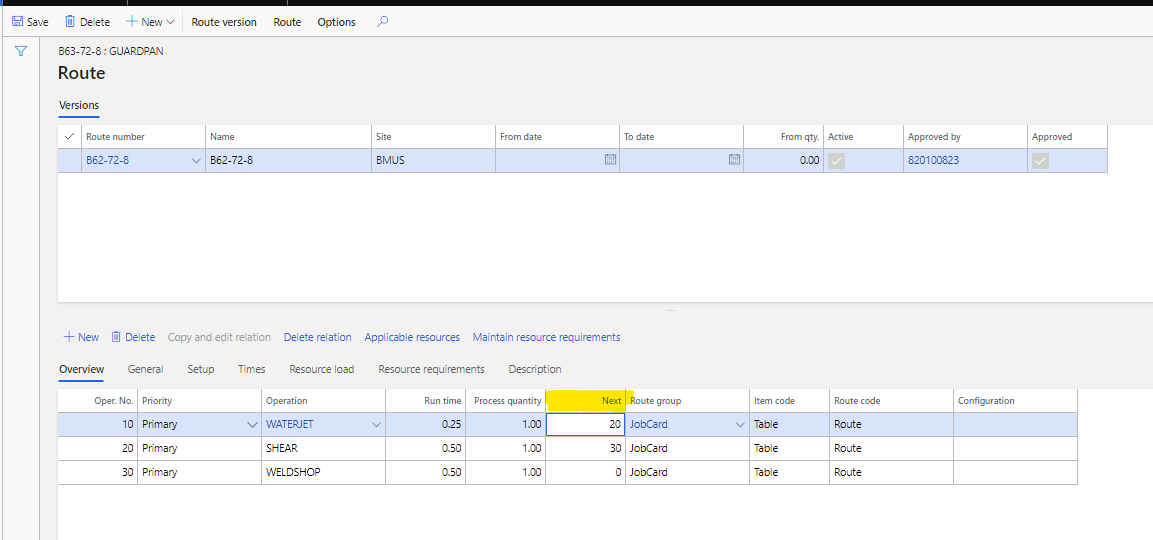
——————————
Samantha Mattson
Business Analyst, Pettibone Companies
The Heico Companies
Warrenville IL
smattson@pettibone.com
——————————
——————————————- -
Daniel Zook
MemberApril 8, 2020 at 9:38 AM
At this point the best thing to do is to try to isolate the problem as much as possible. (Setting a break-point and tracing the code is the other thing I would do when trouble-shooting, but in this case it might not be possible since it is specific to only one user.)Here are some other questions to consider. You don’t have to answer them in the forum post, they are just to help isolate the problem and make sure all your bases are covered:
- Have you confirmed that the user is unable to edit this field for any and all routes?
- Is the user aware of anything else that may have changed around the same time that this problem started?
- Have you confirmed that the test account is accessing the same environment, and is able to edit the same record that the user is unable to edit?
- Have you observed the problem while the user is attempting to edit it? (Sometimes you may see something in person that the user isn’t communicating.)
Sorry I’m not more helpful. If all else fails, you may need to involve your D365 partner.
There is also the Dynamics Community at https://community.dynamics.com/ If you haven’t posted this there yet, it might be worth a try.——————————
Daniel Zook
Director of IT
Lehman’s
Dalton OH
——————————
——————————————- -
Anonymous Member
MemberJuly 6, 2021 at 4:34 PM
This post was removed -
Mark Schurmann
MemberApril 8, 2020 at 9:36 AM
We recently had a single user that lost access to the sales agreement screen. She got a strange error that the menu item was not available. We did the usual troubleshooting (in-private session, different browser, clear usage data, reboot, etc.). Our partner and Microsoft spent about a week chasing it. The resolution was to delete all of the users personalizations under usage data. We have only ever reset on the the usage data on the General tab.In other news, we have users that intermittantly lose their ability to attach documents. All of the troubleshooting tricks listed above don’t resolve it. It seems to resolve itself. We’ve opened tickets on this issue in the past,but once we get Microsoft on the phone, we can’t recreate the problem.
——————————
Mark Schurmann
Accounting Systems Manager
Automobile Protection Corp
Norcross GA
——————————
——————————————- -
Mark has a good point. I’d check the personalizations for the user after clearing the usage data.
——Original Message——
We recently had a single user that lost access to the sales agreement screen. She got a strange error that the menu item was not available. We did the usual troubleshooting (in-private session, different browser, clear usage data, reboot, etc.). Our partner and Microsoft spent about a week chasing it. The resolution was to delete all of the users personalizations under usage data. We have only ever reset on the the usage data on the General tab.
In other news, we have users that intermittantly lose their ability to attach documents. All of the troubleshooting tricks listed above don’t resolve it. It seems to resolve itself. We’ve opened tickets on this issue in the past,but once we get Microsoft on the phone, we can’t recreate the problem.
——————————
Mark Schurmann
Accounting Systems Manager
Automobile Protection Corp
Norcross GA
—————————— -
Daniel Zook
MemberApril 8, 2020 at 9:40 AM
Hi Mark,I’m curious what the difference is between “clear usage data” vs “delete all of the users personalizations under usage data”. I thought clearing the usage data also cleared their personalizations? Or maybe it is different in D365FO?
——————————
Daniel Zook
Director of IT
Lehman’s
Dalton OH
——————————
——————————————- -
Mark Schurmann
MemberApril 8, 2020 at 9:44 AM
I’m afraid I can’t tell you. I was under the impression that the Reset cleared everything.——————————
Mark Schurmann
Accounting Systems Manager
Automobile Protection Corp
Norcross GA
——————————
——————————————- -
Daniel,
If I recall correctly, 2012 usage data included personalizations. In D365 the reset button for usage data touches everything other than personalizations.
——————————
Ian Gorman, PMP, MCSE
Senior Consultant
——————————
——————————————- -
Kerstin Newman
MemberApril 8, 2020 at 9:53 AM
Mark – we have had similar issues in the past, where users were able to edit one day and not the next, sometimes also in only one legal entity and others were fine. What we had the users follow (with advice from MS) was to right-click on the screen where they had issues, click personalize, and the bar that pops up has three dots on the very right. Click that and then “clear”. I believe this clears all personalizations from that screen only rather than clearing all through the user options on the sys admin side. It has helped 5 very random issues on different screens, when even deleting the user and re-importing it didn’t help.——————————
Kerstin Newman
Business Analyst
StarTech.com
London ON
——————————
——————————————- -
Thank you Kerstin, the suggestion of having the user clear the personalization on the page worked! that is very strange to me, and it is now working. I appreciate the help!
——————————
Samantha Mattson
Business Analyst, Pettibone Companies
The Heico Companies
Warrenville IL
smattson@pettibone.com
——————————
——————————————- -
Kerstin Newman
MemberApril 8, 2020 at 10:53 AM
We spent a bunch of time on the phone with MS to see if they could figure out the issue, until one of the engineers came up with this seemingly unconventional suggestion. I am glad it helped you! I have shared this with all of our BAs and our Service Desk, and it has solved a number of issues for a number of users. Yay for random solutions! 🙂——————————
Kerstin Newman
Business Analyst
StarTech.com
London ON
——————————
——————————————-
Sami Mattson replied 6 years, 7 months ago 1 Member · 0 Replies -
-
0 Replies
Sorry, there were no replies found.
The discussion ‘Security Issue – I have users that all of a sudden lose edit rights – Nothing with their security changed’ is closed to new replies.
