


Dynamics F/SCM
Public Group
Active a day ago
Dynamics F/SCM
Organizer:
- JOSE Organized by
-
-

Sales Tax Group setup
-
Sales Tax Group setup
Posted by chantal-golding on June 16, 2020 at 3:25 pm-
Hi everyone,
I selected the Sales Tax Group DOM for Vendor X:
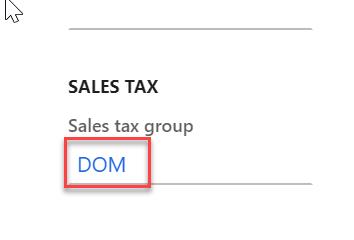
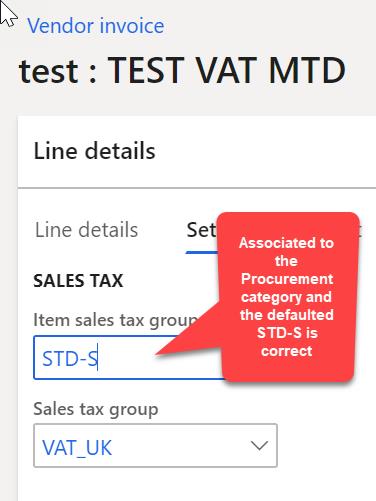
I have also selected the Item Sales Tax Group STD-S for the Procurement Category ConsultingWhen I enter an AP Vendor Invoice to Vendor X with Procurement category Consulting, the associated Sales tax group of that vendor does not come out as DOM. It defaults to VAT_UK which is not associated to that vendor in any ways. The correct Item Sales Tax Group defaults to STD-S.
However if I enter an AP Invoice Journal and select Vendor X, the Sales tax group does default to DOM correctly.Does anyone have an idea of what setup might be missing for the AP Vendor Invoice to default to the correct Sales Tax group according to the vendor setup?
FYI, the AP Invoice is not linked to a PO it is simply being entered on its own.Thanks
——————————
Chantal Golding
PSP Investments
Montreal QC
—————————— -

Tahir Aziz
MemberJune 18, 2020 at 5:38 PM
Hi Chantal,How are you entering the AP Vendor Invoice?
Kindly advise so I can suggest an answer or clue.
Thanks, Tahir.
——————————
Tahir Aziz
Solution Architect, Retail, Finance, SCM
Delcit Inc
Milton ON
——————————
——————————————- -
Hi Tahir,
Thanks for your reply.
We are looking to change the method of entering AP Invoices not related to a PO. Currently we are entering them via the Invoice Journal window and when I enter a vendor ID the sales tax group that defaults on that window is correct and shows the sales tax group associated to my vendor.
However, we are now testing to use the AP vendor invoice. To access it, I go to the Workspace Vendor invoice entry and click New vendor invoice on the top menu. As soon as I enter my vendor ID, I can see in the header section that the sales tax group that is defaulted is incorrect and not the one I associated to that vendor. This header info then gets replicated on each line which is the incorrect information.
I attached 3 print screen to show the vendor setup for the sales tax group, the header default of the sales tax group and a typical line entry.Let me know if you require more information,
Thanks again——————————
Chantal Golding
PSP Investments
Montreal QC
——————————
——————————————- -
Tahir Aziz
MemberJune 22, 2020 at 9:32 PM
Hi Chantal,Sorry for late respond. I don’t know if that has been solved already or still an issue.
I tried to go and create an AP invoice from the workspace and it did populate the tax from the vendor.
So, without looking the setup with you, it will be hard to figure out the root cause.
Let me know if we can spend some time together on this.
Thanks, Tahir.
——————————
Tahir Aziz
Solution Architect, Retail, Finance, SCM
Delcit Inc
Milton ON
——————————
——————————————- -
Heather Roskewich
MemberJune 19, 2020 at 11:50 AM
Hi Chantal,Maybe check the setup on the procurement category itself? There is an item sales tax group that we leave blank even though it suggests it’s mandatory (AX2012 R3). I wonder if your setup is populated and perhaps it’s overriding the vendor set up.
Best of luck
Heather——————————
Heather Roskewich
Controller
Somagen Diagnostics Inc.
Edmonton AB
——————————
——————————————- -
Hi Heather,
We have an Item sales tax group associated to the Procurement category and it defaults to the correct setup. It is the Sales tax group that field that is problematic.
Thanks for your input.
Chantal——————————
Chantal Golding
PSP Investments
Montreal QC
——————————
——————————————- -
Can you check if on the vendor address a sales tax group was populated?
There is some mechanism that default sales tax group by the remittance address on the vendor (I can’t remember the exact setup that triggers it) – but something in your setup might be causing that.——————————
Zvika Rimalt
Functional Consultant
Vancouver BC
——————————
——————————————- -
Hi,
Just to let everyone know that we found the issue and it is actually a bug that we will report to Microsoft.
In the Organization administration module under Legal entities, Addresses, more options & Advanced there was a defaulted Sales tax entered in the General section. By removing this setup the entry in the AP Vendor Entry window now works. However, it is not normal that the right tax set up was working on the AP Invoice journal (reading the info at the vendor level). In the AP Vendor Entry window, the setup at the vendor level should have taken over the more global setup in the Organization administration module and we should not have needed to remove it in order for the function to work correctly.
Thanks again for all your input.
——————————
Chantal Golding
PSP Investments
Montreal QC
——————————
——————————————- -
Beth Zapadka
MemberAugust 21, 2020 at 10:34 PM
Thank you, Zvika! You helped me with my issue. The Sales Tax Group was defaulting correctly per set up under “Invoice and delivery” fast tab for non-PO invoices, but was overridden to the remittance address (defaulted from the Warehouses Sales Tax Group) for PO invoices.This makes sense overall, but we needed to set it to Tax Exempt for some out-of-country vendors. I found the setting you referenced (Vendor > Addresses > More options > Advanced > General > Sales tax) and it defaulted correctly to Tax Exempt for all invoices after this change.
Thanks so much!
——————————
Beth Zapadka
ERP Functional Expert
Glentel Inc.
——————————
——————————————-
chantal-golding replied 6 years, 4 months ago 1 Member · 0 Replies -
-
0 Replies
Sorry, there were no replies found.
The discussion ‘Sales Tax Group setup’ is closed to new replies.
