First of all, please take into account that importing code from a project in Production is not recommended. A best practice is to deploy the updated models.
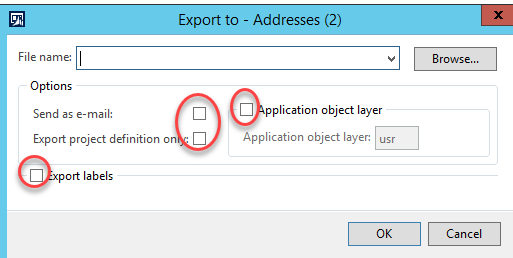
Having said that, if you’re exporting/importing projects, the recommendations with regards to checkboxes would be:
EXPORT:
– Application Object Layer = Yes
Ā Select the layer from where you want to export your modifications. If you’re a customer, this would typically be CUS or USR.
– Export Labels : Select only when you’ve created new labels as part of your development. Please be aware that importing/exporting labels is a bit tricky and not always works nicely.
Again, ideally labels files should be deployed to prod instead of labels being installed via projects.
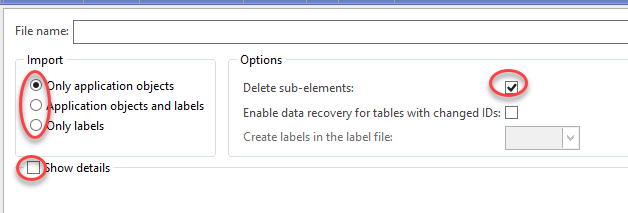
IMPORT:
– Delete sub-elements = NO
– If you’ve exported with labels –> Select “Application objects and labels”, otherwise “Only application objects”.
– Show details will show you which objects are going to be imported, but it won’t have any effect on the import process itself.
With regards to the next steps:
– Full compile – DB sync if your project includes data model elements – It should be enough with incremental CIL compile, although I would recommend full CIL. – If you’re transferring labels, a label cache clean may be needed (or alternatively a restart of AOSs)
Please note:
This action will also remove this member from your connections and send a report to the site admin.
Please allow a few minutes for this process to complete.
Report
You have already reported this .
Welcome to our new site!
Here you will find a wealth of information created for peopleĀ that are on a mission to redefine business models with cloud techinologies, AI, automation, low code / no code applications, data, security & more to compete in the Acceleration Economy!