


Dynamics F/SCM
Public Group
Active a week ago
Dynamics F/SCM
Organizer:
- JOSE Organized by
-
-

Odd issues for a particular
-
Odd issues for a particular
Posted by Patrick Perlas on October 6, 2017 at 11:19 am-
We have a particular user who is unable to open PO’s by double clicking, or the PO form once opened doesn’t display (it remains minimized). It’s not permissions, we’ve had the user set up with sys admin permissions in AX, to no avail. There are other, quirky issues that come up in other forms as well (e.g. the minimized window issue appears in other areas for one).
The only way around it is to reset user’s usage data. This is a temporary fix however as the above issues come up after a few weeks. We’ve reset the usage data 3 times already and I don’t feel like this is the way to go. I’ve thought of recreating the user’s account, but this involves a new AD account, etc.
Has anyone seen anything like this and what worked to get it resolved?
Thanks in advance.
Patrick
-

Dan Murphy
MemberOctober 9, 2017 at 4:01 PM
We had similar issues when we started using Purchase Requisitions. It turned out to cause was the User Relations set-up, or more accurately lack of set-up. From the system administration > Common>User>users list page highlight the user and Relations under Set-Up in the ribbon bar. The user has to have a relation set to worker. If this turns out to be the issue, then one note of caution. When adding a new relation be sure to filter the list of person to show only workers or you risk selecting the wrong person.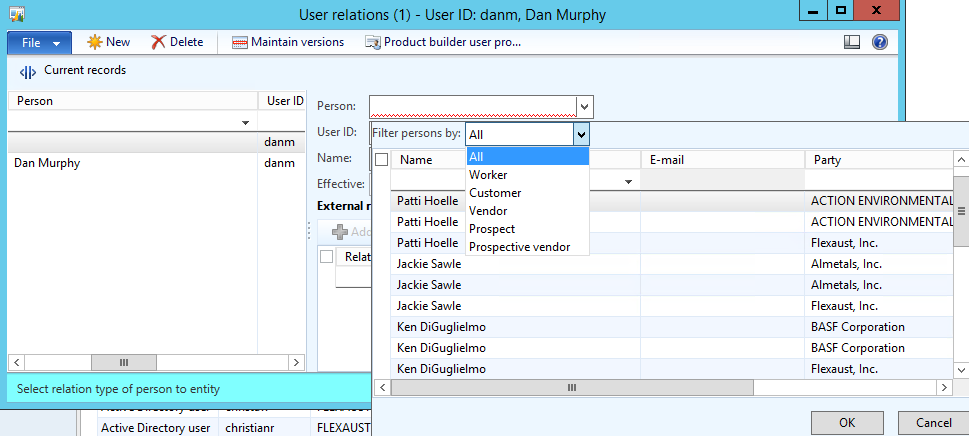
——————————
Dan Murphy
Special Projects
Flexaust
San Diego CA
——————————
——————————————- -
Nirav Modi
MemberOctober 9, 2017 at 9:14 AM
Good Day !!I agree to Patric’s Solution, also with that try to login from other system and check if the issue still persist on other system.
——————————
Nirav Modi
Project Manager – Ax
Indusa – India
00919426381531
——————————
——————————————- -
Hi Patrick,
There is something that the user does to get this behavior. Probably he/she is minimizing the form and then uses the close button? I don’t think recreating the account is helping here. To be sure it is not user/cache related, you could first delete all client cache files on the PC from this user (*.auc and *.kti files from the users appdata directory).
——————————
kind regards,André Arnaud de Calavon
Kaya Consulting
The Netherlands
——————————
——————————————- -
Hi Andre,
Thanks for the suggestion. This seems to have resolved the issue.
Thanks to all who responded, I appreciate your suggstions!
Regards,
Patrick
-
Donald Tyler
MemberOctober 10, 2017 at 8:50 AM
Patrick
I have had this issue for a while and have not found an acceptable answer. It comes and goes. I have an associate who also experiences the problems.
1. When clicking on PO / SO grid screens AX 2012 R3 shuts down.
2. Screens not fully expanding
3. Floating forms (goes to bottom of screen)
Deleting usage data is a temporary fix.
Otherwise life is good.
——Original Message——
Hi Patrick,
There is something that the user does to get this behavior. Probably he/she is minimizing the form and then uses the close button? I don’t think recreating the account is helping here. To be sure it is not user/cache related, you could first delete all client cache files on the PC from this user (*.auc and *.kti files from the users appdata directory).
——————————
kind regards,André Arnaud de Calavon
Kaya Consulting
The Netherlands
—————————— -
Mark Prouty
MemberOctober 10, 2017 at 1:03 PM
?We see this when using Remote Desktop and when screen resolution is different from user’s regular setup. The object opens, but is minimized. I find that I can right click in the windows task bar and Maximize. Then, if I grab the window title bar, it will allow resizing the window.——————————
Mark Prouty
Programmer / Analyst
ANGI Energy Systems
Janesville WI
——————————
——————————————-
Patrick Perlas replied 9 years ago 1 Member · 0 Replies -
-
0 Replies
Sorry, there were no replies found.
The discussion ‘Odd issues for a particular’ is closed to new replies.
