


Dynamics F/SCM
Public Group
Active a day ago
Dynamics F/SCM
Organizer:
- JOSE Organized by
-
-

Master planning, scheduling planned orders
-
Master planning, scheduling planned orders
Posted by DSC Communities on March 21, 2017 at 5:31 pm-

Archive User
MemberMarch 21, 2017 at 5:31 PM
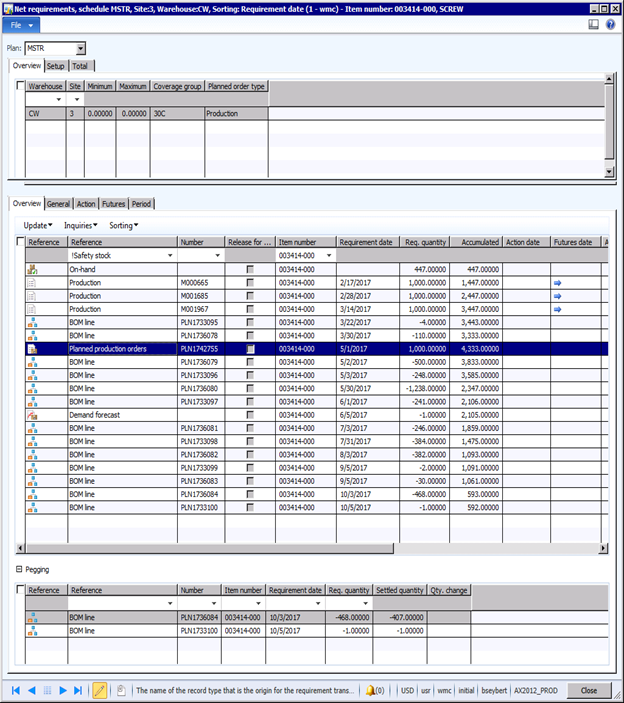
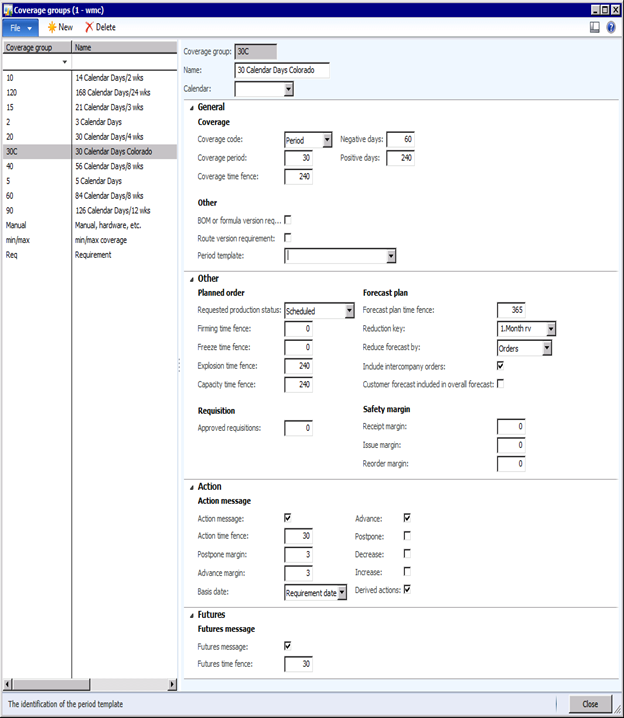
We use AX2012 CU7, below is our coverage settings and net requirements.
Why is their a planned order when we do not need any more stock till September.
Some items plan down to when we run out as it should while others like this item plan early.
We Job schedule, do not use finite capacity, process lead time is 5 weeks and raw material lead time is 2 weeks.
Have been live in 2012 since December 1, 2016.
Thanks for the help in advance.Net requirements
Coverage group
——————————
Bob Seybert
Whip Mix Corporation
Fort Collins CO
—————————— -
1–Does your plan have dynamic negative days enabled? That’s probably not the culprit, but definitely affects the netting process to verify what’s being applied towards that demand.
2–Can you look at the pegging assignments to the production orders and the planned order to verify which demand records they’re pegged to?
3–for the parents (the orders represented by all those BOM line demand records), what does the coverage group and net requirements look like for them? In particular, for this component I notice you’ve basically turned off postponement messages at the group level but are getting them on the production orders anyway (presumably configured to enable action messages at the MP level with overrides by group disabled), so you might be getting into a case where you’ve got conflicting setups as you move through the planning hierarchy.
4–For the component/item, are there any product, storage or tracking dimensions that are turned on as coverage-enabled that are not showing up on the net requirements screen shot? For example, I would doubt you’re planning by warehouse AND location, but if that were the case and one or more of those production orders were scheduled to a different location then the net requirements (without displaying location) would be a little misleading.
——————————
Chan Stevens
Industry consultant
Cincom Systems
Cincinnati OH
——————————
——————————————- -
Archive User
MemberMarch 23, 2017 at 12:10 PM
So far no change to the required date of 5/1????????I have run MRP multiple times trying:
1. Dynamic Neg days box is checked
2. Message in coverage group for postponement box is now checked
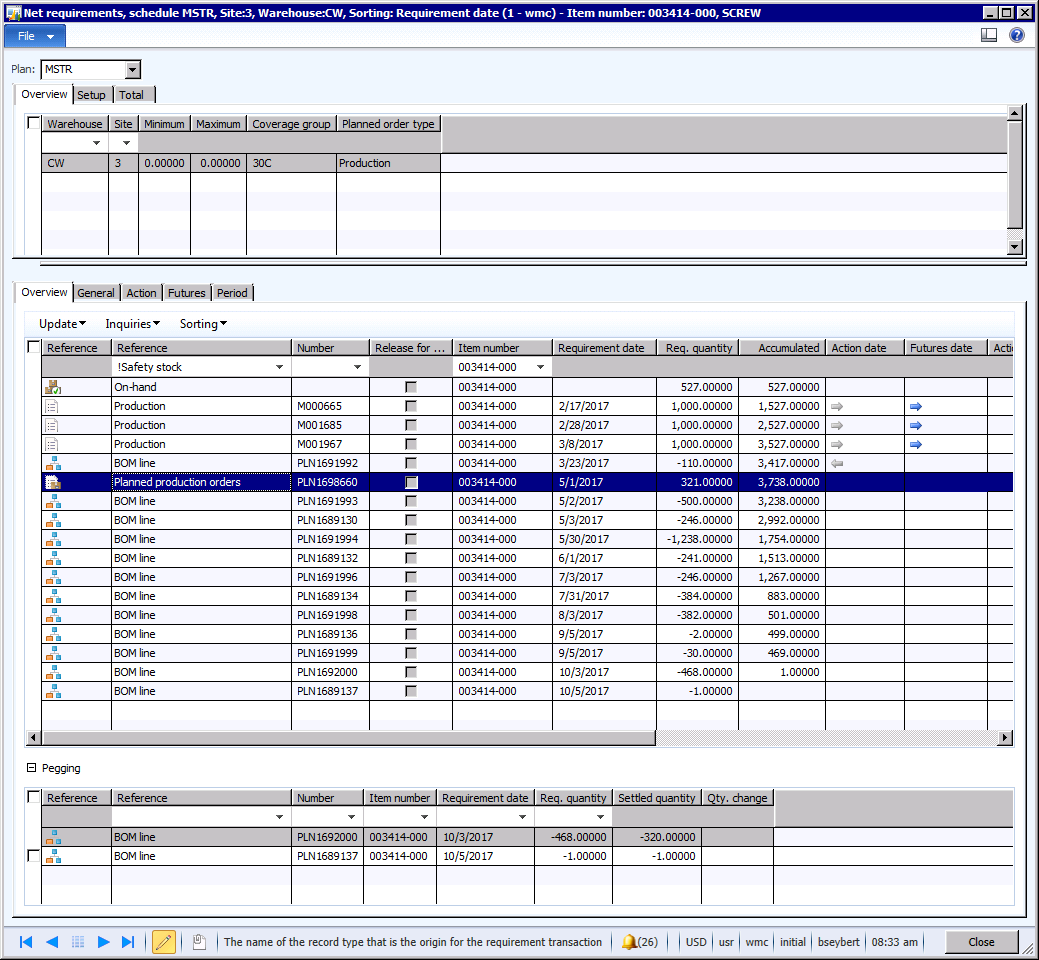
3. Changed negative days in our coverage group from 60 to 2 (which made it worse) back to 60As shown above, the planned production order that is required for 5/1 is pegged to orders due 10/3
There is no safety stock, minimum order size is 1,000 with a multiple of 2, lead time of route 5 weeks. the parent which is one level up has no minimum, we only plan by warehouse, not location. This part is only made and planned in our warehouse, never transferred or shipped to another warehouse.
thanks——————————
Bob Seybert
Whip Mix Corporation
Fort Collins CO
——————————
——————————————- -
Jacob Roder
MemberMarch 23, 2017 at 12:31 PM
Hey Bob,Is the “route lead time” of 5 weeks based on run times, or are you using inventory lead times? Is there possibly something else that’s using up the capacity on the resource and forcing the scheduling to happen so far ahead of time?
-Jake
——————————
Jacob Roder
Sr. Solution Consultant
Dynamic Consulting
Chicago IL
https://twitter.com/jac_rod
——————————
——————————————- -
Amit Rawal
MemberMarch 22, 2017 at 9:02 AM
Supply is always created against some demand.
Check for any open sales orders
Check for any Item forecast entry .
Basically go to Item , select planning Tab and click on net requirement , it will show you pegging relation ships for order created against the specific demand.——————————
Amit Rawal
Microsoft——————————
——————————————- -
Seth Greenberg
MemberMarch 22, 2017 at 4:10 PM
Hello,
I do notice that you have a forecast for June. Depending on your consumption, minimum order quantities, multiples, production batches, etc and your route related to your production order it might be triggering the planned order for May even though you don’t have a sales order until September.
Hope this helps.
Best Regards,
Seth
——————————
Seth Greenberg
Supply Chain Manager
Hamamatsu Corporation
Middlesex NJ
——————————
——————————————- -
Robert Stogner
MemberMarch 23, 2017 at 8:08 AM
Do you have any safety margins set at the plan level?Is it possible that this planned order got marked as approved somehow?
Also check the general tabs, other date fields show up that might shed some light.
——————————
Robert Stogner
I.B.I.S. Inc., a Sonata Company
Burlington NC
——————————
——————————————- -
Allen Rupp
MemberMarch 24, 2017 at 9:15 AM
Can we please see the item’s setup and the route’s setup as screen shots? This could help us determine the plan your MRP produced.——————————
Allen Rupp
Purchasing Manager
Woodland Foods
Waukegan IL
——————————
——————————————- -
Archive User
MemberMarch 24, 2017 at 10:41 AM
As shown below, we have narrowed down the problem but still do not know how to fix.
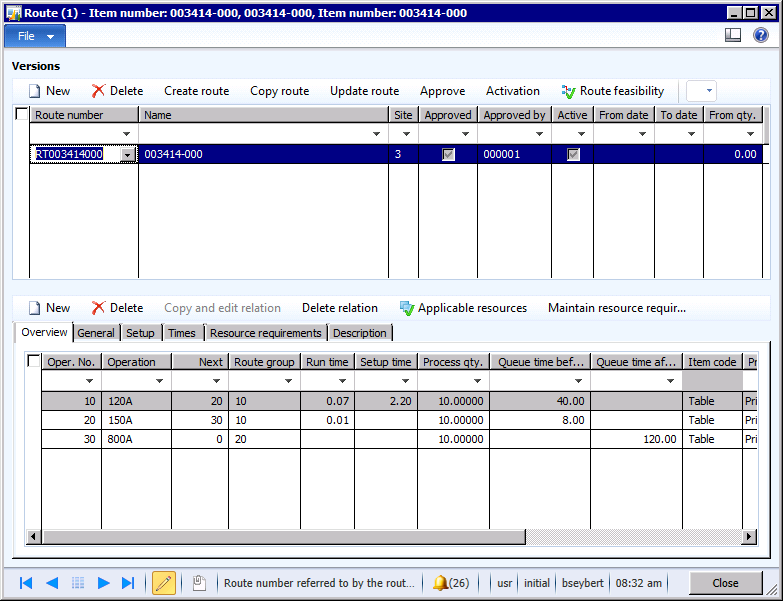
When the route for 003414-000 is modified to remove operation #30’s Resource 800, the planned order goes from 5/1 to 10/3 which is good.
The lead time is shorter by the 120 hours (3 weeks) queue time which is expected.
Put the resource 800 back, then the planned order goes back to the incorrect date of 5/1. (running mrp after each change).
With the minimum lot size changed to 100 from 1000, we see it calculating from the pegged orders of 10/3 to plan for a quantity of 321 which is good.Some parts work fine with the 800 resource and some do not and all parts are setup the same.
Why some work and other do not, with the same resource 800, is the question?
There are no safety margins, plan is not approved and changes with each mrp run.
Last plan
 item route
 item setup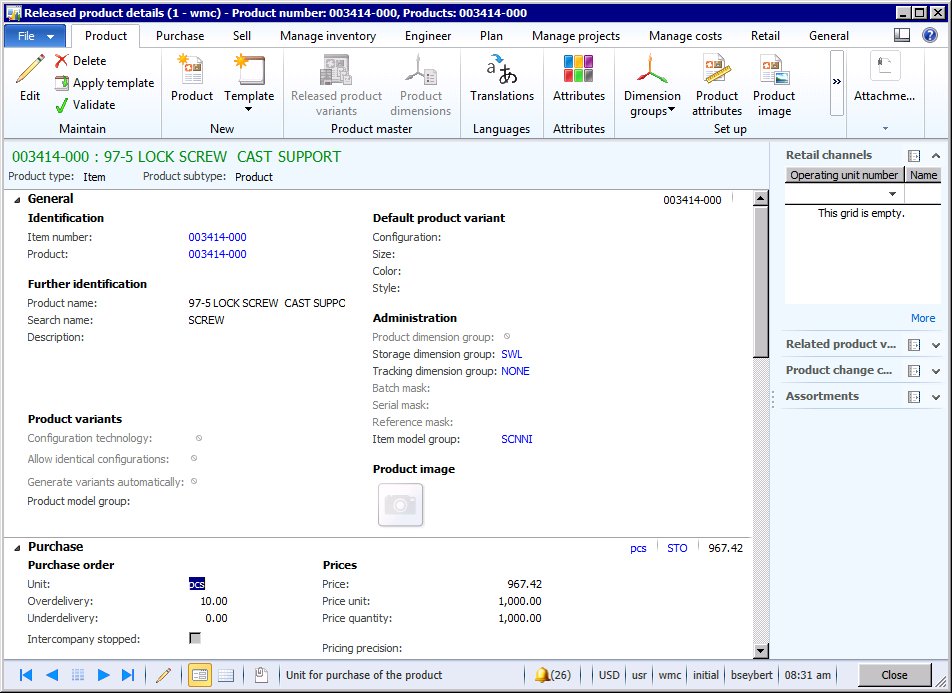
——————————
Bob Seybert
Whip Mix Corporation
Fort Collins CO
——————————
——————————————- -
You could look at capacity reservations against that resource for the July-September range, which might show conflicts.
Also, since it looks like this is pretty extreme scheduling ahead of requirement where the resource is for some reason unavailable, try checking your master plan and changing the backward capacity time fence from what’s probably 0 to something like 20-30 days. See if this results in the order being planned for slightly AFTER the requirement date.
——————————
Chan Stevens
Industry consultant
Cincom Systems
Cincinnati OH
——————————
——————————————- -
Archive User
MemberMarch 29, 2017 at 5:12 PM
Thanks for all your suggestions which help us narrow the problem to an outside resource with the fix explained below.
It appears that when an item is pegged to another production order, does not have a run time and has a queue time after, then AX is not able to schedule the planned order backwards from the production order and looks to schedule it forward from today. If the planned order is pegged to a Sales order then AX is able to schedule the order correctly.
This appears to be a bug; we’re going to work on replicating in a standard environment. If we can replicate then we will work with Microsoft on a code fix.
In the short term, we have a work around that should cause AX to correctly schedule the planned orders. On these operations enter a run time of .01 and a process qty of 1000. This should be small enough to not consume a resource but large enough AX will schedule the order correctly.
——————————
Bob Seybert
Whip Mix Corporation
Fort Collins CO
——————————
——————————————-
DSC Communities replied 9 years ago 1 Member · 0 Replies -
-
0 Replies
Sorry, there were no replies found.
The discussion ‘Master planning, scheduling planned orders’ is closed to new replies.
