


Dynamics F/SCM
Public Group
Active 2 days ago
Dynamics F/SCM
Organizer:
- JOSE Organized by
-
-

Locations
-
Locations
Posted by Tracy Trippler on May 11, 2017 at 4:05 pm-
We are currently working on setting up locations in our warehouse and implementing RF Smart to help capture the movement of inventory, picking and packing process etc. with bar coding. We are running AX 2012 R2.
My question is how can I auto fill picking locations from bulk locations? (I want it so when a picking location’s inventory level is below a certain point, a transfer order is created to tell someone to pull from the bulk location and fill the pick location.)
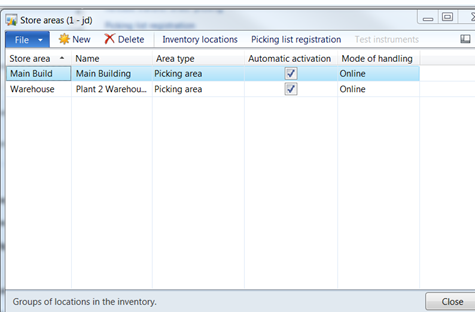
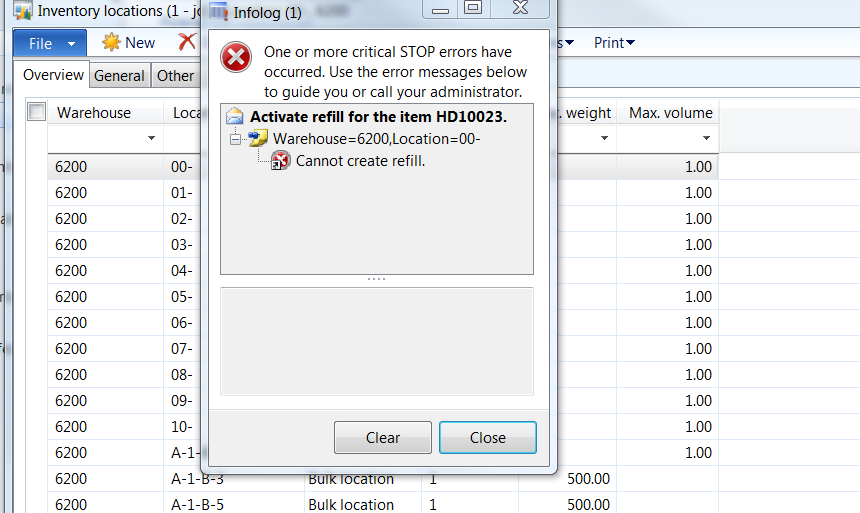
From my research, the only thing I have found was to set up a store area, which I have done (see below) but when I go to the location – function – create refill, I get an error that says I can’t refill (see second screen shot). I must have something set up incorrectly but I am not finding a lot of documentation. Do I have to have store area set up?
 I would appreciate any help or direction on where to look. Thank you in advance.
——————————
Tracy Trippler
President
J&D Manufacturing
Eau Claire WI
—————————— -
Hi Tracy –
The overall setup of legacy Warehousing (not WAX/TRAX) goes like this…
1. Planning:
Map out Warehouse such as…
Number of In/Out docks
Number of Aisles
Number of Racks
Number of Picking and Buffer Locations2. Setup:
Setup Warehouses
*Location Format (e.g. -## = 02, -#& = 0A)
Setup Inventory Aisles
*Special Aisle for later Wizard
Setup Store Areas (group Items together)
Setup Store Zones (group Store Areas)
Setup Pallet Types
Create Locations with Wizard
*Locations
Aisles, Inbound, Outbound, Picking, and Buffer
*Aisles
Use Special
0 for Aisles (these were created earlier)
Use Format convention
*Inbound
1 or more
Use Format convention (e.g. IN_##)
*Outbound
1 or more
Use Format convention (e.g. OUT_##)
*Picking Locations
Number of Aisles (mapped out earlier)
Number of Racks for Picking (mapped out earlier)
Picking Area
Physical Dimensions (AX can test if Items/Pallets fit into a Location)
Review Locations created
*Buffer Locations
Similar process as Picking Locations
Run Update Store Areas (from Warehouse | Functions) and adjust as needed.
Create Inventory Model and Dimensions
Create Items
Create Shipment Templates
Add Inventory in Buffers and Create Refills in Picking.This should help overcome the Refill error. You can also batch up Refill creation (Inventory | Periodic | Locations).
Thanks….Dave
——————————
Dave Phillips
MSFT Senior PFE
Microsoft
Fargo ND
——————————
——————————————- -

Robert Stogner
MemberMay 12, 2017 at 7:54 AM
I am assuming you are not using or don’t plan to use advanced warehousing in AX. Replenishments can be set up to automatically create work to move inventory from bulk to picking locations.——————————
Robert Stogner
I.B.I.S. Inc., a Sonata Company
Burlington NC
——————————
——————————————- -
Guy Terry
MemberMay 13, 2017 at 4:39 AM
Hi Tracy,I think it’s like Dave says.. in R2 you only get Bulk -> Pick refills if you use functionality known as WMSII (WMS2). It’s quite a big topic, and should be considered in conjunction with your RF Smart implementation (last time I checked, RF Smart worked with or without WMSII).
If you do go that route, I think refills are done using ‘Pallet transports’:
About refill pallet transports [AX 2012]This blog, although for AX 2009, is still relevant for WMSII on AX 2012:
Refill of Picking Locations in Dynamics AX 2009and on the right of that page, check the four links under ‘What’s new in Dynamics AX 2009’; they refer to WMSII processes.
——————————
Guy Terry
Application Consultant
ibrl
United Kingdom
——————————
——————————————- -
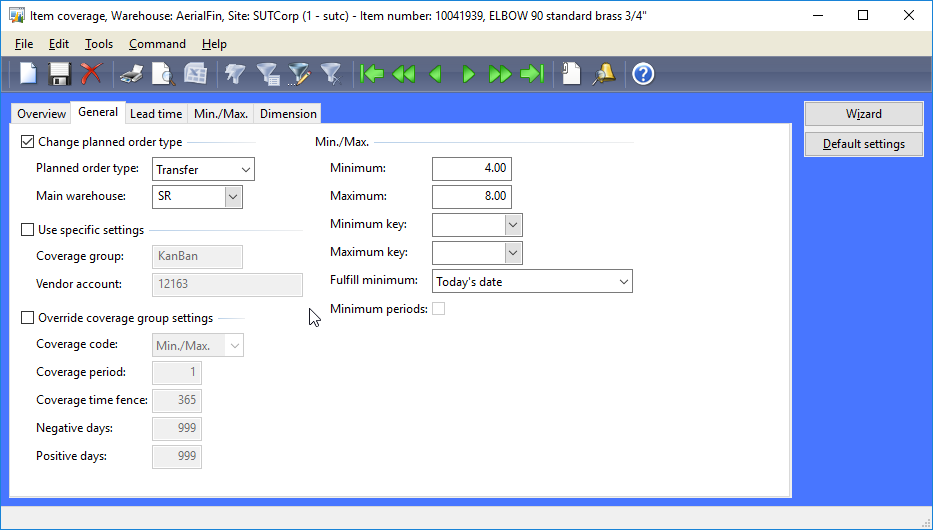
I’m on AX09 but we do this by setting item coverage like below.
——————————
Sean Blais
Operations Support
Sutphen Corporation
Dublin OH
——————————
——————————————-
Tracy Trippler replied 9 years, 5 months ago 1 Member · 0 Replies -
-
0 Replies
Sorry, there were no replies found.
The discussion ‘Locations’ is closed to new replies.
