


Dynamics F/SCM
Public Group
Active 9 hours ago
Dynamics F/SCM
Organizer:
- JOSE Organized by
-
-

Local Client Vs Remote Client
-
Local Client Vs Remote Client
Posted by DSC Communities on February 8, 2017 at 10:33 am-

Corey Vantilborg
MemberFebruary 8, 2017 at 10:33 AM
All,Another post about installing the AX client on Windows 10 got me wondering about this.
How many of you install the AX client locally?
We do not do this at all. For live system accessing we use RemoteApp/RemoteDesktop. This is for performance and control reasons as we are geographically spread out.
All of our development boxes are self-contained systems running a Server OS. Again accessed via RemoteDesktop.For those that run the clients locally, how do you keep them up to date? Do you ran them across WAN links? If so any tools to management performance?
One major downside we have had with Remote Desktop is printer management is painful. In fact we are looking into both Citrix Xen and VMware horizons to help with that issue and others with Remote Desktop. Anyone have experience with those products?
——————————
Corey Vantilborg
ERP Analyst
Tigercat International Inc.
Brantford ON
—————————— -
Barr Snyderwine
MemberFebruary 9, 2017 at 7:23 AM
We also do most users remote. WE try a few locally to remove any RDC issues. Most we go back to remote. Printing can be an issue but we are able to get around it.
We have many users who work in the office and then travel for those we use citrix and use both RDC from citrix or the application publishing.
Citrix is very vey stable and the printing works but sometimes does have some setup issues but are always able to get past. One thing to always do is use standard well known and widely used printers e.g. HP——————————
Barr Snyderwine
Hargrove, Inc.
Lanham MD
——————————
——————————————- -
we use remote app and it works very well, no real printing issues. I have used AX over Citrix and it worked very well and gave really good performance once it was configured correctly. I dislike local clients for several reasons, first and foremost is the updating of the clients(time and effort) and second is that you have to have more powerful machines for local clients and that is a cost factor.
——————————
Paul Martin
Expert ERP Analyst
TempurSealy Inc.
Trinity NC
——————————
——————————————- -
Mike Fechter
MemberFebruary 9, 2017 at 8:37 AM
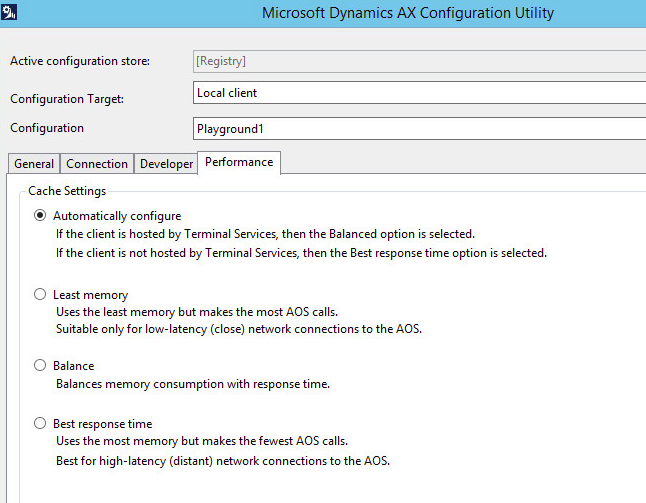
We do a mix, local and Terminal Server. We use Parallels 2X RDP with our Terminal Servers and it works very well, especially with the printing. I would recommend you look at the 2X product along with Citrix & VMware.We do the local installs at our corporate headquarters where we have 100+ PCs. Yes, this makes updating the client a pain in the neck, but we don’t have to do it often. We don’t run them across WAN Links. There’s a setting in the client for Performance on Terminal Server. We leave it at “Automatically configure”.
——————————
Mike Fechter
IIMAK
Amherst NY
——————————
——————————————- -
Hi –
Still not a bad idea to have a local client or two to troubleshoot issues that might originate from Citrix, VMWare, Remote Desktop, etc. Issues such as scrolling, caching, and refreshing come to mind. The local client helps narrow down the root cause.
Thanks….Dave
——————————
Dave Phillips
MSFT Senior PFE
Microsoft
Fargo ND
——————————
——————————————-
DSC Communities replied 9 years, 9 months ago 1 Member · 0 Replies -
-
0 Replies
Sorry, there were no replies found.
The discussion ‘Local Client Vs Remote Client’ is closed to new replies.
