


Dynamics F/SCM
Public Group
Active 4 minutes ago
Dynamics F/SCM
Organizer:
- JOSE Organized by
-
-

Lead times
-
Lead times
Posted by Unknown Member on January 26, 2017 at 12:00 pm-
Lead times:
I have noticed that our lead time settings don’t seem to be working for out sourced products when generated by the Master plan.
I would like to set up specific part #’s with a 7 day lead time. I have set up default orders settings under our part number. Default order settings > Inventory tab > Other. I have the “Inventory Lead Time” set at 7 and I have the “Working days” box checked. I have noticed after running the Master plan that I am not getting a 7 day lead time. My order date and delivery date are the same.
I have also tested the same settings under the purchasing tab with no results. I have been doing some research and I am wondering if this has anything to do with trade agreement settings?
I have attached Default order settings snip.
——————————
Ryan Schweikert
Production Scheduler
J&D Manufacturing
Eau Claire WI
—————————— -
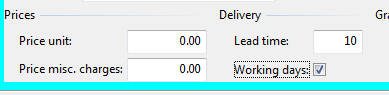 Try Trade agreements> Delivery> Lead time.
——————————
Sean Blais
Operations Support
Sutphen Corporation
Dublin OH
——————————
——————————————- -
Ryan, you said outsourced so I’m assuming you mean purchased items? If so, you need to specify the lead time under the Purchase tab, not the Inventory tab. If you have Trade agreements and Master planning is setup to look for trade agreements (Master planning has a parameter that says “Find trade agreement”), then it will use that lead time instead.
Inventory is for production items that don’t have a route or transfer orders, but not purchased items.
——————————
Andrew Lencsak
Senior Application Consultant
eBECS
Atlanta GA
——————————
——————————————- -

Evert Bos
MemberJanuary 27, 2017 at 9:52 AM
Andrew said it.——————————
Evert Bos
Sikich LLP
Naperville IL
——————————
——————————————- -
Thank you for the response. We have changed the lead time in the trade agreement parameters for our out sourced part.
Unfortunate it didn’t seem to make a difference. I have checked all of our default order settings & they are correct. I checked the master plan parameters and they are also correct. Our current item “Product type” is set up as a “Service” I am wondering if this has anything to do with our issue?Is there anything else you would suggest? Is there any other information I can give you that might help?
——————————
Ryan Schweikert
Production Scheduler
J&D Manufacturing
Eau Claire WI
——————————
——————————————- -
Duke Keyes
MemberJanuary 27, 2017 at 8:11 AM
Ryan,
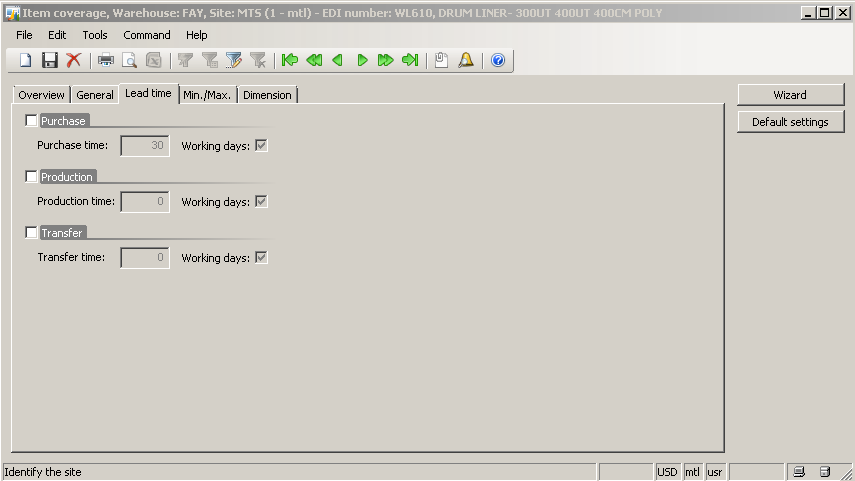
This is just a shot in the dark. Under the item go to general tab, go to setup, then click item coverage, then click lead time. At the top is should say Purchase and should be unchecked, underneath it should show Purchase time: and the lead time should be there grayed out. If the Purchase is clicked and the purchase time has a different lead time then your current lead time here is where the lead time is being overrode. I included a screenshot fro AX2009.
Hope this helps.
——————————
Duke Keyes
Materials Manager
Marshalltown Company
Fayetteville AR
——————————
——————————————- -
service items are typically items you would not track in inventory. By design, it would only be tracked if it was Product type = Service, and Item model group that has “Stocked Product” checked. If it’s service and not stocked then you would never have planned orders so I’m assuming yours is stocked.
This however, should have no effect on offsetting the order date and receipt date. do you have Site specific order settings? These would override the Default order settings… If not, what is the Default order type field set to under the General tab of your Default order settings? If a Purchase item, this should be to “Purchase order.” That settings correlates with the Inventory and Purchase tabs for the lead times.
Any changes you make to these settings, you will need to run MRP on that part again for them to take affect on the planned order.
——————————
Andrew Lencsak
Senior Application Consultant
eBECS
Atlanta GA
——————————
——————————————- -
If I’m reading between the lines correctly it sounds like you make a product and send it out for plating/paint/heat treat/something? Do you have a route/operation set up for this “service” which should probably be an “item”? Let us know if that’s the scenario or if my reading between the lines was blurred…
TGIF,
Sean——————————
Sean Blais
Operations Support
Sutphen Corporation
Dublin OH
——————————
——————————————- -
Hector Cazot
MemberJanuary 27, 2017 at 9:17 AM
Hi Ryan, you already have many option to test. I just want to suggest another try, the total lead time is composed by several segments. So maybe the inventory/purchase leadtime is not having any effect due to the service type of the item, I was thinking about this other post
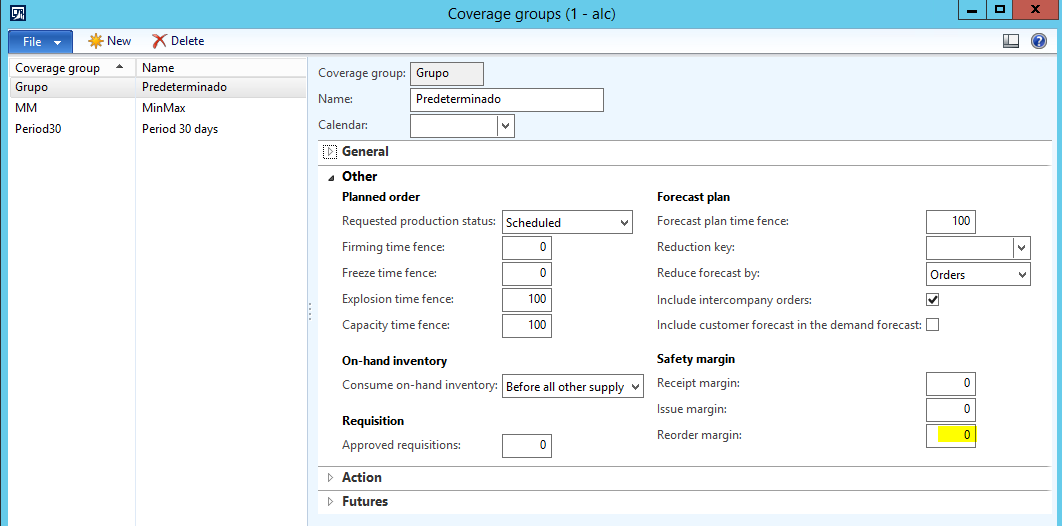
Open ForumAxug remove preview Open Forum Hidden page that shows all messages in a thread View this on Axug > In this post you can see the ‘Reorder margin’ that is the administrative time you need to place a purchase order, I think that this is independant if the item is service or not. Maybe you should try having your time placed in this field, that you can find it in the item Coverage Group, Other fast tab, Safety margin Group
——————————
Hector Cazot
Consultant Sr.
Industry Systems and Solutions
Guatemala
——————————
——————————————- -
Thank you for all the responses I have not yet tested them all. Before I go any further I will do my best to describe how our out source process is set up. I understand there maybe multiple variations of how one company may utilize outsourced work in AX.
I have attached and example:
The planned production order is released & subcontracted work creates a purchase order. The production order is started and the materials are consumed. Our purchase order is then released to the out sourced vendor. Once the finished product is delivered back the purchase order is received & the out sourced part # on the BOM is consumed. After it is received the production order is reported as finished and ended putting the finished product in stock.The finished product is set up under “item” – the outsourced labor on the BOM is set up under “service” .
I have tested default order settings and trade agreements in both the finished product & the out sourced labor item on the BOM & planned orders are still coming up with an order & delivery date the same.——————————
Ryan Schweikert
Production Scheduler
J&D Manufacturing
Eau Claire WI
——————————
——————————————- -
Hi, so if I’m reading this correctly you want to see the lead time for the fan blade (the make item) in planned orders? If so, the question now is do you have Finite capacity planning turned on for master planning parameters? AX will use the inventory lead time if you don’t and then use the Route after scheduling. If you do, AX uses the Route times to determine the lead time because you’re planning capacity against the machines. If you want to use the inventory lead time instead of the build time in your route, then don’t use Finite capacity for Master planning.
——————————
Andrew Lencsak
Senior Application Consultant
eBECS
Atlanta GA
——————————
——————————————-
Unknown Member replied 9 years, 9 months ago 1 Member · 0 Replies -
-
0 Replies
Sorry, there were no replies found.
The discussion ‘Lead times’ is closed to new replies.
