HTS Codes

  • HTS Codes

    Posted by Tracy Trippler on June 11, 2018 at 5:13 pm
    • Tracy Trippler

      Member

      June 11, 2018 at 5:13 PM

      ?Good morning,

      We are running AX2012 R2.Ā  I amĀ looking for where to put HTS codes for international shipping. Does anyone have any ideas or knowĀ if it is available in R2?Ā  Thanks.

      Ā 

      ——————————
      Tracy Trippler
      President
      J&D Manufacturing
      Eau Claire WI
      ——————————

    • Grace Gillenwater

      Member

      June 11, 2018 at 5:25 PM

      ?Hi Tracy,

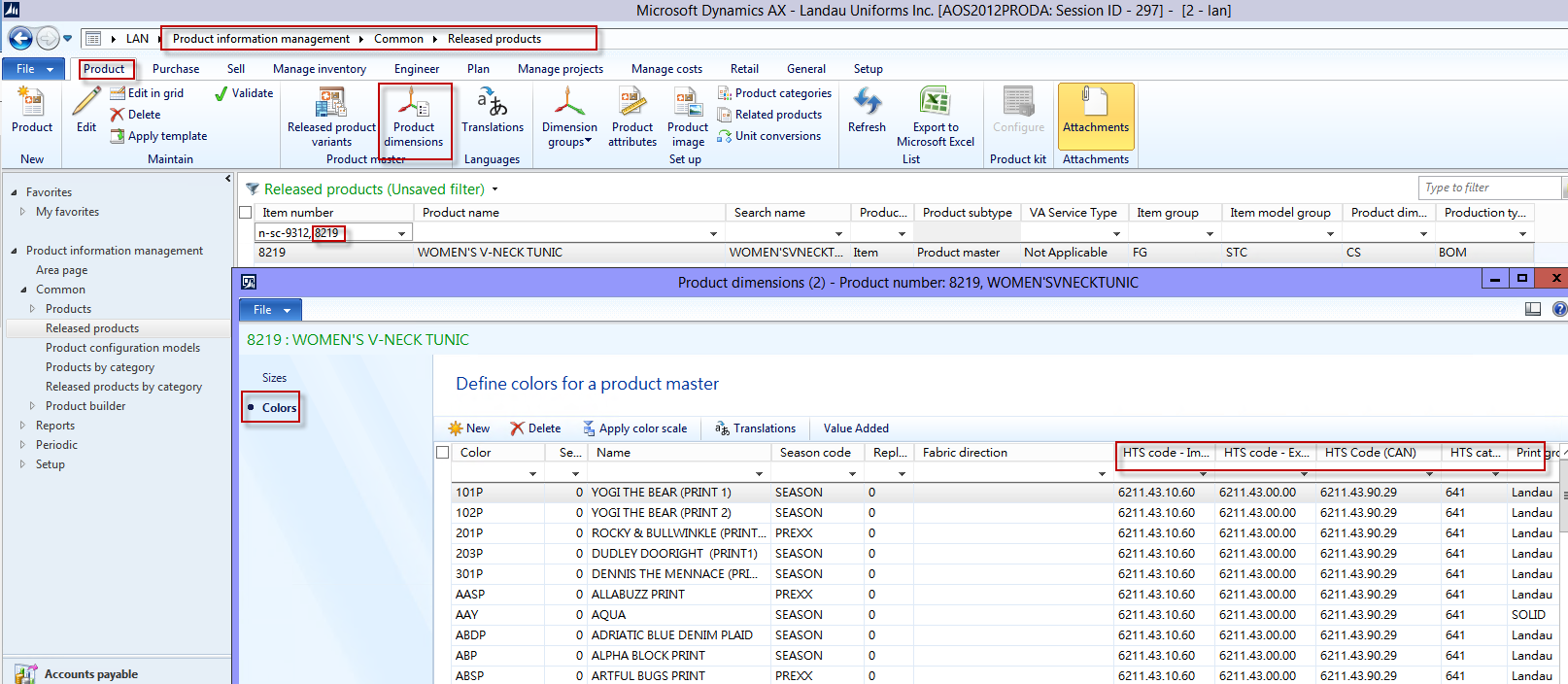
      Yes, there is a place to put the HTS codes. It will be at the Item Level, under the Product Dimension ribbon.Ā  Click on the Color option and the columns should be there forĀ  you.Ā  I checked with out Int’l Dept. and these fields wereĀ not a Customization in AX2012; as it was in AX4.0.

      ——————————
      Grace Gillenwater
      Accounting Clerk
      Landau Uniforms
      Olive Branch MS
      ——————————
      ——————————————-

    • Andrew Lencsak

      Member

      June 11, 2018 at 8:54 PM

      Hi Tracy and Grace,
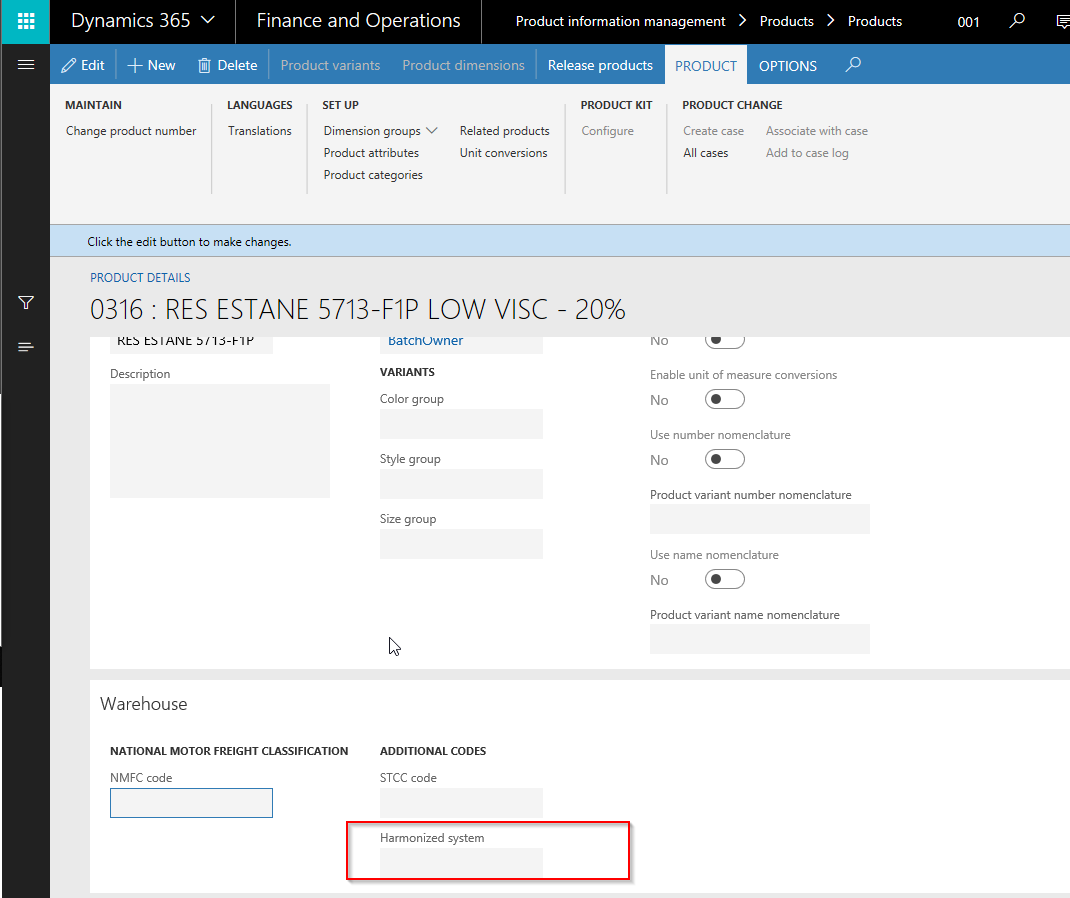
      I think what Grace shows actually is a customization. I say this for a few reasons: 1) Not all items for all companies have Product dimensions, like Color. That’s a setup option when you create items, and HTS codes aren’t specific to Product masters with Product dimensions. 2) AX4.0 did not have any Warehouse mgt module and in AX, the only out-of-the-box functionality I am aware of is in versions AX2012R3 and later in Warehouse Management, which can be set upon creation of the Product or Product master:

      Prior to that, you could have commodity codes assigned to things like Procurement categories and the items linked to them. Similar to HTS codes, STCC codes also were not available until R3 through the Warehouse and Transportation mgt modules.

      ——————————
      Andrew Lencsak
      Senior Application Consultant/Solution Architect
      eBECS Limited
      Atlanta GA
      ——————————
      ——————————————-

    • Colby Gallagher

      Member

      June 11, 2018 at 9:53 PM

      Hi Tracy,Ā 
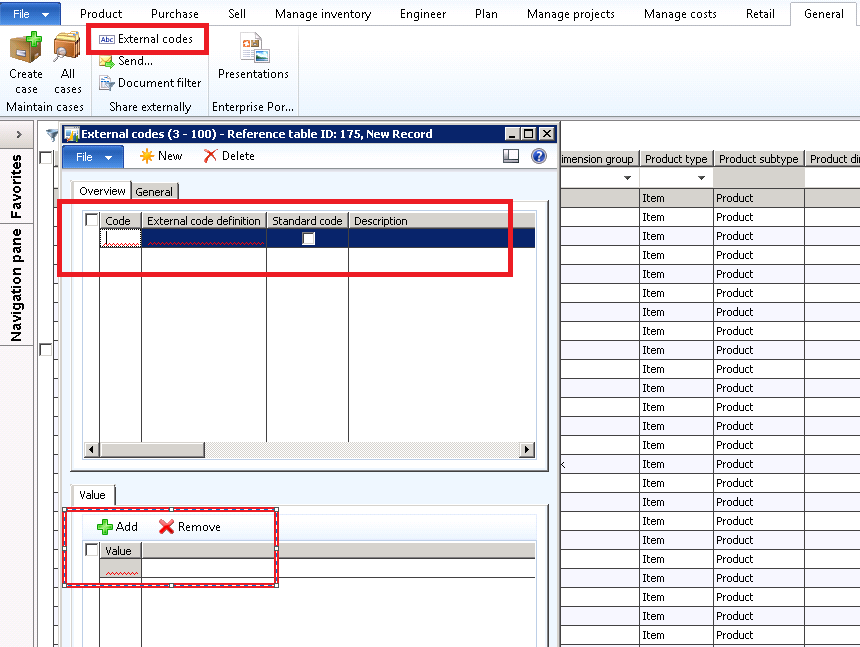
      Ā  Yes, in R2 you don’t really have dedicated fields for this like you do in R3 and beyond.Ā  You can use external item ID’s and create a dummy customer / vendor to house them and then modify your forms / reports accordingly, or on the Released Product -> General Tab in ribbon -> External Codes and create a consistent code for all items, and again modify reports / forms accordingly.Ā 

      ——————————
      Colby Gallagher
      Manufacturing Systems Consultant
      Agility Business Solutions
      Brecksville OH
      ——————————
      ——————————————-

    Tracy Trippler replied 8 years, 1 month ago 1 Member · 0 Replies
  • 0 Replies

Sorry, there were no replies found.

The discussion ‘HTS Codes’ is closed to new replies.

Start of Discussion
0 of 0 replies June 2018
Now

Welcome to our new site!

Here you will find a wealth of information created for peopleĀ  that are on a mission to redefine business models with cloud techinologies, AI, automation, low code / no code applications, data, security & more to compete in the Acceleration Economy!