How to increase the Azure quota for “Standard D Family vCPUs”?

  • How to increase the Azure quota for “Standard D Family vCPUs”?
    Posted by DSC Communities on January 18, 2021 at 1:42 pm
    • Daniel Zook

      Member

      January 18, 2021 at 1:42 PM

      In case you haven’t heard, new D365 customers are detrimentally affected by this announcement: “Sandbox Develop and Test environments will only be deployable as Cloud-hosted environments after November 1, 2020.”

      We have a demo environment deployed to Azure, and now we need to deploy a Dev environment.Ā  When I first tried to deploy the Dev environment, I received an error about the total number of vCPUs available in our quota.Ā  I requested an increase in our quota, and received it.Ā  However, when I tried again to deploy the Dev environment, a different error now appears:

      You’ve reached the ARM Core limit in your subscription for VM family [Standard D Family vCPUs]. You have [10] total cores, [2] cores available, but this deployment needs [8] cores in total. You need [6] more cores. You can either delete some existing topologies or, increase the Azure ARM Core limit for your subscription. If the issue persists, please contact support with this Id: 75dcacab-a46e-4adc-8a18-92b94475fc12

      I when I try to request an increased quota for “Standard D Family vCPUs”, I can’t find the option for that.Ā  Am I missing something?

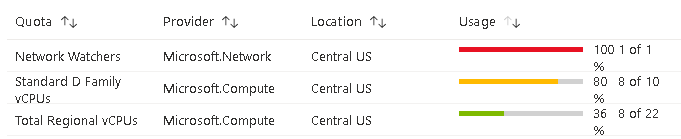
      Quote currently shows this:


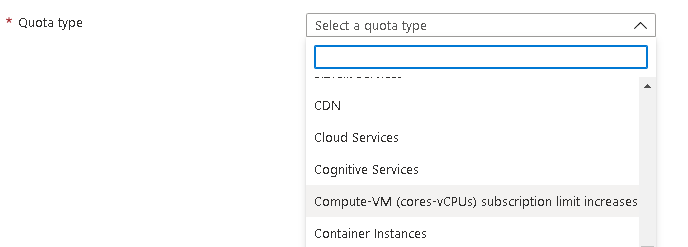
      I click on “request increase”, and select this:


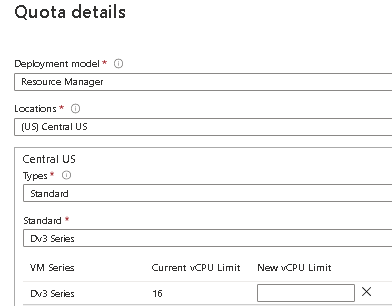
      After submitting that, I click on Enter Details, select Central US for the region, but when I try to select type of “standard” vCPUs, there is no option for “Standard D Family vCPUs”.


      Anyone have any insight on this?Ā  I don’t know what specific version of the D series LCS is trying to use in the Dev box deployment, so should I pick each D series option and ask for an increase in quota for all of them, or do something else?

      ——————————
      Daniel Zook
      Director of IT
      Lehman’s
      Dalton OH
      ——————————

    • Daniel Zook

      Member

      January 18, 2021 at 1:48 PM

      Some more info:
      The LCS deployment form lists the CPU size as “D13”, which doesn’t correspond with anything in the Azure quota increase request form.

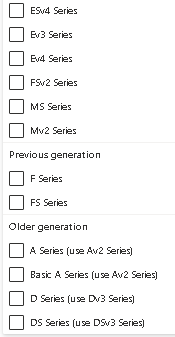
      The Azure quota request form states to “use Dv3 Series” in the list for “older generation” under “D Series”, but if I select Dv3, it shows I already have 16 vCPUs…


      I’m requesting the “D Series” from the “Older generation” list anyway to see if that works.

      ——————————
      Daniel Zook
      Director of IT
      Lehman’s
      Dalton OH
      ——————————
      ——————————————-

    • Daniel Zook

      Member

      January 18, 2021 at 3:13 PM

      That was it.Ā  The dev environment is now deploying.Ā  Hopefully this helps someone else down the road.

      ——————————
      Daniel Zook
      Director of IT
      Lehman’s
      Dalton OH
      ——————————
      ——————————————-

    • Ben Morgan

      Member

      January 19, 2021 at 9:26 AM

      Not a direct answer to your question (which it looks like you resolved on your own), but when I contacted Microsoft, they recommended the standard B8MS VM for setting up these dev environments.Ā  You can get pricing here https://azure.microsoft.com/en-us/pricing/details/virtual-machines/windows/.Ā  We also had to request quota increases for the VM class we used, so in general something like that should be an expectation – but what needs to be increased will likely depend on your specific setup.Ā  I’m also just parking this information here for future reference in case it would be helpful.

      ——————————
      Ben Morgan
      M3 Engineering & Technology Corp
      ——————————
      ——————————————-

    DSC Communities replied 5 years, 2 months ago 1 Member · 0 Replies
  • 0 Replies

Sorry, there were no replies found.

The discussion ‘How to increase the Azure quota for “Standard D Family vCPUs”?’ is closed to new replies.

Start of Discussion
0 of 0 replies June 2018
Now

Welcome to our new site!

Here you will find a wealth of information created for peopleĀ  that are on a mission to redefine business models with cloud techinologies, AI, automation, low code / no code applications, data, security & more to compete in the Acceleration Economy!