


Dynamics F/SCM
Public Group
Active 3 days ago
Dynamics F/SCM
Organizer:
- JOSE Organized by
-
-

Grid Filter
-
Grid Filter
Posted by Unknown Member on January 30, 2017 at 4:11 pm-
Axperts,
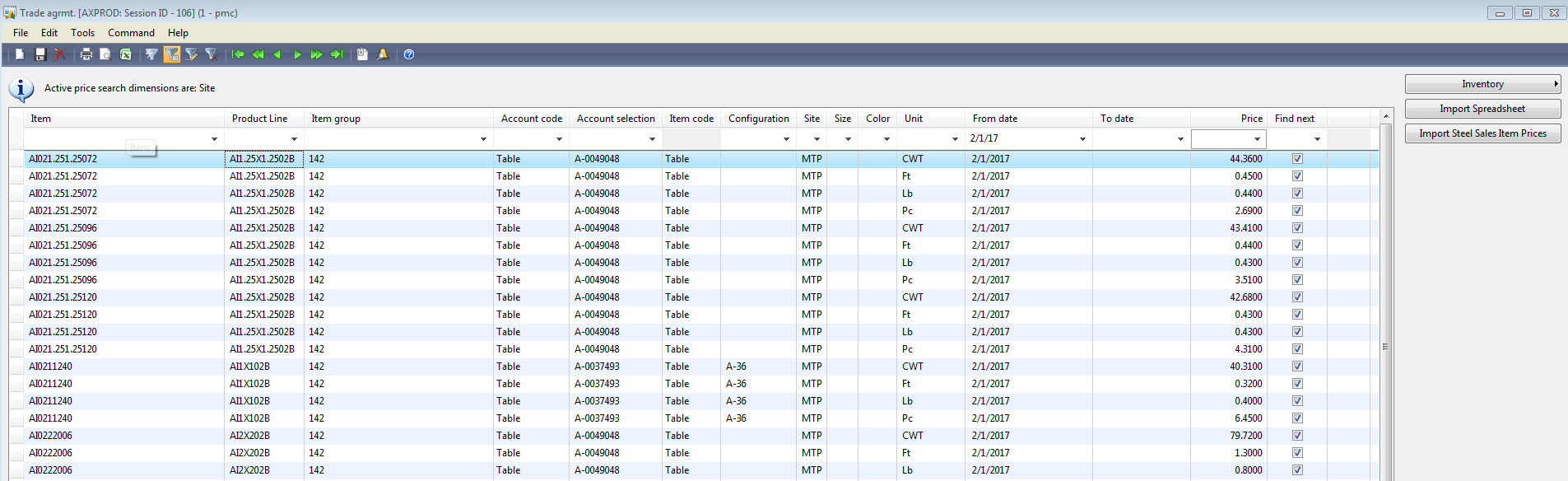
I am trying to see if we have any trade agreement records that the price does not end in 00. IE i want to make sure all prices only have 2 decimals. $42.9900 rather than $42.9912
I have tried !*00 and !??.??00
Any ideas?
——————————
Trenton Pierce
Business Intelligence Analyst
Priefert Manufacturing
Mt. Pleasant TX
—————————— -

George Mihal
MemberJanuary 31, 2017 at 5:57 AM
Workaround is to just export it into Excel and look for it that way. It doesn’t look like the field accepts wildcards without customization of some sort; you cannot look up any part of the pricing, but you can use arithmetic operators (<, >, etc.).——————————
George Mihal
Bicon, LLC
Boston MA
——————————
——————————————- -
I agree that the export to excel is the only workaround at this point. I was just hoping that I missed something. Thank you for the suggestions .
——————————
Trenton Pierce
Business Intelligence Analyst
Priefert Manufacturing
Mt. Pleasant TX
——————————
——————————————- -
Hi Trenton,
Not trying to sell you my product here, because Priefert already has an Atlas license….so just offering you a solution.
If this is a process which you’ll repeat from time to time, an Atlas report would be better than a straight export to Excel, because then next time all you have to do is click refresh to repeat the process.
I just built a quick report (took about 5 minutes) that pulls the data from AX, adds a Managed column to convert the dollar figure to text and trim the all but the last two characters. Now all I have to do is refresh the report, and filter that column for anything other than “00”.
I believe you guys are on Atlas 5. Shoot me an email at jason.carter@globesoftware.com.au. I’ll send you an Atlas 5 report that does what you need, and you should be able to use it right away with your data.
Regards,
Jason
——————————
Jason Carter
Regional Channel Manager – Americas
Globe Software Pty Ltd
Fargo ND
——————————
——————————————- -
Archive User
MemberJanuary 31, 2017 at 7:31 AM
You should be able to put a SQL statement directly into the filter to get the records you are looking forWHERE FLOOR(Amount_Ex*100)!=Amount_Ex*100
——————————
Matt Dickson
Business Analyst
Lawrenceville GA
——————————
——————————————- -
Archive User
MemberJanuary 31, 2017 at 7:32 AM
Never mind … I see you are on AX2009. I don’t think that works in that application.——————————
Matt Dickson
Business Analyst
Lawrenceville GA
——————————
——————————————- -
I don’t remember where the set up parameter is but I believe in AX09 you can set the decimal level. We only allow two places. (I could see where process mfg may want more but we don’t have the need.)
——————————
Sean Blais
Operations Support
Sutphen Corporation
Dublin OH
——————————
——————————————- -
I have found that at times the best option is to export to excel. especially when you are not getting the filter results you want, as good as the grid filter is , sometimes you either need to do an advanced query filter or just export to excel
——————————
Paul Martin
Expert ERP Analyst
TempurSealy Inc.
Trinity NC
——————————
——————————————- -
Gilberto De la Rosa
MemberJanuary 31, 2017 at 11:40 AM
The field “Amount” in the “PriceDiscTable” which is the one that keeps all the price agreements made with vendors, uses “ExtendedDataType” (AmountCurr) making not possible to modify the decimals to be accepted in this field, reason the best place to modify the decimals in the “ExtendedDataType AmountCurr”——————————
Gilberto De la Rosa
Manager Applications and Business Systems
Alamos Gold
——————————
——————————————-
Unknown Member replied 9 years, 9 months ago 1 Member · 0 Replies -
-
0 Replies
Sorry, there were no replies found.
The discussion ‘Grid Filter’ is closed to new replies.
