


Dynamics F/SCM
Public Group
Active 29 minutes ago
Dynamics F/SCM
Organizer:
- JOSE Organized by
-
-

Extract vendor master data
-
Extract vendor master data
Posted by nazimlalji@hotmail.com on April 30, 2019 at 8:45 pm-
Any suggestion for extracting Vendor master data in one Excel work sheet which includes everything which is in vendor form: like Vendor #, Name & Address, phone and email, Tax ID number, etc etc
Thanks and regards?
——————————
Nazim Lalji
Dynamics AX Analyst——————————
-
Hi Nazim,
What exact version of Microsoft Dynamics are you using? As of version AX2012 R2 with CU7 and Dynamics 365 FO, you can use data management to export vendors using Data Import Export Framework/Data Management. In Dynamics 365 for Operations, you can also use the feature ‘Open in Excel’ and add more columns to get the desired list.
——————————
kind regards,André Arnaud de Calavon
Solution Architect, Microsoft MVP – Microsoft Dynamics Business Solutions
——————————
——————————————- -
HI Andre
its AX 2012 R3 CU12
Require to export Master data from AX to Excel
thanks and regards
——————————
Nazim Lalji
Dynamics AX Analyst
Nazim Lalji
Los Angeles CA
——————————
——————————————- -

Colby Gallagher
MemberMay 1, 2019 at 8:38 AM
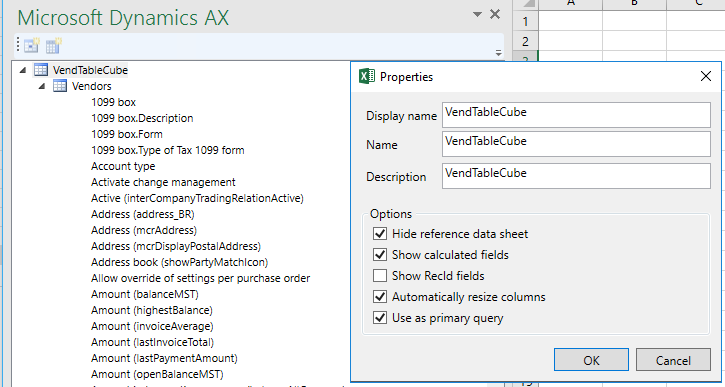
Hi Nazim,You can expose the AOT query “VendTableCube” to the Excel add-in at Org admin -> Setup -> Document Mgmt -> Document Data souces.
When you connect to this query in Excel via Dynamics AX tab in ribbon -> Add-Data -> Add-Data, right mouse click on the top level table -> Properties -> Show calculated fields, and you will also get all display methods for the tables in the query, one of which is Telephone. The rest of your fields should be there.
——————————
Colby Gallagher
Manufacturing Systems Consultant
Agility Business Solutions
Brecksville OH
——————————
——————————————- -
Either using DIXF or a straight SQL query would probably be easiest, both have the ability to be exported in an Excel format.
——————————
Alex Meyer
Director of Dynamics AX/365 for Finance & Operations Development
Fastpath
Des Moines, IA
——————————
——————————————- -
Robert Menschel
MemberMay 1, 2019 at 12:15 PM
What do you mean by “everything”? An SQL “Select * from VendTable” works in AX2009, It doesn’t pick up contacts or secondary addresses, or multiple state tax IDs, but it pulls all data that applies one-to-one with any vendor.——————————
Robert Menschel
Lead Systems Engineer
HD Supply Repair & Remodel
Roseville CA
——————————
——————————————- -
Mark Prouty
MemberMay 2, 2019 at 11:44 AM
This really depends on the version you are using, and how often you need to extract the data.
You can open vendor details, Select all (Ctrl-A), Copy (Ctrl-C) and Paste into Excel. You will get duplicate columns of what is contained in the overview, plus a lot of stuff you are not interested in.
In AX2012 or D365, look for a view, which will have pre-built links (joins) to related tables. This would be my first choice.
If you want to write a sql query yourself, you will? learn a lot about table structures – I’ve found this handy in navigating: https://alexdmeyer.com/ax2012erd/——————————
Mark Prouty
Programmer / Analyst
ANGI Energy Systems
Janesville WI
——————————
——————————————- -
Do you have any custom fields that could be a little more tricky?
——————————
Crystal Ahrens
Solution Architect
Kodak Alaris Inc.
Albion NY
——————————
——————————————- -
Carsten Schoenberg
MemberMay 3, 2019 at 3:31 PM
Hi Nazim,if you give me all the fields you need, I can pull together an Atlas Query and upload it for you to use.
Other thing is like someone else said. SQL select * on vendtable for most of the contentrgds
Carsten
——————————
Carsten Schoenberg
FITPRO SOLUTIONS
Hamburg
——————————
——————————————-
nazimlalji@hotmail.com replied 7 years, 6 months ago 1 Member · 0 Replies -
-
0 Replies
Sorry, there were no replies found.
The discussion ‘Extract vendor master data’ is closed to new replies.
