


Dynamics F/SCM
Public Group
Active a day ago
Dynamics F/SCM
Organizer:
- JOSE Organized by
-
-

Export to Excel Option
-
Export to Excel Option
Posted by DSC Communities on April 16, 2020 at 2:20 pm-

Krishnendu Sinha
MemberApril 16, 2020 at 2:20 PM
Hi Everyone,
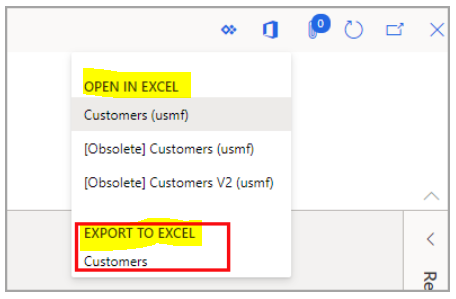
We all know the open in excel Open in Excel options are automatically added to pages when the system finds data entities that have the same root data source as the page. We can add our own custom options through code.
Can anyone share how the list comes in Export to Excel or add our custom data entity option to export to excel.
Thanks
Krishnendu
——————————
Krishnendu Sinha
sa.global
—————————— -
Export to Excel allows you to export every grid on current form. The name represents grid primary datasource.
If you want to make a custom export from code take a look at the class CustCollectionsExcelStatement or the links below.https://jonesd365.blogspot.com/2019/05/exporting-data-to-excel-from-x-code.html
——————————
Miha Vuk
Docentric
Kranj
——————————
——————————————- -
Krishnendu Sinha
MemberApril 20, 2020 at 2:57 PM
Hey Miha,Thanks for the response … what I meant by custom export was even though if my data entitie’s root data source isn’t same as the root data source of the form , I want to bring the entity in export to excel list.
Thanks
Krishnendu——————————
Krishnendu Sinha
sa.global
——————————
——————————————- -
You cannot add the entries to Export to Excel (unless you add additional grids on the forms).
You can add the entries to Open in Excel by developing new data entities or by adding Document Templates.
——————————
Miha Vuk
Docentric
Kranj
——————————
——————————————- -
Hi Krishnendu
If you go to Document Templates you can see this full Open in Excel options. This is where you go to load templates that will overwrite the existing templates. This is popular when you want to modify the Open in Excel option for journal uploads to change order of columns or to add remove columns from the default template
Thanks,
——————————
Arush Kuthiala
Western Computer
Toronto ON
——————————
——————————————- -
Ben Castellow
MemberApril 20, 2020 at 9:52 AM
Tagging onto Arush’s comment, for the GL journal entry template (General journal line entry-LedgerJournalLineEntryTemplate), one of the most common changes is to replace the Account.MainAccount (main account only) with AccountDisplayValue – Account (main account and financial dimensions). Not sure why this is not in the delivered template since I would think 99% of companies use financial dimensions.Thanks!
——————————
Ben Castellow
sa.global
Marietta GA
——————————
——————————————- -
Krishnendu Sinha
MemberApril 20, 2020 at 3:18 PM
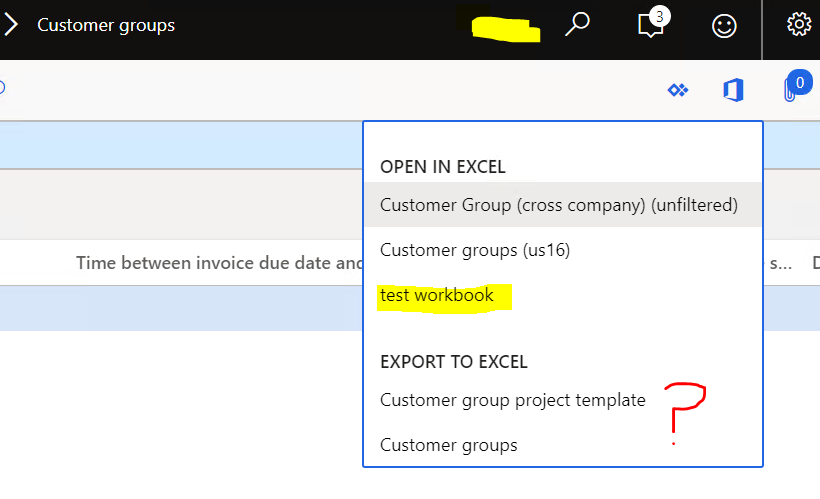
Hi Arush & BenThanks …I am aware of document templates…. I added one test workbook….what I am looking for is to add a different data entity (for eg: Customers ) option in export to excel in the customer group form…PFB screenshot with question mark.
——————————
Krishnendu Sinha
sa.global
——————————
——————————————- -
Hi Krishnendu,
List in Export to Excel is directly based on the number of grid present in current form.
Hence, All the grid in a current form will have respective menuitem in Export to Excel unless “exportallowed” property is set to false in form for that particular grid.
——————————
Nandita Nityanandam
Marketing Head
Synoptek
Oakbrook Terrace IL
——————————
——————————————-
DSC Communities replied 5 years, 11 months ago 1 Member · 0 Replies -
-
0 Replies
Sorry, there were no replies found.
The discussion ‘Export to Excel Option’ is closed to new replies.
