


Dynamics F/SCM
Public Group
Active 3 days ago
Dynamics F/SCM
Organizer:
- JOSE Organized by
-
-

Excel Add-In (no data)
-
Excel Add-In (no data)
Posted by Mark Yankovich on June 10, 2019 at 3:29 pm-
Hello!
Made a first attempt to use the Dynamics AX add-in for Excel. All seems fine, except that no data is returned. The tables and fields show in the left pane, but no data is returned. What are we missing?
We are in an AX 2012 R3 on-premise implementation stage.
(The client components were removed and re-installed with no change in the results).
Thank you!
——————————
Mark Yankovich
Allegheny Bradford Corporation
——————————?? -
Hi Mark,
What exactly do you mean with a left pane. Can you possibly include a screenshot (using the advanced editor) to illustrate exactly what you are looking at?
——————————
kind regards,André Arnaud de Calavon
Solution Architect, Microsoft MVP – Microsoft Dynamics Business Solutions
——————————
——————————————- -
Andre,
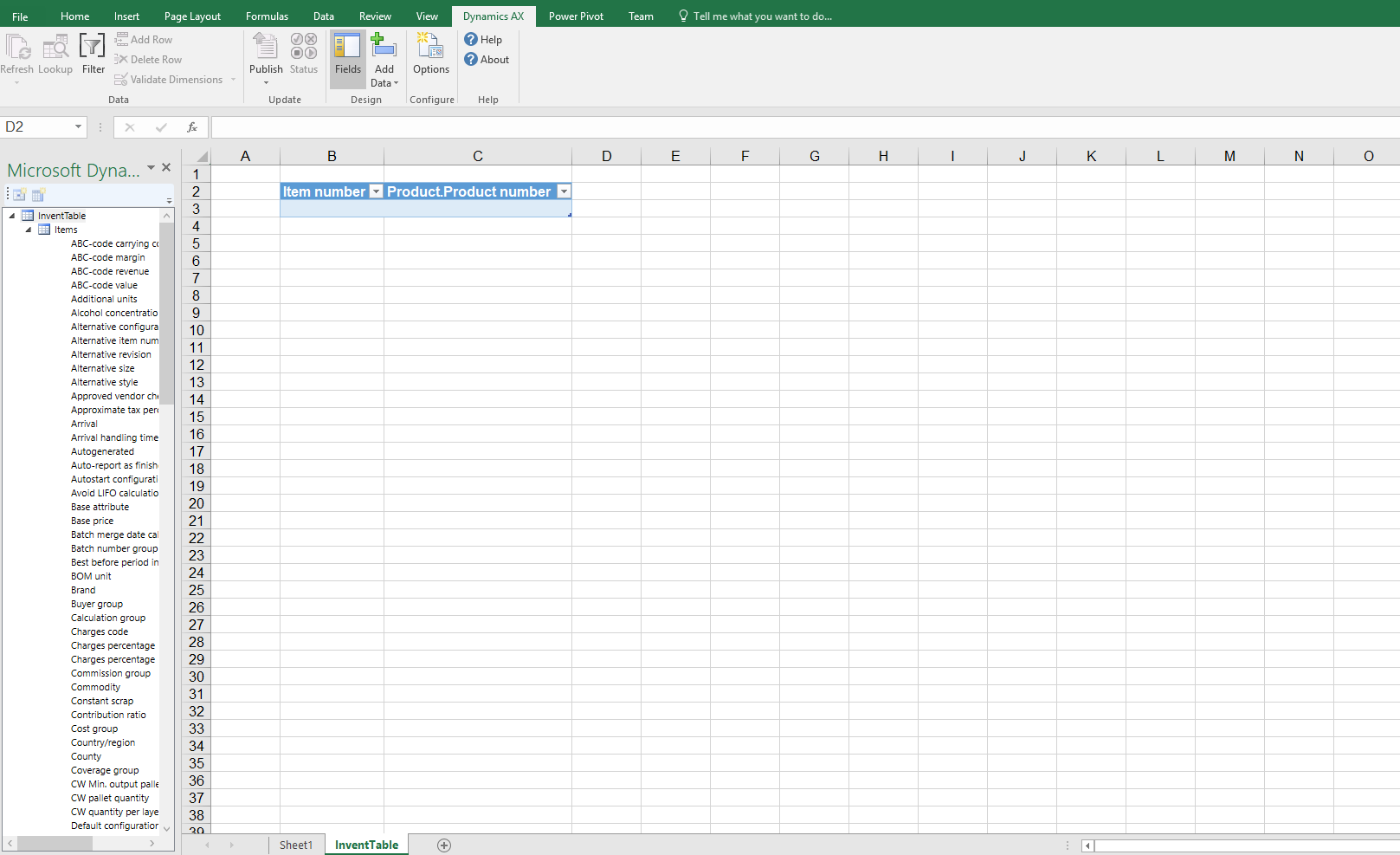
Here is a screenshot. The left side displays the fields of the InventTable. Notice that no data was returned to the spreadsheet.
——————————
Mark Yankovich
Allegheny Bradford Corporation
——————————
——————————————- -

Colby Gallagher
MemberJune 11, 2019 at 11:59 AM
You are currently in “Design mode” when the field list is displayed on the left, you cant retrieve data in design mode. Double click / drag the fields onto the worksheet that you want to see / edit. Right mouse click on the top level table -> Properties -> tick the “show calculated fields” box to show display methods. Then, once your done selecting fields,iIn the Dynamics AX tab in the ribbon, click the “Fields” button so it is not highlighted.Once you have exited design mode, click the “refresh” button in the top left.
Also, hit the Options button and verify you are connected to the correct AOS.
——————————
Colby Gallagher
Manufacturing Systems Consultant
Agility Business Solutions
Brecksville OH
——————————
——————————————- -
Chaitanya Golla
MemberJune 11, 2019 at 11:42 AM
Hi,Please refer below links to check if any setup/configuration is missing:
(Integrating Microsoft Dynamics AX with Microsoft Office)
https://docs.microsoft.com/en-us/dynamicsax-2012/appuser-itpro/integrating-microsoft-dynamics-ax-with-microsoft-office(Set up integration with Microsoft Office Add-ins)
https://docs.microsoft.com/en-us/dynamicsax-2012/appuser-itpro/set-up-integration-with-microsoft-office-add-ins(Using the Microsoft Dynamics AX Add-in for Excel)
https://docs.microsoft.com/en-us/dynamicsax-2012/appuser-itpro/using-the-microsoft-dynamics-ax-add-in-for-excel——————————
Regards,
Chaitanya Golla
Lead Architect
——————————
——————————————- -
All is working now. Thanks to your help!
——————————
Mark Yankovich
Allegheny Bradford Corporation
——————————
——————————————-
Mark Yankovich replied 7 years, 4 months ago 1 Member · 0 Replies -
-
0 Replies
Sorry, there were no replies found.
The discussion ‘Excel Add-In (no data)’ is closed to new replies.
