


Dynamics F/SCM
Public Group
Active 5 days ago
Dynamics F/SCM
Organizer:
- JOSE Organized by
-
-

Delete a production order – AX 2012 R2 CU8
-
Delete a production order – AX 2012 R2 CU8
Posted by Unknown Member on January 30, 2017 at 1:04 pm-
Hello All,
I’m trying to delete a production order because the user posted in the wrong unit of measure. Anyway, several journals had already been posted for the order and I need to reverse it. I set the status back to create but then I get a message that I can’t delete it because I need to release items first. See attached.
Ideas on how I can delete the order?
Let me know.
Thanks,
Sam
——————————
Sam Clark
Business Systems Analyst
Team Technologies
Morristown TN
—————————— -
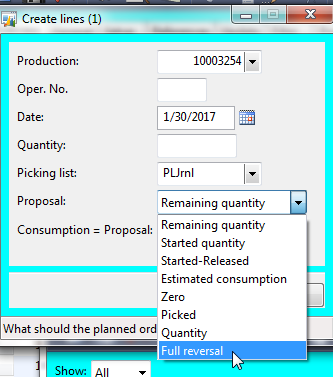 And you’ve already created a new pick list journal for a full reversal of all material and posted it?
——————————
Sean Blais
Operations Support
Sutphen Corporation
Dublin OH
——————————
——————————————- -

Emily Tsang
MemberFebruary 1, 2017 at 2:08 PM
I have the same problem, after reset to create, this infolog popped up., i try the full reversal, still not working.,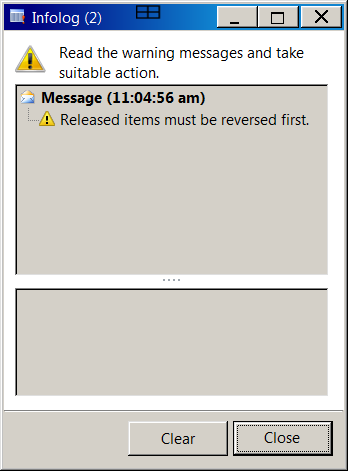
——————————
Emily Tsang
production control manager/master scheduler
Teledyne Technologies Inc
san diego CA
——————————
——————————————- -
Hi Sean,
Strangely we have never done this step when setting orders back to created. I did however, see this on a blog this morning and I tried it. The journal came back with a message that said ‘no lines were created’.
Thoughts?
Thanks,
Sam
——————————
Sam Clark
Business Systems Analyst
Team Technologies
Morristown TN
——————————
——————————————- -
Try remaining qty, zero out the consumption and check “End” on each line. This should release the BOM.
——————————
Richard Wehmeyer
PlayCore
Chattanooga TN
——————————
——————————————- -
Morning,
The pick lists have already been posted so I can’t zero out the consumption and ‘End’ it.
Usually once I change the order to ‘create’ it reverses everything, but this time it’s hung up.
Thoughts?
Thanks,
Sam
——————————
Sam Clark
Business Systems Analyst
Team Technologies
Morristown TN
——————————
——————————————- -
The Consumption=Proposal box was checked when you performed the full reversal?
——————————
Sean Blais
Operations Support
Sutphen Corporation
Dublin OH
——————————
——————————————- -
Hi Sean,
It doesn’t let me do a ‘full reversal’ at all. Says ‘no journal lines created’.
Thanks,
Sam
——————————
Sam Clark
Business Systems Analyst
Team Technologies
Morristown TN
——————————
——————————————- -
Elliot Finn
MemberJanuary 31, 2017 at 12:57 PM
HI
Have you tried doing a Production order consistency Check. Should be found in Production control > Periodic > Production order consistency check. That should bring up the following box, just click select, enter the Production order as criteria, then click OK.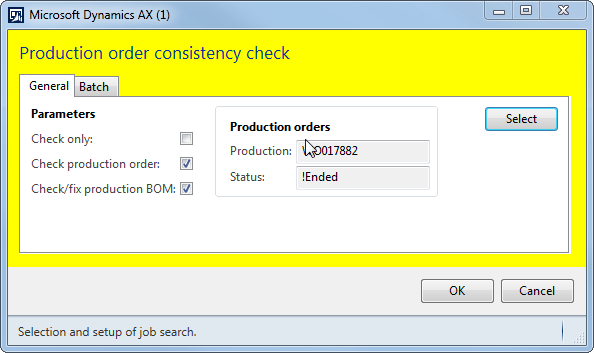
That often works for me when a work order is hung up.Cheers
——————————
Elliot Finn
Assistant Systems Administrator
Dairy Goat Co-operative (NZ) Ltd
Hamilton New Zealand
——————————
——————————————- -
Try this link
Dynamics AX: Deleting a Production Order After Posting a Picking JournalTridea Partners Blog remove preview 
Dynamics AX: Deleting a Production Order After Posting a Picking Journal This post outlines the steps required in Microsoft Dynamics AX to reset the status of a production order in order to delete the order. Once a production order has been picked you will need to reverse the picking list before resetting the status and deleting the order. View this on Tridea Partners Blog > ——————————
Paul Martin
Expert ERP Analyst
TempurSealy Inc.
Trinity NC
——————————
——————————————- -
Thanks everyone for all the great input!
Sam
——————————
Sam Clark
Business Systems Analyst
Team Technologies
Morristown TN
——————————
——————————————-
Unknown Member replied 9 years, 6 months ago 1 Member · 0 Replies -
-
0 Replies
Sorry, there were no replies found.
The discussion ‘Delete a production order – AX 2012 R2 CU8’ is closed to new replies.
