


Dynamics F/SCM
Public Group
Active 11 hours ago
Dynamics F/SCM
Organizer:
- JOSE Organized by
-
-

D365 Workspace vs Favourite
-
D365 Workspace vs Favourite
Posted by nazimlalji@hotmail.com on January 10, 2019 at 12:46 am-
Hi All
Whats the difference between workspace and Favourite in D365
thanks——————————
Nazim Lalji
Dynamics AX Analyst——————————
-
favourties work just like they did in AX2012: you make a certain menu entry a “favourite” and it shows up at the top left corner of the screen, available for quick access without having to go through the whole manu.
Workspaces are work areas, pre-configured out of the box, that brings together existing reports, data entry forms, lists related to one area of functionality, which supposedly would be useful for a user performing certain work function.
——————————
Zvika Rimalt
Functional Consultant
Vancouver BC
——————————
——————————————- -

MICHAEL MILLS
MemberJanuary 11, 2019 at 9:02 AM
With workspace you can group a number of different Elements (Favorites) and decide on Presentation Eg. Tile, List, Link. So for me by creating a Workspace and adding all of the different Elements I need to do, some as Tiles with counter on, List for the task I monitor daily, and Links for task I do once in a while.
Michael Mills | AX D365 Consultant Operations
Blue Horseshoe, 11939 N. Meridian St., Ste 300, Carmel, IN 46032
Mobile: 813-335-6582 | http://www.bhsolutions.com——Original Message——
Hi All
Whats the difference between workspace and Favourite in D365
thanks——————————
Nazim Lalji
Dynamics AX Analyst——————————
-
JOHN q
MemberFebruary 28, 2019 at 12:41 PM
Hello Nazim,Please see official Microsoft documentation for further details: Navigation concepts
See attached image for broad overview of nav concepts.Thank you,
Johnny
——————————
Johnny Struck
Self
Seattle WA
——————————
——————————————- -
Greg Griffith
MemberMarch 1, 2019 at 9:53 AM
On the left navigation pane and below the Favorites is a section for Recent. Under Recent, you will see recently selected menu items. The Workspaces are a configurable feature that work to gather up a set of related menu items. It is an alternative to using Favorites. There are multiple ways to navigate. Recommended: Use the methods that work well for you.——————————
Greg Griffith
Sr. Consultant
Hitachi
——————————
——————————————- -
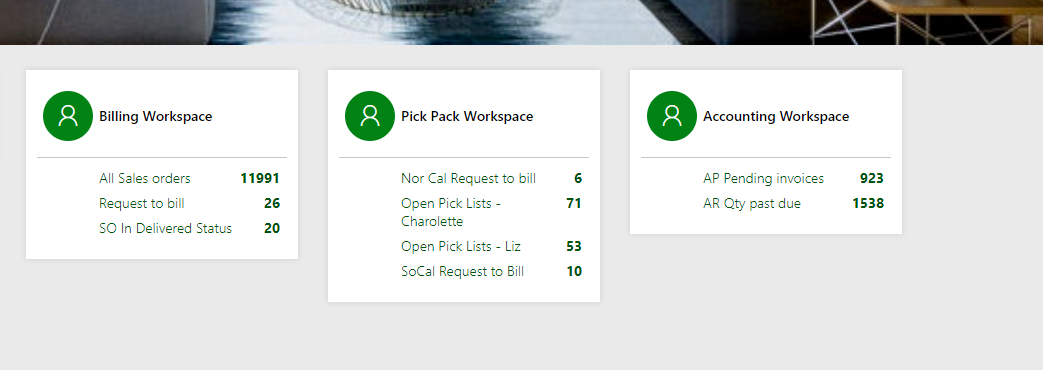
?The biggest difference is that workspaces can store a filtered view. We like to create workspaces that allow employees to know what to work on when they open up D365. They launch their work day from here, rather than going to a favorite, and filtering to see their work.
They also give managers a quick snapshot in real time. Accounting managers can see open AR, open AP, etc, all in one workplace.
——————————
Sandra Rudloff
Vice President Business Systems
Pivot Interiors, Inc.
Santa Clara CA
——————————
——————————————- -
Think of workspaces as the original Role Centers. this is a quick way based on your role to not have to do a ton of navigation or set favorites to do your daily tasks. it is the next evolution of role centers
——————————
Paul Martin
Production Program Manager
Elite Comfort Solutions, LLC
Rutherfordton NC
——————————
——————————————-
nazimlalji@hotmail.com replied 7 years, 10 months ago 1 Member · 0 Replies -
-
0 Replies
Sorry, there were no replies found.
The discussion ‘D365 Workspace vs Favourite’ is closed to new replies.
