


Dynamics F/SCM
Public Group
Active 2 weeks ago
Dynamics F/SCM
Organizer:
- JOSE Organized by
-
-

BYOD Export Batch Jobs Failing
-
BYOD Export Batch Jobs Failing
Posted by DSC Communities on May 22, 2019 at 2:30 pm-

Ricky Bennett
MemberMay 22, 2019 at 2:30 PM
Hi,Has anyone experience the issue with multiple batch jobs failing to export data entities to the Azure SQL Database (BYOD). How do I trouble shoot this issue? The execution log only states that it failed copying from stage to target. Any information regarding this would be greatly appreciated.
Thanks,
Ricky——————————
Ricky Bennett
National Vision, Inc
—————————— -
Joe MacPherson
MemberMay 23, 2019 at 2:44 AM
Hey Ricky…There could be a number of issues that are affecting the exports to BYODB… These are some of our experiences that we’ve had to take into consideration…
- There is a 60 minute defined server Timeout threshold on any one Data Entity Export that exceeds the threshold and the Data Entity will fail to export…
- Have you looked at the Staging Cleanup? One thing that caught us was that unbeknownst to our team every time that you export to the BYODB, you will append to the backend ‘Staging” tables that you won’t see… Even if you select to by-pass Staging on the export, data will append, so it is imperative to Clean the Staging using the Data Management tool… we actually have a Batch job that we created to clean the Staging data nightly after our extracts have completed…
- There are occasions that we’ve experienced where the Data Entity loses context/connection to the BYODB (we haven’t found the root Cause of this yet) and the only recourse that you have is to Drop and Republish the Data Entity…
- Are the batch extracts assigned to a Batch Group on an AOS that is also shared with interactive activity?
- Are there other higher priority batch jobs executing in parallel
- Are there other batch jobs executing as multi-threaded batch job that supersede
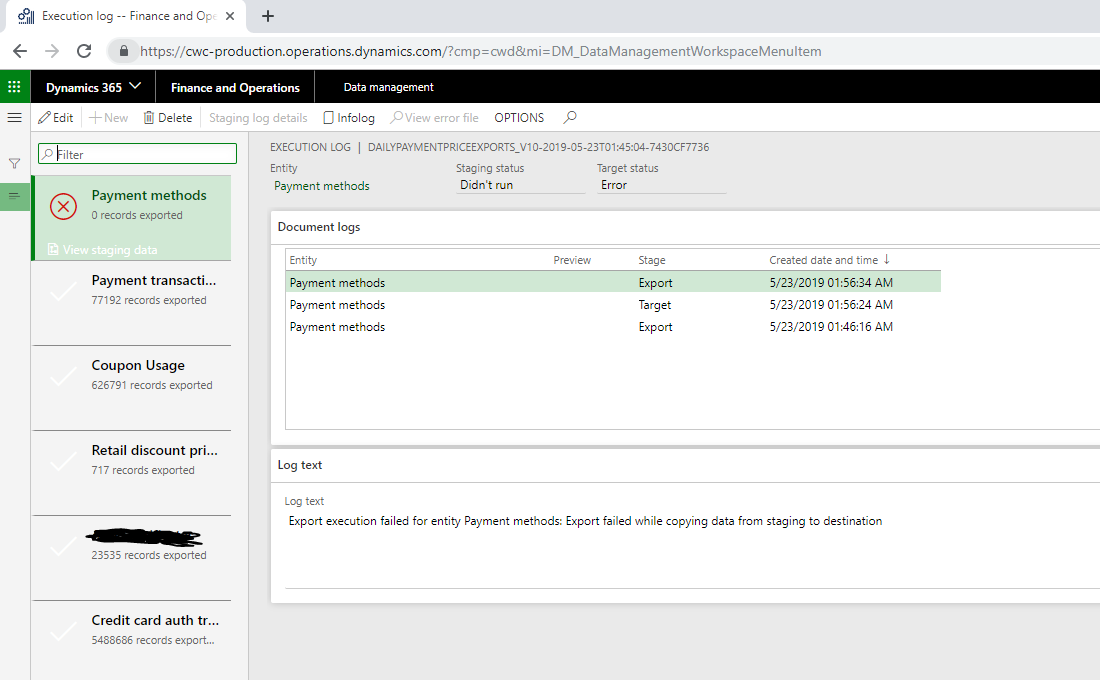
- Here is an example of a nightly extract that failed randomly…
- Rerunning this Data Entity by itself as Export now easily pulled that data
——————————
Joe MacPherson
Coldwater Creek
Hingham MA
——————————
——————————————- -
Mark Schurmann
MemberMay 23, 2019 at 10:00 AM
I often find that locating the errors for a data management job to be a game of hide-and-seek. Try the following:1. From the Execution Summary Screen, select the View execution log.
2. Select the data entity that is failing. There should be two entries in the Document log. One for target and one for export. Select each and evaluation the Log text for an error.
3. Select ViewStaging data for the failing data entity. Turn on “Show Duplicates” and then filter on status of “Error”. Evaluate the error message for each record.You may want to try republishing the data entity. This sometimes clears the pipes of whatever is wrong and the job will then succeed.
——————————
Mark Schurmann
Accounting Systems Manager
Automobile Protection Corp
Norcross GA
——————————
——————————————- -
David Greenberg
MemberMay 23, 2019 at 2:17 PM
Have you created a recurring data job to schedule your exports to the BYOD??In the latest version of Microsoft’s knowledge base article — Bring your own Database (BYOD) [see link below], it states that you shouldn’t create a recurring data job for the BYOD export (using Manage > Manage recurring data jobs). Instead, you must use the Export in Batch Option (available under Export Options). Even though scheduled exports created under both of these methods will appear to be batch jobs under the System Administration workspace – Inquiries – Database – Batch Jobs section
Note: Use of recurring exports in Manage > Manage recurring data jobs for BYOD is discouraged. You must use the Export in batch option.
——————————
David Greenberg
Illinois Tool Works
Troy OH
——————————
——————————————- -
Mark Schurmann
MemberMay 24, 2019 at 9:13 AM
We have always setup the recurring batch jobs through Data Management. I’ve never thought of manipulating the batch job that is created. I think if I ran into an issue, my inclination would be to delete the batch job and recreate it through Data Management.——————————
Mark Schurmann
Accounting Systems Manager
Automobile Protection Corp
Norcross GA
——————————
——————————————- -
Gina Pabalan
MemberMay 24, 2019 at 9:00 AM
A few questions:1. Are you using the out of box Microsoft Standard Entities? If so, keep in mind that these entities were designed to get data INTO D365, not support data extract/reporting. The standard entities have logic built into them that transforms data from the underlying OLTP to the Entity. This is additional work that needs to be performed in the export process, and depending on your configuration of D365 and data volumes, could potentially cause some performance issues.
2. Are you using Incremental Load? Again, the Out of box entities are not optimized for data export so they are not set up for incremental – but for a one time data load INTO D365. Over time, as your database grows, you will need incremental. This involves some customizations and possible creation of your own Entities.
Caution: Customers should be careful of data redundancies in the BYOD – or pushing the same data to the BYOD multiple times. This is a risk in an environment where you are building entities for one-off specific reporting needs. Suggestion would be to push out the underlying D365 table structures in an unadulterated form – to get to the lowest level of granularity in your data. This will be helpful to avoid data redundancies, storage will be more efficient, and the best way to harmonize data from OTHER transaction systems, if you have to.
Gina Pabalan
Blue Kite
Independent Senior BI Advisor | Program Manager | Microsoft Dynamics
gina.pabalan@ibluekite.com——————————
Gina Pabalan
Blue Kite
Independent Senior BI Advisor | Program Manager | Microsoft Dynamics
gina.pabalan@ibluekite.com
——————————
——————————————-
DSC Communities replied 7 years, 3 months ago 1 Member · 0 Replies -
-
0 Replies
Sorry, there were no replies found.
The discussion ‘BYOD Export Batch Jobs Failing’ is closed to new replies.
