Bulk User import

  • Bulk User import

    Posted by Amber Aaron on December 5, 2021 at 4:00 pm
    • Amber Aaron

      Member

      December 5, 2021 at 4:00 PM

      Hello is there a way to import many user accounts into D365 F&O at one time? I attempted to use excel add-on and update the design table but I get the error that the workbook could not update

      ——————————
      Amber Aaron
      Summit Racing Equipment
      Tallmadge
      ——————————

    • Kamar Wilks

      Member

      December 6, 2021 at 7:09 AM

      Hi Amber

      Excel Add-In

      I have not used Excel Addin for this before but my suggestion is to check that all fields available for the add-in are in your file and are accounted for. I have seen before where the add-in does not work unless all fields are showing in the selected fields area. You may do so by
      1. Click on design
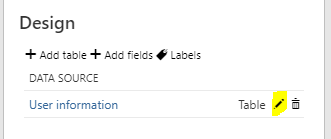
      2. Click on the edit icon for the data entity
      3. In the Available Fields section do CTRL+A then click on add under Selected Fields. All Fields will now be displayed in the Selected Field section.
      4. Click on Update
      5. Fill in the necessary fields and try to publish again

      Data Management
      You could manually fully set up one user. Then use data management to export the user information. Amend the file exported by adding all the other users and modeling them after the one you had manually created. Import the amended file back into D365 and see if that works.

      If you have users in different countries please pay attention to language, country, and timezone in your file.

      ——————————
      Kamar Wilks
      BlueCrest Inc
      Danbury
      ——————————
      ——————————————-

    • Amber Aaron

      Member

      December 9, 2021 at 4:46 PM

      Thank you so much I went with DMF

      ——————————
      Amber Aaron
      Summit Racing Equipment
      Tallmadge
      ——————————
      ——————————————-

    • Kerstin Newman

      Member

      December 6, 2021 at 9:03 AM

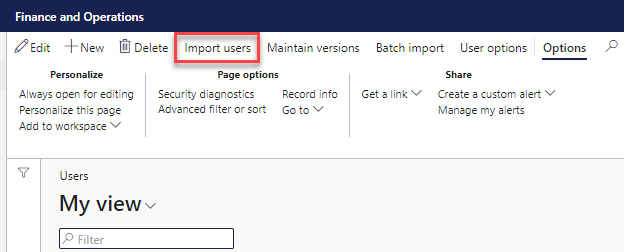
      Are you importing them from AD? If so, you go to the users screen and click “Import Users” and can select as many as you want to all import at once:

      ——————————
      Kerstin Newman
      Business Analyst
      StarTech.com
      London ON
      ——————————
      ——————————————-

    • Amber Aaron

      Member

      December 9, 2021 at 4:47 PM

      Thank you Kerstin! We are on-prem so syncing our AD doesn’t work properly for some reason.

      ——————————
      Amber Aaron
      Summit Racing Equipment
      Tallmadge
      ——————————
      ——————————————-

    Amber Aaron replied 4 years, 7 months ago 1 Member · 0 Replies
  • 0 Replies

Sorry, there were no replies found.

The discussion ‘Bulk User import’ is closed to new replies.

Start of Discussion
0 of 0 replies June 2018
Now

Welcome to our new site!

Here you will find a wealth of information created for peopleĀ  that are on a mission to redefine business models with cloud techinologies, AI, automation, low code / no code applications, data, security & more to compete in the Acceleration Economy!