

Budgeting module – budget model requirement

  • Budgeting module – budget model requirement
    Posted by nazimlalji@hotmail.com on January 22, 2019 at 1:29 pm
    • Najeem JanatAli

      Member

      January 22, 2019 at 1:29 PM

      Hi All

      please can you advice, does every time it requires to set up a separate model for upload of yearly budget

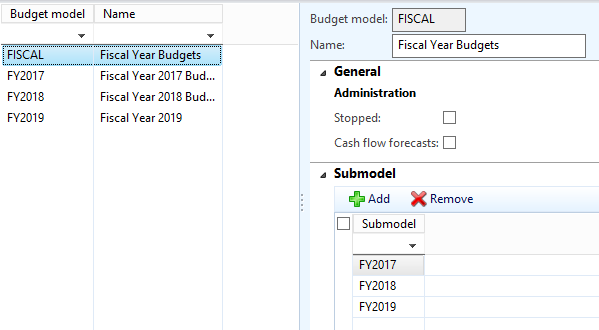
      AttachedĀ  is the form

      please advise

      thanks and kind regards

      ——————————
      Nazim Lalji
      Dynamics AX Analyst

      ——————————

    • Steve Latta

      Member

      January 23, 2019 at 8:11 AM

      Hello Nazim,

      I don’t believe it is required, however it is a good practice.

      What I do is create a budget model called “Budget” and then separate budget models for each fiscal year “FY2017, FY2018, etc.”. I then add the yearly models as submodels under “Budget”. That way, in Management Reporter, I can build my reports to use the “Budget” model for budget column data and each new year is automatically rolled up into the report without having to change the column definition to use one of the annual budget models specifically.

      Budget models
      Using different models would also allow you to set up unique budgets – for example an optimistic budget, a pessimistic budget and an expected budget, if you had a requirement for that.

      ——————————
      Steve Latta
      Accountant
      Ortec, Inc.
      Easley SC
      ——————————
      ——————————————-

    • Amos Black

      Member

      January 23, 2019 at 8:13 AM

      Hi Nazim. You don’t need a new budget model every year. If you do, you’ll need to modify all your budget reports to look at the new budget model. We use the same budget model for our primary budget model year after year, but we do set up different models for different versions of our forecast.

      ——————————
      Amos Black
      Analyst, Finance
      Shentel
      Edinburg VA
      ——————————
      ——————————————-

    • Ryan Sandness

      Member

      January 23, 2019 at 11:39 AM

      It depends on your requirements, but the short answer is no, its not required.Ā 

      You could setup a budget model called ‘Annual’ and use it year over year with date filters when necessary.

      ——————————
      Ryan Sandness
      Senior Program Manager Ryan.Sandness@microsoft.com
      ——————————
      ——————————————-

    nazimlalji@hotmail.com replied 7 years, 6 months ago 1 Member · 0 Replies
  • 0 Replies

Sorry, there were no replies found.

The discussion ‘Budgeting module – budget model requirement’ is closed to new replies.

Start of Discussion
0 of 0 replies June 2018
Now

Welcome to our new site!

Here you will find a wealth of information created for peopleĀ  that are on a mission to redefine business models with cloud techinologies, AI, automation, low code / no code applications, data, security & more to compete in the Acceleration Economy!
