


Dynamics Business Central (NAV)
Public Group
Active 4 days ago
Experts:




Summarize Change Log Entries
-
Summarize Change Log Entries
Posted by Jason Wilder on August 23, 2019 at 8:35 am-
I have seen a few posts over the years about Change Log Entries getting out of control. In order to help our own company with this I have created a simple tool that others may benefit from. It counts change log entries by table, displays counts by field in a factbox and gives access to Change Log Setup and Delete Change Log Entries report in the ribbon. All this is date filterable as well. Here is what it looks like (blanks in Table Caption or Field Name means the table/field does not exist anymore so you can most certainly delete those):
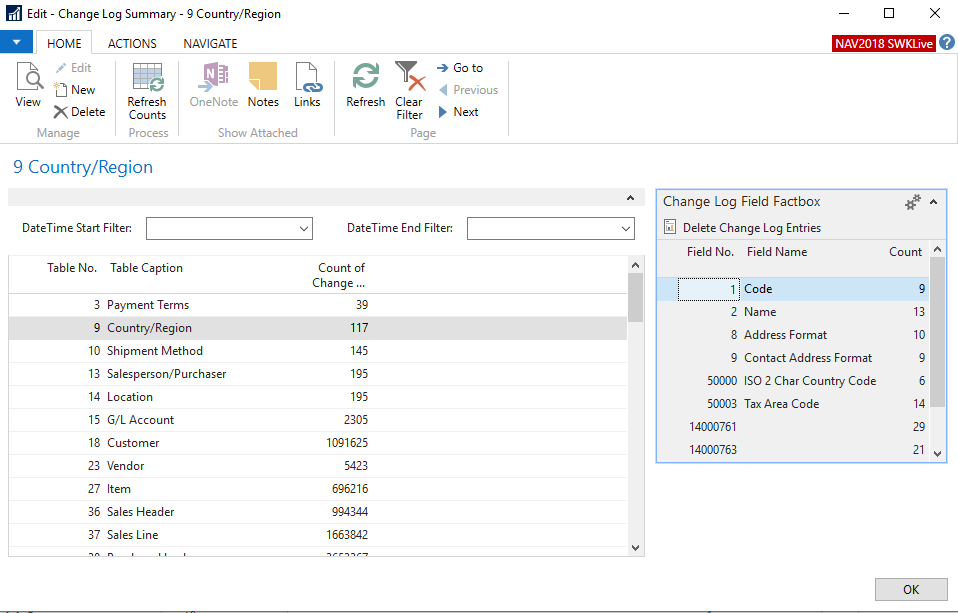
You can even Delete Change Log entries at the field level which can be further filtered based on your date filter and Count fields are drill-downable. There is nothing crazy new from base but just summarized and easier to use. Depending how large your Change Log Entry table is this screen could take a second or two to load and move round. It will be faster if you use the scroll bar instead of using the keyboard cursor keys to move one record at a time (the slowness is due to the field factbox).
I have attached the 3 C/AL objects (2 Pages and 1 Query) as text that can be imported into a database for you to try it out. Currently the object numbers are this but will probably need to be renumbered into a range that works for you:
Page 50000 Change Log Summary
Page 50001 Change Log Field Factbox
Query 50000 Change Log TotalsSend me an email if you need help with the renumbering. Don’t forget that when importing as text it overwrites exsiting object so make sure these object numbers don’t exist.
——————————
Jason Wilder
Senior Application Developer
Stonewall Kitchen
York ME
—————————— -
Looks like the attachment of the objects opens them in a new web page instead of allowing you to download them. Either copy and paste into notepad and then save as a file or send me a message and I will send you the objects.
——————————
Jason Wilder
Senior Application Developer
Stonewall Kitchen
York ME
——————————
——————————————- -
Thanks for this, Jason. I plan to check it out.
BTW, you can right-click the attachment and click Save Link As to download the text file.
——————————
Lewis Rosenberg
IT Manager
Mars Fishcare
Chalfont PA
————————————————————————
BCUG/NAVUG All-Star
BCUG/NAVUG Board of Advisors, Chairperson
BCUG/NAVUG Programming CommitteeTwitter: @RosenbergL
LinkedIn: https://www.linkedin.com/in/rosenbergl
————————————————————————NAVUG/BCUG Summit (navugsummit.com)
Orlando, FL – October 15-18, 2019Come hear me speak:
GET50 – All About NAV/BC Security
Friday, October 18, 2019
9:45 AM – 10:45 AM
——————————
——————————————- -
Jason, this is awesome! I love that you are sharing with everyone, love NAVUG!
——————————
Kim Dallefeld
Kim@Dallefeld.com
Dallefeld Consulting, LLC
Member of Dynamics Consulting Group
Ft. Worth, TX
2019 NAVUG Board of Advisors
Past NAVUG Board Chairman
NAVUG Programming Committee
——————————
——————————————- -
This version fixed a few minor bugs.
——————————
Jason Wilder
Senior Application Developer
Stonewall Kitchen
York ME
——————————
——————————————-
Jason Wilder replied 7 years, 1 month ago 1 Member · 0 Replies -
-
0 Replies

Sorry, there were no replies found.
The discussion ‘Summarize Change Log Entries’ is closed to new replies.
