


Dynamics Business Central (NAV)
Public Group
Active 3 days ago
Experts:




SQL and Managing NAV SQL Environment
-
SQL and Managing NAV SQL Environment
Posted by Ronald L McVicar Jr on January 22, 2018 at 9:36 am-
Bottom line question: How often or what is best practice for rebooting a Microsoft Dynamics NAV SQL Server? I know in general, regardless of ERP system, MS SQL Server should only be updated for ?:
tempdb issues
hotfixes, updates, service packs (essential) etc.
some kind of infrastructure or SAN, storage change e.g. port changes, etc.However in various ERP MVP groups there are some sage best practices as some of these environments have lagging code not leveraging what Microsoft SQL can now do but did not do then the great migration happened (e.g., mid-1990’s to mid-2000) or other challenges in various configuration (e.g., high volume, serialized inventory, job costing, etc..
This being said what is the best practice for Microsoft Dynamics NAV?
I already read all the surveys from the dba and system community:
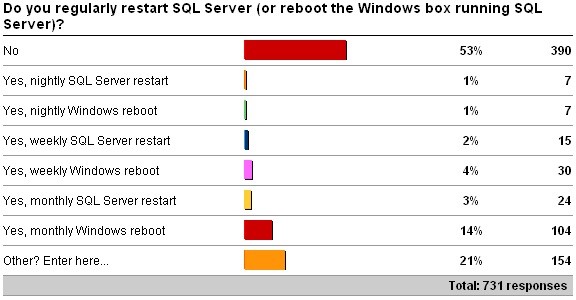
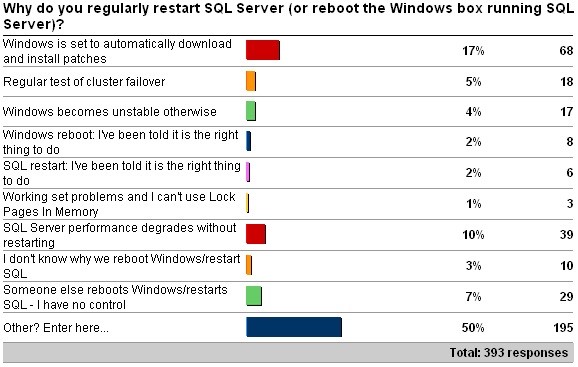
——————————
Ronald McVicar
National Steak Processors, Inc.
Owasso OK
—————————— -

Mathew Ealy
MemberJanuary 22, 2018 at 9:51 AM
With all Microsoft servers patch management is a huge factor in the servers up time. Using WSUS our Dev SQL server would be updated restarted patches tested, if the patches where approved they then would be rolled out to production a maintenance window scheduled and the server restarted during that time frame. This could be monthly or quarterly depending on how impotent the update is to security.Because of the need to keep the servers updated causing pretty standard reboot cycles I never got to a point where the server needed rebooted because of the ERP data on the SQL server itself.
——————————
Mathew Ealy
Nav Support Specialist
Rentokil N. America
Reading PA
——————————
——————————————- -
Val Gameiro
MemberJanuary 23, 2018 at 9:22 AM
?We reboot the SQL server for updates or patches to Windows or SQL. Definitely not a regular occurrence. And our updates are all set to manual, as many Microsoft updates have broken systems.——————————
Val Gameiro
Senior NAV Analyst
BPL Plasma Inc.
Austin, Texas
NAVUG Austin Chapter Leader
——————————
——————————————- -
Ramin Marghi
MemberJanuary 23, 2018 at 12:36 PM
Hi Ronald,I definitely echo the other responses — restarting the server is generally not recommended to be a frequent occurrence. I do, however, defer to the expertise of infrastructure specialists on this topic.
One thing to be aware of when restarting a server — sometimes restarting the SQL server will trip up the NAV middle tiers (even if they’re on a separate application server). Specifically it can cause some headaches with NAS / Job Queues. If your organization uses NAS Services, just make sure a follow-up task of any SQL reboots is to check on the heartbeat of the Job Queues and the Status of the Job Queue Entries.
——————————
Ramin Marghi , CPA, CGA
CPA, CGA | ERP Consultant
Catapult ERP
VANCOUVER BC
——————————
——————————————- -
One thing to be aware of when restarting a server — sometimes restarting the SQL server will trip up the NAV middle tiers (even if they’re on a separate application server).
Specifically it can cause some headaches with NAS / Job Queues. If your organization uses NAS Services, just make sure a follow-up task of any SQL reboots is to check on the heartbeat of the Job Queues and the Status of the Job Queue Entries.Ramin Marghi, 01-23-2018 12:35 PMYes, it definitely causes issues. I have just made it part of my SQL reboot process to check the services for NAS/Job Queue to make sure those all are functioning properly. There have been instances where I had to restart the service trier service and job Q services after the SQL server reboot.
Meenakshi
——————————
Meenakshi Singh
Manager of Business Applications
Home Market Foods, Inc.
Norwood MA
——————————
——————————————- -
Justin Falconer
MemberJanuary 26, 2018 at 2:27 PM
One thing to be aware of when restarting a server — sometimes restarting the SQL server will trip up the NAV middle tiers (even if they’re on a separate application server). Specifically it can cause some headaches with NAS / Job Queues. If your organization uses NAS Services, just make sure a follow-up task of any SQL reboots is to check on the heartbeat of the Job Queues and the Status of the Job Queue Entries.Ramin Marghi, 01-23-2018 12:35 PMI just ran into this the other day, and I have also added this to my list of things to check when rebooting SQL server.
I normally only reboot SQL due to install of patches to the OS or SQL.
?——————————
Justin Falconer
IT Manager
Tender Corporation
Littleton NH
——————————
——————————————- -
David Singleton
MemberJanuary 29, 2018 at 6:23 AM
If it’s not broke don’t fix it.
Only reboot SQL if there is a specific need to do so.
——————————
David Singleton
Go Live International
SQL Perform Navision Performance Consultant
dsingleton@go-live.us
——————————
——————————————- -
Geovanny Fuentes
MemberJanuary 29, 2018 at 11:26 AM
I’m a fan on updates, but also caution! is a big factor.
I would normally see what is getting updated and update my TEST SQL box.
I review the changes, reboot and have users test it out.
If issues are found, it gets taken out and never implemented to the LIVE SQL box.
Otherwise, those rare times of the year after testing, its does get rebooted with the necessary patches needed to keep our box healthy and safe by Microsoft.
Good luck.——————————
Geovanny Fuentes
San Diego CA
——————————
——————————————- -
Jeane Meade
MemberJanuary 30, 2018 at 9:22 AM
NAV 2015 here. Our NAV and SQL boxes are VMs on the same host. My steps are to stop all NAV services, then reboot the SQL box. Apply updates to the SQL box and reboot as needed. Then reboot the NAV box, apply updates and reboots as needed. Then check to make sure everything is working correctly. Then I shut down the NAV VM, then the SQL VM and reboot the host. Apply updates and reboots as needed to the host. Once the host is in good shape, restart SQL VM, wait until it’s up, then restart the NAV VM. Again, check everything is working correctly. This is done monthly.Since following the above process, we haven’t had any errors.
——————————
Jeane Meade
IT/DBM
Sheldons’, Inc.
Antigo WI
——————————
——————————————- -
We follow the same steps for our NAV 2013 services and SQL server.
Thanks,
Meenakshi——————————
Meenakshi Singh
Manager of Business Applications
Home Market Foods, Inc.
Norwood MA
——————————
——————————————-
Ronald L McVicar Jr replied 8 years, 6 months ago 1 Member · 0 Replies -
-
0 Replies
Sorry, there were no replies found.
The discussion ‘SQL and Managing NAV SQL Environment’ is closed to new replies.
