


Dynamics Business Central (NAV)
Public Group
Active 6 days ago
Experts:




Shipment Date and Receipt Date on a Transfer Order
-
Shipment Date and Receipt Date on a Transfer Order
Posted by Jason Wilder on February 7, 2019 at 5:02 pm-
We use Transfer Orders to ship from one location to another. It can take a different number of days from shipment to receipt depending on numerous factors such as the Locations, Shipping Service and time of year. Without any setup the Shipment Date and Receipt Date always remain in sync with each other. This is annoying as these dates will never be the same for us. We would like to set the Shipment Date and then separately set the Receipt Date. Anyone know how to do this with a mod? I have messed around with Inbound and Outbound Warehouse Handing Time but it doesn’t really do anything but change the Receipt Date by one day no matter how many days I enter.
In the Code there are references to Location, Company Information, Shipping Agent Agent, Shipping Agent Service, Calendar Codes and Transfer Routes when it calculates these dates. Before I spend more time trying to figure this out can anyone explain how this works or how to maybe set a Inbound Warehouse Handling Time to change the Receipt Date?
——————————
Jason Wilder
Senior Application Developer
Stonewall Kitchen
York ME
—————————— -

Devraj Ghosh
MemberFebruary 8, 2019 at 9:41 AM
Hi Jason, I’ve had a similar request and I’ve had to modify the transfer routes table to add the factors that affect the lead time between the dates (shipment and receipt). I don’t see any other way to do this without some form of customization.——————————
Devraj Ghosh
Sr. NAV Consultant
RSM USA
——————————
——————————————- -
Cynthia Priebe
MemberFebruary 8, 2019 at 9:53 AM
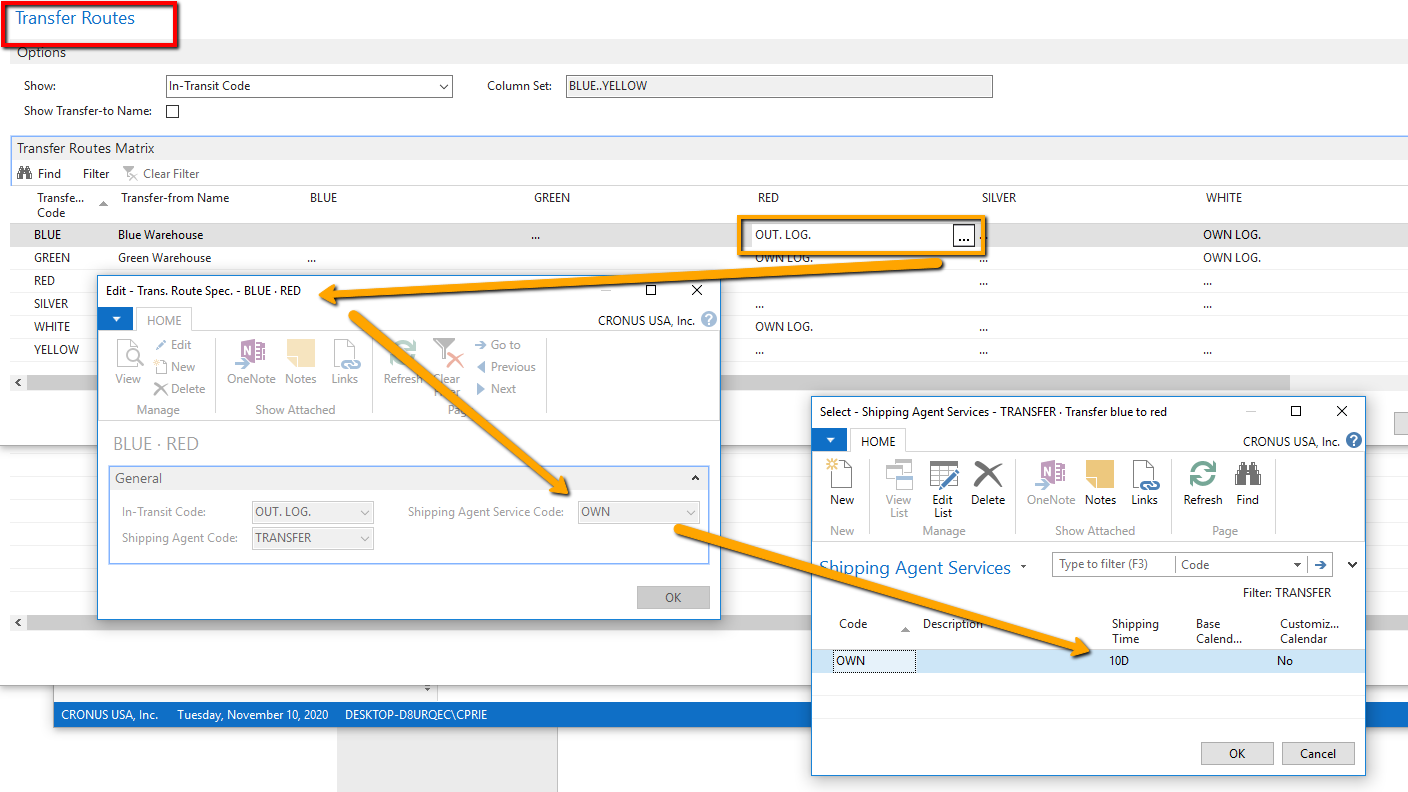
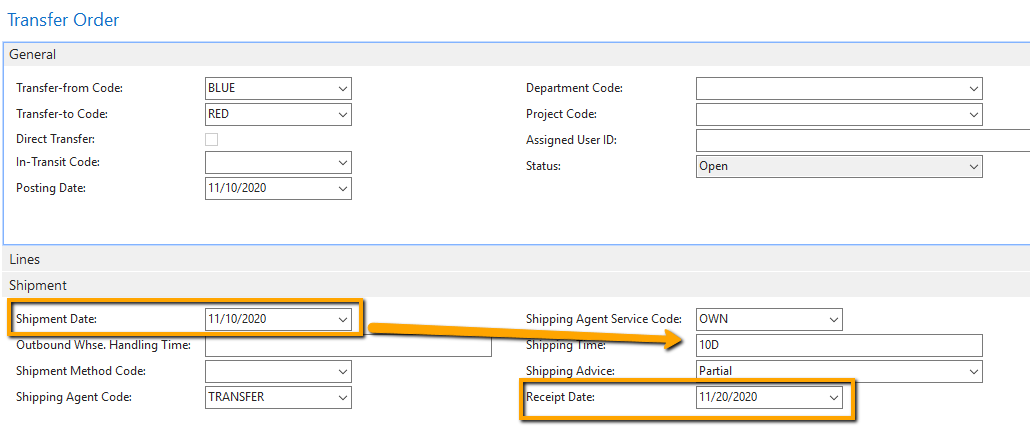
You can use the Shipping Time from the Shipping Agent Service if you add this to the Transfer Route Specifications. When you select the From and To Locations on the Transfer Order it will use this information to set the Shipping Time and thereby Receipt Date.Let me know if this resolves your issue.
——————————
Cynthia Priebe MCP, DCP
Senior Analyst and Project Manager
Liberty Grove SoftwareJoin us at User Group Focus in Houston, March 13-14, 2019.
Woo-hoo! There is a track for Business Analysts this year.
Join me and my co-panelists and presenters at the following sessions:
BAN75 – Ask the Analysts
CFO90 – Ack! My A/P Person Just Left, What Do I Do Now?Not for you, check out the other great content at https://www.ugfocus.com/focus/locations/houston/houston2
——————————
——————————————- -
Cynthia, ?I am still unable to get this to work. I can get the Shipping Time populated to 10D in the Transfer Header and the Transfer Lines based on the transfer route setup but it still doesn’t calculate the dates correctly. Shipping Date says 2/8/19 and Receipt Date says 2/9/19. I can change the Shipping Time on the header or line to 1000D and it still says 2/8/19 and 2/9/19. In your scenario above what is the Shipping Date and the Receipt Date, is it actually 10 days apart?
If we focus down on the Transfer Lines only and look at “Shipping Time”, “Outbound Whse. Handling Time”, “Inbound Whse. Handling Time” they do not at all seem to work for me (we do not have mods in this area). Do they work for you?
——————————
Jason Wilder
Senior Application Developer
Stonewall Kitchen
York ME
——————————
——————————————- -
Found the answer (thanks for the responses as it helped a lot). There is a field in Company Information table called “Cal. Convergence Time Frame” on the Shipping Fasttab. Ours was blank. Since it was blank the system would only go out 1 day of the calendar when trying to calculate the new dates. This field is suggested to be set to 1Y. As soon as I did this everything works really good now. Crazy that we have had NAV for 20 years and this has not come up before.
——————————
Jason Wilder
Senior Application Developer
Stonewall Kitchen
York ME
——————————
——————————————- -
Cynthia Priebe
MemberFebruary 8, 2019 at 11:43 AM
Jason,And of course Cronus that I used for my response has it set to 1Y.
——————————
Cynthia Priebe MCP, DCP
Senior Analyst and Project Manager
Liberty Grove SoftwareJoin us at User Group Focus in Houston, March 13-14, 2019.
Woo-hoo! There is a track for Business Analysts this year.
Join me and my co-panelists and presenters at the following sessions:
BAN75 – Ask the Analysts
CFO90 – Ack! My A/P Person Just Left, What Do I Do Now?Not for you, check out the other great content at https://www.ugfocus.com/focus/locations/houston/houston2
——————————
——————————————-
Jason Wilder replied 7 years, 8 months ago 1 Member · 0 Replies -
-
0 Replies
Sorry, there were no replies found.
The discussion ‘Shipment Date and Receipt Date on a Transfer Order’ is closed to new replies.
