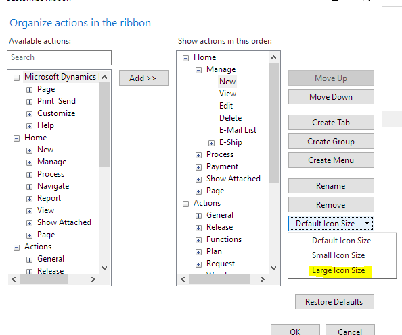
You can customize the size of the icons on your ribbon in NAV?
Go to the blue box at the top left and choose customize ribbon. When you highlight an action [icon] on the right box and go to the Icon Size on the far right you can choose Default, Small or Large.
Change these icons to Large for your most used actions on the ribbon. You can also move them up to the Home tab for easy access!
Ā
Set aside tabs for later in Microsoft Edge
Select
whenever you have tabs that you might need again later. To bring them back, select and then Restore tabs.
Find the tab you need in Microsoft Edge
Selectto show previews of all of your tabs at once – super useful when you have several tabs from the same website.
Import your bookmarks and more
Quickly get your bookmarks, saved passwords, and browsing history from other browsers on your PC. Select More …> Settings > Import from another browser and then choose the browser.
Handy Hotkeys!
Win + [left or right arrow] to pin current window to respective screen edge.
Win + M to minimize all desktop windows
Win + R to open the run command
Win + X to open Windows quick access menu.
Alt + Tab to switch between open programs
Ctrl + Shift + Esc to open the task manager
Ā
Ā
Ā
Ā
—————————— Holly Kutil American Ring/NAV Admin Solon, OH 44139 **Great Lakes Chapter** ?? Women In Dynamics ?? ——————————
Please note:
This action will also remove this member from your connections and send a report to the site admin.
Please allow a few minutes for this process to complete.

Report
You have already reported this .
Welcome to our new site!
Here you will find a wealth of information created for peopleĀ that are on a mission to redefine business models with cloud techinologies, AI, automation, low code / no code applications, data, security & more to compete in the Acceleration Economy!