

Rapidstart —- Shortcut Dimensions Nav 2018

  • Rapidstart —- Shortcut Dimensions Nav 2018
    Posted by Michael-Carr on November 15, 2018 at 1:14 pm
    • Michael Carr

      Member

      November 15, 2018 at 1:14 PM

      Using NAV 2018 CU6.Ā  We are trying to load Fixed Asset Data to Fixed Asset Cards from Legacy System.

      We need to Add Shortcut Dim 4 & 5 to some of the Assets.

      Added the “Dimensions to Columns” Field to our configuration package. but when weĀ  export the package to Excel to load data the shortcut dim columns do not export?Ā 

      I am missing something incredibly simple?

      Thanks for any suggestions!

      ——————————
      Michael Carr
      VP , Finance
      Philadelphia Scientific LLC
      Montgomeryville PA
      ——————————

    • Kim Dallefeld

      Member

      November 15, 2018 at 1:20 PM

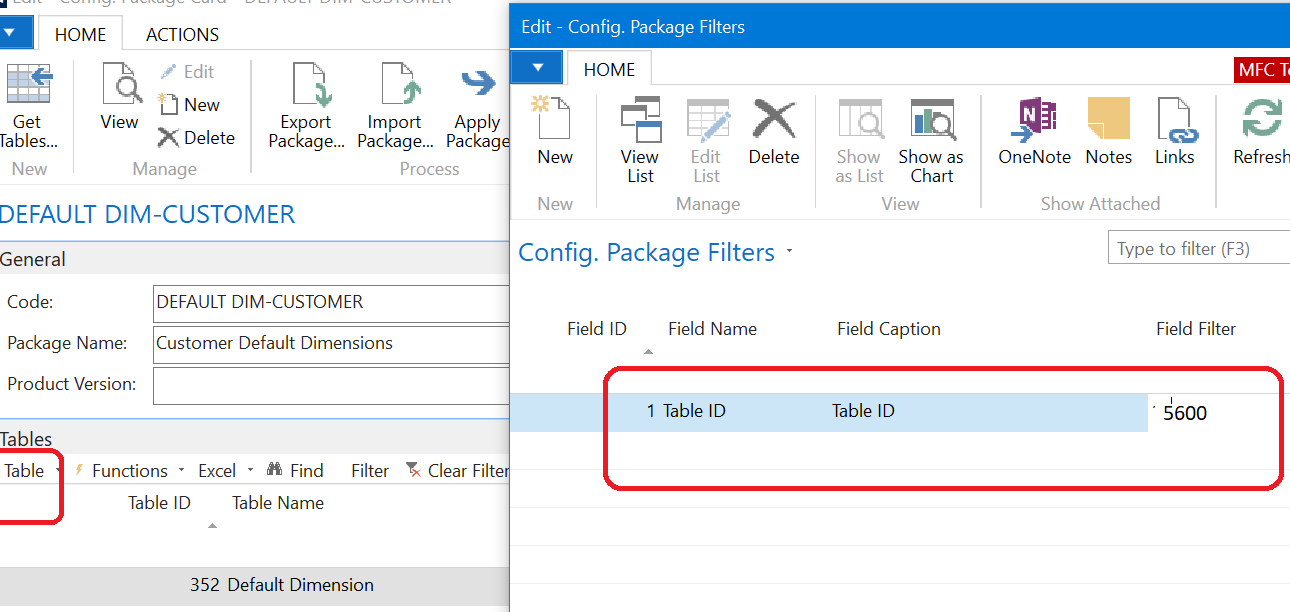
      ?The values for shortcut dimensions are not stored in the Asset record. Rather they are stored in a default dimensions table. You will need to export that table as well filtering for table 5600.

      If you need further help, give me a call

      ——————————
      Kim Dallefeld
      Kim@Dallefeld.com
      Dallefeld Consulting, LLC
      2019 NAVUG Board of Advisors
      Past NAVUG Board Chairman
      NAVUG Programming Committee
      ——————————
      ——————————————-

    • Michael Carr

      Member

      November 15, 2018 at 2:15 PM

      Kim, Thanks for your response.

      Yes I believe we have loaded the default dimensions tables 349 Dimension Values and 352 Default Dimension into the package, Which is what you are referring to?

      ——————————
      Michael Carr
      VP , Finance
      Philadelphia Scientific LLC
      Montgomeryville PA
      ——————————
      ——————————————-

    • Lewis Rosenberg

      Member

      November 15, 2018 at 3:25 PM

      ?Right.Ā  When you export from Default Dimensions table 352, as Kim said, you’ll want to make sure that you have a filter (Table menu > Filters) for field 1, Table ID = 5600, which is the Fixed Assets table.Ā Ā  This way you’ll only export default (shortcut) dimensionsĀ for your fixed assets.

      ?

      ——————————
      Lewis Rosenberg
      IT Manager
      Mars Fishcare
      Chalfont PA

      ———————————————–

      BCUG/NAVUG All-Star
      BCUG/NAVUG Board of Advisors, Chairperson
      BCUG/NAVUG Programming Committee

      @RosenbergL
      https://www.linkedin.com/in/rosenbergl/
      ——————————
      ——————————————-

    Michael-Carr replied 7 years, 9 months ago 1 Member · 0 Replies
  • 0 Replies

Sorry, there were no replies found.

The discussion ‘Rapidstart —- Shortcut Dimensions Nav 2018’ is closed to new replies.

Start of Discussion
0 of 0 replies June 2018
Now

Welcome to our new site!

Here you will find a wealth of information created for peopleĀ  that are on a mission to redefine business models with cloud techinologies, AI, automation, low code / no code applications, data, security & more to compete in the Acceleration Economy!



