


Dynamics Business Central (NAV)
Public Group
Active a day ago
Experts:




Rapid Start Customization
-
Rapid Start Customization
Posted by Jason Wilder on April 6, 2018 at 9:46 am-
I have finally taken the time to really learn the RapidStart functionality (NAV 2017) and it is really nice. I noticed 2 places where Microsoft intended to allow developers to extend the functionality a bit if you need. One I understand and the other is still a bit of a mystery to me so I am wondering if anyone has ever used this before. If you can make it to the bottom of this post then that is where my question is.
RapidStart consists of 4 areas:
Configuration Questionaire – stands alone and is basically a way to export questions to Excel so a user can answer them there. Import them back to NAV and update the specific field in the specific table that the question was designed for.
Configuration Worksheet – Tracks Overall progress of which tables have been completed and who is responsible for it. You can have headings with indentation, references, and make changes if you have attached a Package.
Configuration Packages – The real work horse of RapidStart and if you are only going to learn one thing about RapidStart it should most certainly be this (and Configuration Templates below)
Configuration Templates – Simply a way to set Default Values on a Configuration Package (you assign this to a configuration package).In Configuration Packages there are 2 fairly hidden places to customize things:
1) Report 8621 “Config. Package – Process”. This report is called automatically and has a few samples of the things it can do such as Uppercase, LowerCase, Title Case, RemoveNonAlphaNumericCharacters, Date and Time formatting, plus others. Really easy for a developer to follow the examples and add their own.2) Processing Rules, Action=Custom (Config. Package Card, Tables Fasttab, Tables, Processing Rules). Seen here:
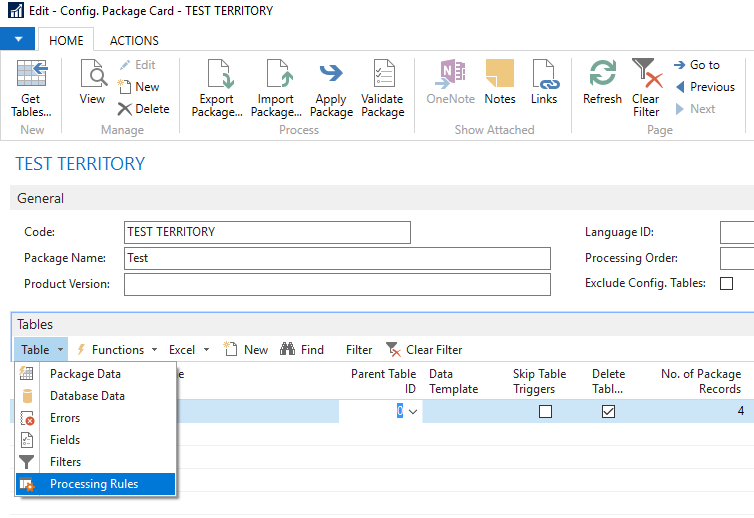
You set the Action to Custom and then need to choose a custom Codeunit that you have designed to do whatever you want. This codeunit needs to have table 8614 “Config. Package Record” as a parameter on the OnRun (TableNo = Config. Package Record) and then you can use this record to do whatever you want. The problem is that when this codeunit is called when you are “Applying Data” the records have already been inserted or modified in the database. This means we would have to use the Config. Package Record to go figure out the primary key and then go find the actual record to do the modify on. Certainly doable but a bit of extra work that I can’t imagine anyone has ever spent the time to do. Has anyone done this and do you have an example of a Processing Rule, Custom Codeunit that works with Rapid Start?——————————
Jason Wilder
Senior Application Developer
Stonewall Kitchen
York ME
—————————— -
Anxious for an answer….you should do a Summit session on RapidStart Features!! This was a great post with lots of good information for anyone wanting to understand RapidStart.
——————————
Kim Dallefeld
Kim@Dallefeld.comPast NAVUG Board Chairman
NAVUG Programming Committee
——————————
——————————————- -

Franz Kalchmair
MemberApril 7, 2018 at 4:35 PM
that can be used for changing records after package insert.
when running “apply package “after package-import the custom “processing rule” cu is applied. fct. process in cu 8631 is then run. works for some tables not for all, e.g. sales header, purchase header, etc.the custom “processing rule” cu, e.g. 50000, reopen a sales doc after import:
OnRun(VAR Rec : Record “Sales Header”)
ReleaseSalesDoc.PerformManualReopen(Rec);——————————
Franz Kalchmair
Microsoft MVP
Senior Consultant
Vienna, Austria, Europe
——————————
——————————————-
Jason Wilder replied 8 years, 5 months ago 1 Member · 0 Replies -
-
0 Replies
Sorry, there were no replies found.
The discussion ‘Rapid Start Customization’ is closed to new replies.
