


Dynamics Business Central (NAV)
Public Group
Active 5 days ago
Experts:




RapdiStart suring an upgrade
-
RapdiStart suring an upgrade
Posted by Jason Wilder on May 20, 2019 at 3:20 pm-
Sorry didn’t mean “suring” in the title but rather “during”!
Just noticed as we upgrade to NAV 2018 that our existing rapidstart packages do not have any of the new fields available and still have fields that were removed during the upgrade. I am guessing the only fix is to delete the table from the package and reset it up to see any new or deleted fields (followed by exporting a new template to excel). Anyone else encounter this and have a better solution (as mine my take us a little while)?
If it is just deleted fields that you want to get rid of you can go into table 8616 “Config. Package Field” and simply delete the appropriate records. It really is the added fields that I am struggling with.
——————————
Jason Wilder
Senior Application Developer
Stonewall Kitchen
York ME
—————————— -

Adam Jones
MemberMay 21, 2019 at 2:29 AM
Hi Jason,We are currently on NAV2017, and when we use rapidstart we sometimes delete the columns we’re not interested in, and when we import the package, it ignores the columns that aren’t there and makes no changes to these. I think as long as there are no key fields missing, and no “extra” columns in the spreadsheet, NAV will just continue the import. You may have to go and add information to the new fields from the dev, or individual item cards if you need to, to fill in missing info.
Many thanks.
Adam.
——————————
Adam Jones
Celebration Paper & Plastics Ltd
Burton upon Trent
——————————
——————————————- -
Thanks for the reply! Unfortunately the columns I am talking about are used in the import. Certainly worth deleting the table in the Config. Package and re-setting it up so all the new fields are available but still hoping for something easier.
——————————
Jason Wilder
Senior Application Developer
Stonewall Kitchen
York ME
——————————
——————————————- -
Paul Davis
MemberMay 21, 2019 at 11:29 AM
Hi Jason,You could create the package you need in the new environment, and export it to excel. Then you could export it’s equivalent package in the old environment. You can then copy paste the records across to the package from the new environment, and populate the data required for the fields that are new in the new environment.
You can leverage excel’s formula logic to populate the new fields on specific conditions. The complexity of this process really depends on what the new fields are – and how many potential values might populate the fields. Also, if the new fields are linked to a sub table, the sub-tables are going to need to have all of the optional values populated as well.
I hope that is clear, its not the easiest topic to discuss in the abstract, feel free to provide a detailed example.
Regards,
——————————
Paul Davis
Business Systems Analyst
The Sun Valley Rice Co., LLC
Dunnigan CA
——————————
——————————————- -
Andrea Wasley
MemberMay 22, 2019 at 8:57 AM
Hi Jason,We are using RapidStart for our upgrade as well and noticed there was no way to refresh the tables in the Config. Packages to bring in the new fields. I would delete the table and basically start over – until I stumbled upon a trick.
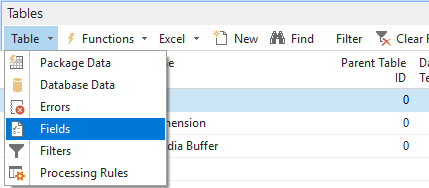
While inside the Config. Package Card – select the row of the table you need to update. Instead of clicking on the columns to see the “No. of Fields Available”, etc. – go to the “Tables” fast tab – and the “Table” drop down. Select “Fields” and it will show you all of the fields in the table. You can change your selection from there OR you can now go back to the “No. of Fields Available” and see them.
I tested it again this morning to confirm, and it works like a charm. A couple extra clicks – but better than deleting and restarting!
——————————
Andrea Wasley
Project Manager
NOCO Energy Corp.
Tonawanda NY
——————————
——————————————- -
Literally one of the coolest tricks I have seen in a while. Exactly what I was looking for, thanks!
One note:
I did notice that the new fields are automatically included fields so most of these in our case need to be un-clicked.——————————
Jason Wilder
Senior Application Developer
Stonewall Kitchen
York ME
——————————
——————————————- -
Cynthia Priebe
MemberMay 23, 2019 at 9:40 AM
The column “No. of Fields Available” should do the same without as many clicks to get there. You may have to add the column if it is not on your worksheet.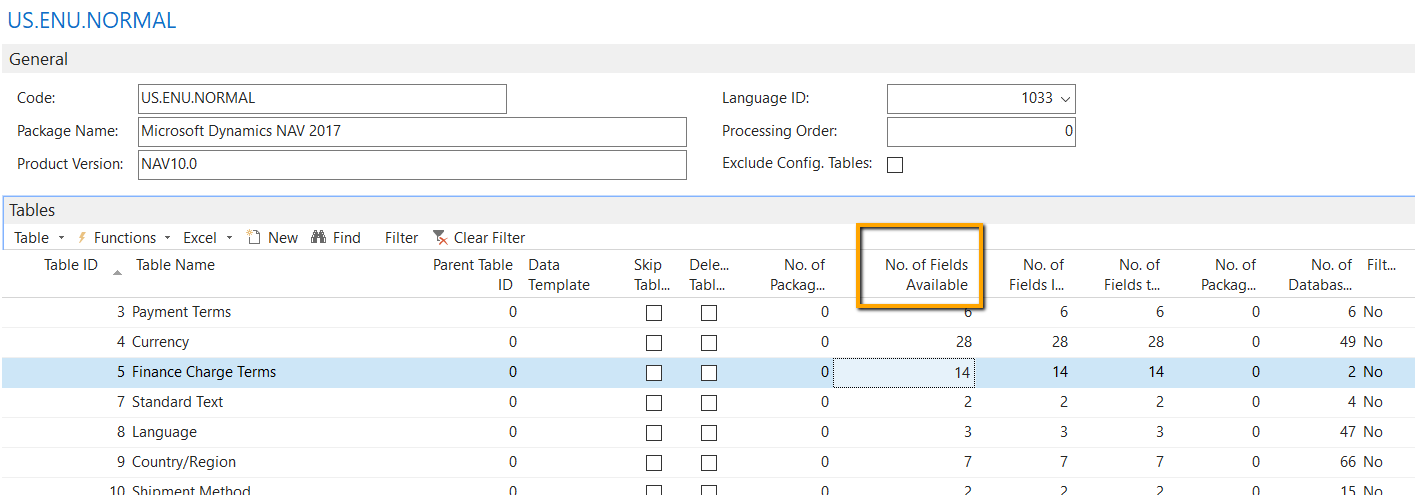
——————————
Cynthia Priebe MCP, DCP
Senior Analyst and Project Manager
Liberty Grove Software
——————————
——————————————-
Jason Wilder replied 7 years, 5 months ago 1 Member · 0 Replies -
-
0 Replies
Sorry, there were no replies found.
The discussion ‘RapdiStart suring an upgrade’ is closed to new replies.
