Quick Tip to allow a user access to many role centers at once

  • Quick Tip to allow a user access to many role centers at once
    Posted by Jason Wilder on December 18, 2017 at 8:26 am
    • Jason Wilder

      Member

      December 18, 2017 at 8:26 AM

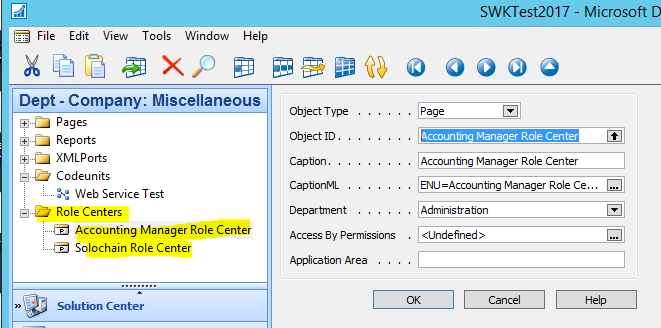
      I find that often we have a user that could benefit by having access to more than one Role Center.Ā  A quick way to do this is to have a developerĀ  Create a Group somewhere in the menusuite objectĀ  and add the role center page(s) underneath this group.Ā 
      Menusuite Object

      This allows the Role Center to be searchable from the search box and will open up the Role Center just like any other page!Ā  This page will look different from your main role center in that in won’t have the navigation pane on the left hand side.Ā  You could theoretically open up as many roles centers as you want, each as their own page and still have your main role center as well (don’t forget you can hit Shift+F12 from anywhere in NAV to get to your main role center)

      The trick is to make sure when the developer adds the role center to the menusuite that the Department = Administration.Ā  This way the Role Center will always open in a new window.Ā  If you set Department = List then the role center actually replaces your main role center and you might see some weird results.

      ——————————
      Jason Wilder
      Senior Application Developer
      Stonewall Kitchen
      York ME
      ——————————

    • Paul Turner

      Member

      December 19, 2017 at 10:07 AM

      Fantastic tip.Ā  Thank you!Ā  This will be very useful for us when we upgrade.

      ——————————
      Paul Turner
      Liberty Mountain
      Sandy UT
      ——————————
      ——————————————-

    • Ramin Marghi

      Member

      December 19, 2017 at 12:23 PM

      Hi Jason,

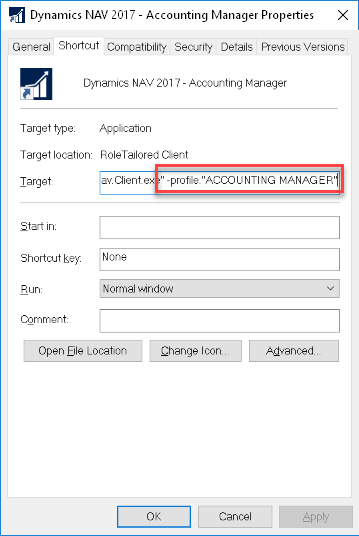
      Great tip! Another tip (not requiring any dev work) is to use the NAV shortcut to switch Role Centres (Canadian spelling :P) — basically, if you copy your NAV shortcut and right-click and go to Properties, you can append some text to the end of the “Target” to point to a Role Centre of your choosing:


      Basically add:

      Ā -profile:”PROFILE NAME

      And you can switch to that Profile (and the associated Role Centre).

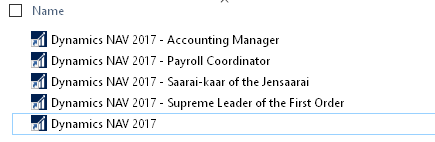
      So you could have a folder with any/all of the Roles you want to switch to at the click (well, double-click) of a mouse:

      ——————————
      Ramin Marghi , CPA, CGA
      CPA, CGA | ERP Consultant
      Catapult ERP
      VANCOUVER BC
      ——————————
      ——————————————-

    Jason Wilder replied 8 years, 6 months ago 1 Member · 0 Replies
  • 0 Replies

Sorry, there were no replies found.

The discussion ‘Quick Tip to allow a user access to many role centers at once’ is closed to new replies.

Start of Discussion
0 of 0 replies June 2018
Now

Welcome to our new site!

Here you will find a wealth of information created for peopleĀ  that are on a mission to redefine business models with cloud techinologies, AI, automation, low code / no code applications, data, security & more to compete in the Acceleration Economy!