


Dynamics Business Central (NAV)
Public Group
Active a week ago
Experts:




Production Journal – Default Flushing Method
-
Production Journal – Default Flushing Method
Posted by Lewis Rosenberg on August 26, 2021 at 5:06 pm-
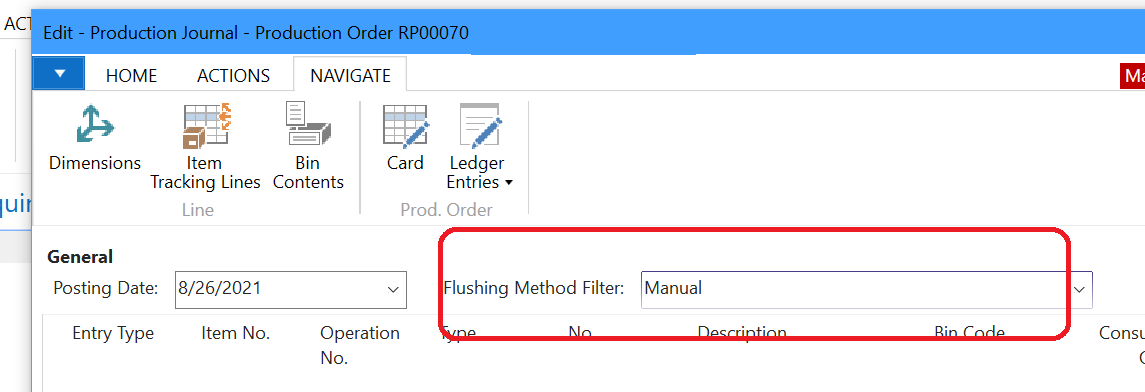
Other than through program code, is there a way to change the default value of the Flushing Method Filter in the Production Journal?
——————————
Lewis Rosenberg
IT Manager
Mars Fishcare
Chalfont PA
http://www.apifishcare.com
————————————————————————
D365UG-BC/NAVUG All-Star
D365UG-BC/NAVUG Board of Advisors, Chairperson Emeritus
D365UG-BC/NAVUG Programming CommitteeTwitter: @RosenbergL
LinkedIn: https://www.linkedin.com/in/rosenbergl
————————————————————————
—————————— -
Lewis,
Since the other flushing methods do auto-consumption of components, what is the interest in having it default to a different value? The risk is someone may consume something that is going to be backflushed and cause over-consumption.
——————————
Ben Baxter
Consultant
Accent Software, Inc.
Carmel, IN
——————————
——————————————- -
Our users need to change the filter to add item tracking (lot numbers) to all of the backflushed items.
——————————
Lewis Rosenberg
IT Manager
Mars Fishcare
Chalfont PA
http://www.apifishcare.com
————————————————————————
D365UG-BC/NAVUG All-Star
D365UG-BC/NAVUG Board of Advisors, Chairperson Emeritus
D365UG-BC/NAVUG Programming CommitteeTwitter: @RosenbergL
LinkedIn: https://www.linkedin.com/in/rosenbergl
————————————————————————
——————————
——————————————- -
Lewis,
In the case of both Forward and Backward flushing, it is a more pro-active approach to assigning Item Tracked inventory to a Production Order. You define what Items, and which Lot/Serial, is to be used prior to the production process starting. This allows for that information to be on the traveler and any related pick documents. For this reason, you would use the Line > Components page to assign the Item Tracking Information.
If I am understanding what you’re doing, at the time of Output (hence the Production Journal) the Users are defining what Lot/Serial information was consumed during the production process. This is more of a reactive approach to consumption and best handled by utilizing the Manual flushing method. By using Manual the Items are available for the Users to assign the Item Tracking information at the time of Output. The quantities can still all default in to the Expected Quantity, so the Users only need to enter the Item Tracking at that time.
Rather than change the logic of the system, I think it would be better to update the data to match the process you are doing, which sounds like a Manual consumption.
——————————
Ben Baxter
Consultant
Accent Software, Inc.
Carmel, IN
——————————
——————————————-
Lewis Rosenberg replied 5 years, 1 month ago 1 Member · 0 Replies -
-
0 Replies

Sorry, there were no replies found.
The discussion ‘Production Journal – Default Flushing Method’ is closed to new replies.
