Pop Up Help

  • Posted by Shawna-ONeill on October 30, 2018 at 10:57 am
    • Shawna O’Neill

      Member

      October 30, 2018 at 10:57 AM

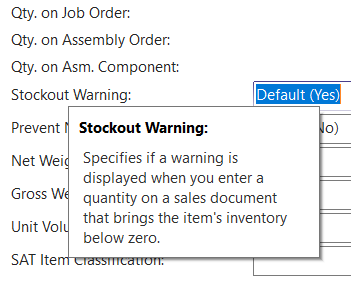
      Has anyone found a way to expand the time that the Help box showing the definition of a field ?is visible? See below.Ā  Some are so lengthy you can’t read in one view.Ā  We are in the process of implementing Nav 2018.

      Help pop up

      ——————————
      Shawna O’Neill
      ERP Financial Analyst
      American Art Clay Co
      Indianapolis IN
      ——————————

    • Iaroslav Pankovskyi

      Member

      October 31, 2018 at 12:11 PM

      Hi Shawna,
      Excellent question. There seems to be no out-of-the-box tool for that, but as a workaround, you can use the “Print Screen” button on your keyboard and save your favourite the screenshots in one place. You can also use these web pages to search for the related information:Ā 
      1) Business Central: https://docs.microsoft.com/en-ca/dynamics365/business-central/ui-work-productĀ 
      2) NAV 2016:Ā https://docs.microsoft.com/en-us/previous-versions/dynamicsnav-2016/hh173988(v=nav.90)

      ——————————
      Iaroslav
      ——————————
      ——————————————-

    Shawna-ONeill replied 7 years, 11 months ago 1 Member · 0 Replies
  • 0 Replies

Sorry, there were no replies found.

The discussion ‘Pop Up Help’ is closed to new replies.

Start of Discussion
0 of 0 replies June 2018
Now

Welcome to our new site!

Here you will find a wealth of information created for peopleĀ  that are on a mission to redefine business models with cloud techinologies, AI, automation, low code / no code applications, data, security & more to compete in the Acceleration Economy!