


Dynamics Business Central (NAV)
Public Group
Active 5 days ago
Experts:




Open any table from WIndows Client just like the old days
-
Open any table from WIndows Client just like the old days
Posted by Jason Wilder on January 31, 2018 at 11:39 am-
Back in the Classic Client days a user with the correct permissions (typically a Super User) could go to Object Designer and then view the data for any table and even make a change or two if needed. Also there was a nice screen called Table Information (File, Database, Information, Tables button) that seems to have gone away with the Classic Client (shows record count and size per table per company). I have added these to the Windows Client so thought I would share.
Looks like this:
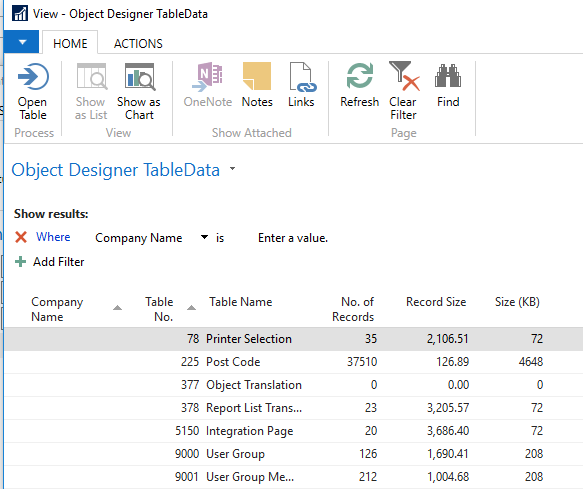
Hit the Open Table Action to open the Page listing all of the data in that table, for that company. Be wary as someone can make changes to this data. I have added a little bit of code to only allow users with the SUPER permission set to open the page, which you can comment out if you want.I do not know how to attach a text file to this post but if you email me I will send you the object as text. If someone knows how to attach a file to a post please tell me and I will do that.
——————————
Jason Wilder
Senior Application Developer
Stonewall Kitchen
York ME
—————————— -

Naveen Jain
MemberJanuary 31, 2018 at 1:05 PM
Hi Jason,Although it was a great tool, but in the new version of NAV, if you ever need the similar information then create a rapidstart package and see most of this information in their.
Naveen Jain
——————————
Naveen Jain
Director of IT
Symbex Companies
Santa Fe Springs CA
——————————
——————————————- -
Rapid Start is great but more work in this case. This page requires no set up or training at all. Find your table, click a button and start filtering, editing, copying etc…
——————————
Jason Wilder
Senior Application Developer
Stonewall Kitchen
York ME
——————————
——————————————- -
Naveen Jain
MemberJanuary 31, 2018 at 2:26 PM
Jason,That’s great. Now you reminded me that although they have removed the link in the newer version but left the System table object “Table Information” in their and I did created a new page from this table.
Thank you for sharing.
Naveen Jain
——————————
Naveen Jain
Director of IT
Symbex Companies
Santa Fe Springs CA
——————————
——————————————- -
Ramin Marghi
MemberJanuary 31, 2018 at 1:49 PM
Hey Jason,That’s pretty awesome — it’d be great to share with the community. You can attach it when you’re responding by clicking on the Attach button at the bottom of the “Post Reply” screen (below Original Message tab):

Looking forward to playing around with this — thanks in advance for sharing!——————————
Ramin Marghi , CPA, CGA
CPA, CGA | ERP Consultant
Catapult ERP
VANCOUVER BC
——————————
——————————————- -
Thanks, I have now added the attachment. One Page, that’s it.
——————————
Jason Wilder
Senior Application Developer
Stonewall Kitchen
York ME
——————————
——————————————-
Jason Wilder replied 8 years, 8 months ago 1 Member · 0 Replies -
-
0 Replies
Sorry, there were no replies found.
The discussion ‘Open any table from WIndows Client just like the old days’ is closed to new replies.
