


Dynamics Business Central (NAV)
Public Group
Active 5 hours ago
Experts:




Online Payments
-
Online Payments
Posted by Elizabeth McQuiston on March 20, 2020 at 9:14 am-
With our Governor (Pennsylvania) closing all “non-life-sustaining” businesses we are finally working to change how we do things in our office.
One of those things is moving to automatic payment via ACH by certain vendors (Insurances, utilities, etc.) Is there a way to enter these in the system so they are “automatically” paid? We have a bunch set up where we run our normal process which generates a file we send to the bank, but in this case these payments would be initiated by the Vendor not us.
Just trying to get away from cutting paper checks, been trying to do this for a while – who knew it would take a Pandemic to make it finally happen.
——————————
Liz McQuiston
Corporate Controller
Superior Walls of America
New Holland PA
Running BC on Prem
******************************
BCUG/NAVUG Board of Advisors
Delaware Valley Chapter Leader
—————————— -

Cari Corozza
MemberMarch 20, 2020 at 10:39 AM
Hey Liz,This is such a great topic to bring up, since I’m sure many companies are trying to work their way through things like this right now. You have a few different options to accomplish automatic posting to the bank account. I’ve outline three options below; The first option will work best if you continue to enter purchase invoices for the vendors, while options two and three apply if you are entering the expenses as journals (journals will not post through to the vendor ledger entries with the methods below).
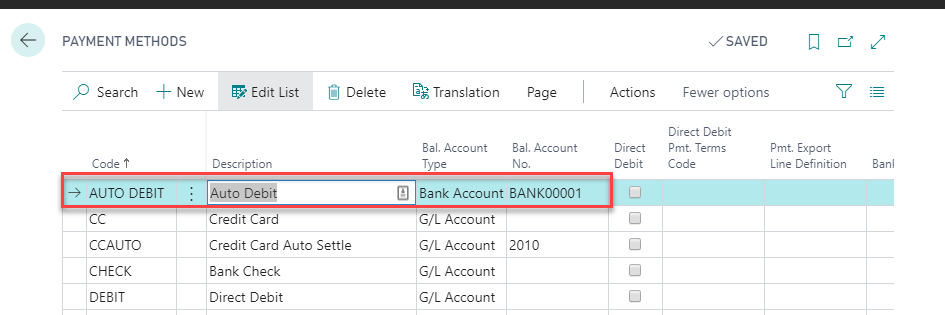
1. Create a Payment Method Code of Auto Debit and select it for the applicable vendors. I included a screenshot below so you can see how I suggest setting up the Payment Method Code with the bank account assigned as the Balancing Account Type and No. This Payment Method will automatically post the payment to the assigned bank account when each purchase invoice is posted. Be vigilant of posting date in purchase Invoices, as this is the same date that the bank account ledger entry will post.
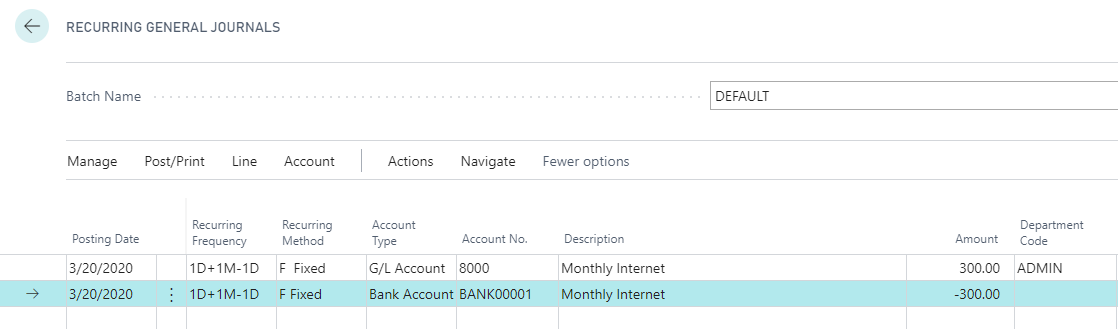
2. Use a Recurring General Journal. This option allows the most control over the entry because it allows the user to set a recurring method and frequency, but it must be done as a multiple-line entry. One line (or multiple lines) will record the G/L Account entry, and one line will record the Bank Account entry. This is something you can do daily, weekly, or as part of the month-end process. My example only shows one expense line, however you can use a Recurring General Journal to post as many lines as needed.
With a Recurring Method of ‘Fixed,’ the amounts will not change when the entry posts and populates for the next month, which is useful if the billing amounts will not change. If the amount varies from month to month, the Recurring Method of ‘Variable’ will be a better option and will reset the amount to zero after posting.
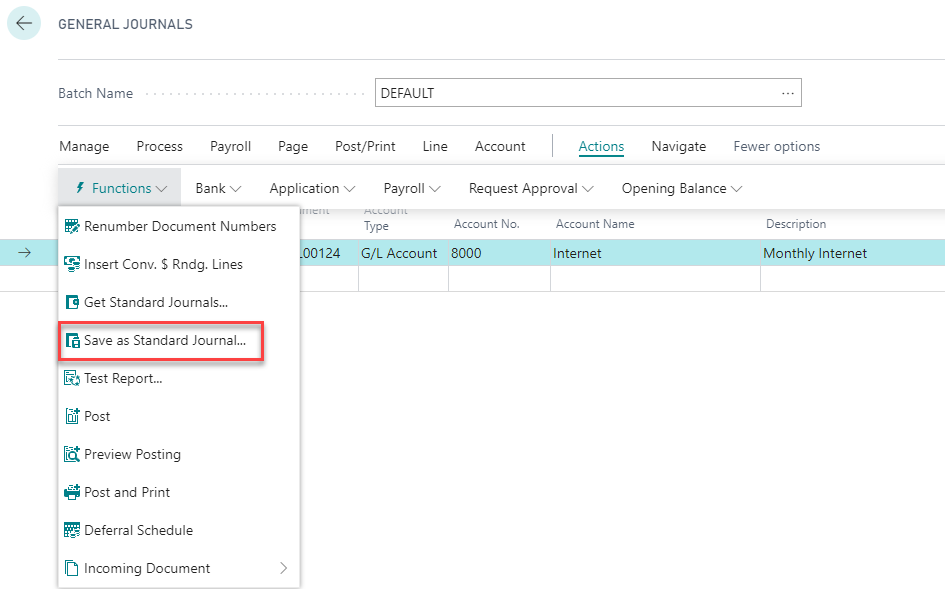
 3. Use a Standard Journal with General Journals. This option will allow a single-line journal entry, however it does not allow as much control over posting because there is no recurring frequency and recurring method. You will need to set up a Standard Journal the first time and will then be able to use it going forward. You can see in my first screenshot below that I’m able to make a single line entry with type of G/L Account as the expense side and the Balancing Account Type of Bank Account with the assigned bank account number.
To save this as a Standard Journal, go to Actions–> Functions–> Save as Standard Journal. This will prompt you for a name and description for the Standard Journal. You can add as many lines as you would like to the Standard Journal and can even name it something like ‘Month-End’ and include all entries for the month.
The next time you need to make the entry, navigate to the same menu and select ‘Get Standard Journals,’ and this will allow you to select the Standard Journal that you previously saved.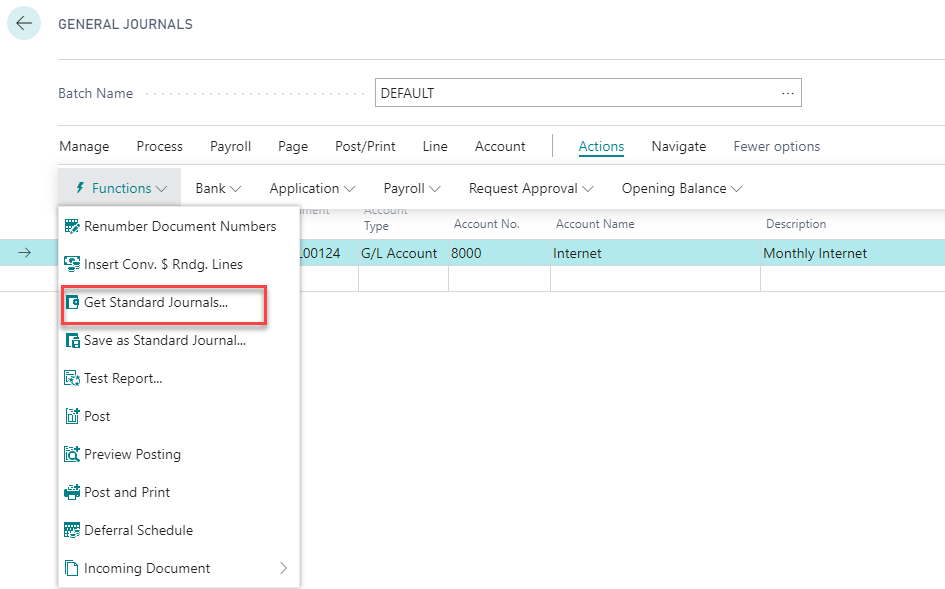
I agree that automating processes like this is becoming more and more important as we transition from an office space to our remote work stations, so I hope that this gives you a few ideas. We will all get through this together!
——————————
Cari Corozza
Trainer
New View Strategies
“The NAV & BC training and process experts”
Milwaukee, WI
——————————
——————————————- -
Thank you that was extremely helpful?
——————————
Liz McQuiston
Corporate Controller
Superior Walls of America
New Holland PA
Running BC on Prem
******************************
BCUG/NAVUG Board of Advisors
Delaware Valley Chapter Leader
——————————
——————————————- -
A product in the market that can help you with this.
Deluxe has a great solution called eChecks. It’s where you’d so to speak email them a check. This not only allows your clients to hold on to their money longer, it’s less expensive than cutting checks, no infrastructure or checks/ink needed – more secure – and easy to incorporate as part of your payment workflow! Designed for Dynamics.
Check it out: Jim.Burdick@deluxe.com is a person you can contact to learn more.
——————————
Kim Peterson
Founder
Dynamics Connections
Battle Lake MN
Kim@DynamicsConnections.com
701-261-7307
——————————
——————————————-
Elizabeth McQuiston replied 6 years, 7 months ago 1 Member · 0 Replies -
-
0 Replies
Sorry, there were no replies found.
The discussion ‘Online Payments’ is closed to new replies.
