


Dynamics Business Central (NAV)
Public Group
Active 4 days ago
Experts:




October”s Tips & Tricks!
-
October”s Tips & Tricks!
Posted by Holly Kutil on October 2, 2017 at 2:30 pm-
 Using My Customers, My Vendors, and My Items as filters
You have likely come across the My Customers, My Vendors, or My Items lists on your Role Center page (your NAV home page). Depending on the Profile assigned to you, you may have one or all of these available to show on your Role Center.
The functionality is pretty straightforward: If you frequently, or exclusively, work with some customers (vendors, or items), you can click on Manage List in the My Customers page part to create a shortlist with just those records so you can quickly jump to one of them by double-clicking it right from the Role Center.
What most people don’t know is that you can use your “My” shortlists as filters all across NAV, on pages as well as reports! It’s quite simple too. Just use these filter strings…
- My Customers: %mycust
- My Vendors: %myvend
- My Items: %myitem
-
We have found that %mycust works the same as %mycustomers, and similarly for the other two “My” lists.


More secret right-click optionsSecret right-click options revealed by the Shift key don’t end with file paths, though
The basic Send to tool that appears as an option when you right-click on a file or folder is handy enough indeed, allowing you to move the item quickly to a handful of locations on your PC, add it to a .zip archive, or send it off in an email or fax
But that’s just the tip of the iceberg! Holding down the Shift key as you right-click a file or folder will add an absolute ton of new folder locations to the basic Send to menu
Problem Steps Recorder
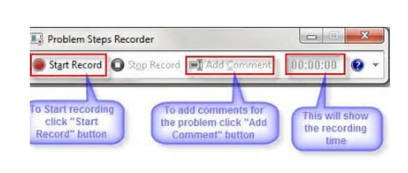
This little-known tool creates an HTML slideshow of your actions, recording your moves step-by-step so that you can show your IT admin or resident PC geek exactly what you’re doing when you run into a problem. It’s a huge boon during especially tricky troubleshooting situationsTo open the Problem Steps Recorder, simply search for psr in the Windows 7 Start menu or Windows 8’s Start screen. The tool should pop right up and is very straightforward to use
——————————
Holly Kutil
American Ring/NAV Admin
Solon, OH 44139
**Great Lakes Chapter**
?? Women In Dynamics ??
—————————— -
?I don’t think I ever saw that Problem Step Recorder before. What a great tool that can be used if you are writing how-to instructions and want to include screen shots.
——————————
Lewis Rosenberg
IT Manager
Mars Fishcare
Chalfont PANAVUG Board of Advisors, Programming
NAVUG Programming Committee
NAVUG Membership Committee
——————————
——————————————- -
This is
neat.. Didn’t know about the problem step recorder… Thanks for sharing, !?——————————
Meenakshi Singh
Manager of Business Applications
Home Market Foods, Inc.
Norwood MA
——————————
——————————————- -
Oh that is nice. Thanks for showing us PSR, Holly.
——————————
Gregory Alford
ERP Manager
Tri Star Metals LLC
Carol Stream IL
——————————
——————————————- -
Love the PSR, ! Thanks for sharing!
——————————
Greg Enns
ERP Coordinator
Technical Prospects
Kaukauna WI
——————————
——————————————-
Holly Kutil replied 9 years ago 1 Member · 0 Replies -
-
0 Replies

Sorry, there were no replies found.
The discussion ‘October”s Tips & Tricks!’ is closed to new replies.
